
If you've been researching what is managed website hosting explained in plain terms, you've likely hit a wall of technical jargon and vague promises. Here's the real issue: most small business owners assume that "managed" means someone else handles everything about their website. That assumption leads to expensive surprises. Managed hosting is a specific service model with clear boundaries, and understanding those boundaries is the difference between a website that runs smoothly and one that quietly develops problems while you're focused on running your business.
Table of Contents
- Key takeaways
- What managed website hosting actually includes
- What managed hosting does not cover
- Types and tiers of managed hosting services
- How managed hosting works day to day
- My take on managed hosting for small businesses
- How Epdwebsites handles hosting for busy professionals
- FAQ
Key takeaways
| Point | Details |
|---|---|
| Managed hosting covers infrastructure | Your provider handles servers, security patches, uptime monitoring, and backups. |
| Application-level tasks are your responsibility | Plugin updates, content changes, and malware inside your CMS are not typically included. |
| Service levels vary widely | The term "managed hosting" is used loosely; always verify what features are actually included. |
| Hosting and maintenance are different things | Combining managed hosting with a maintenance plan gives you full website protection. |
| Migration quality matters | Expert-led migrations can finish in under four hours with zero downtime. |
What managed website hosting actually includes
Managed website hosting is a service model where your hosting provider takes responsibility for the technical operation of the server your website lives on. That's the core definition. You're not just renting space on a server. You're paying for a team to actively manage that server on your behalf.
Here's what that typically looks like in practice:
- Server setup and configuration: The provider provisions your server, installs the necessary software stack, and configures it for performance from day one.
- 24/7 uptime monitoring: Your server is watched around the clock. When something goes wrong at the infrastructure level, the provider responds. Managed hosting plans often guarantee 99.95% uptime or higher, with average response times under two hours for critical issues.
- Automated daily backups: Snapshots of your server are stored separately so your site can be restored quickly after a failure. Note that infrastructure-level backups cover the server environment, not necessarily every piece of content inside your CMS.
- Server-level security: This includes firewalls, DDoS protection, malware scanning at the server layer, and SSL certificate provisioning and renewal. Most managed hosts handle SSL management automatically, so you never have to worry about an expired certificate.
- Performance optimization: Caching mechanisms and PHP configuration tuning at the server level contribute significantly to site speed. These require specialized expertise that most business owners simply don't have time to develop.
Pro Tip: Ask any managed hosting provider to give you a written list of exactly what is and isn't covered before you sign up. If they hesitate or give you a vague answer, that's a red flag.
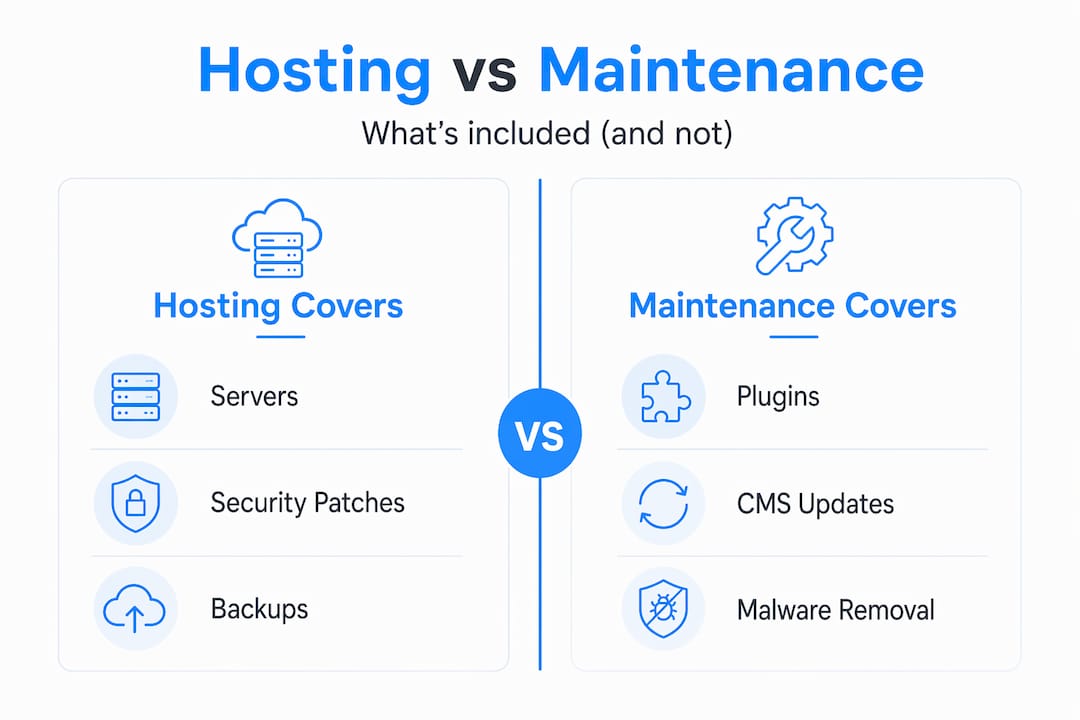
The distinction that matters most here is server-level versus application-level. Your managed host owns the infrastructure. What runs on top of it, your WordPress installation, your plugins, your theme, your content, that's generally your territory.
What managed hosting does not cover
This is where 67% of WordPress site owners get tripped up. They believe managed hosting covers all security and maintenance tasks. It doesn't. And that gap can quietly damage your website.
Managed hosting providers typically do not update plugins or themes, remove malware that's embedded inside your CMS, fix broken links, or make content changes. Those are application-level responsibilities. They sit above the server layer, inside your actual website software.
Here's a clear breakdown of the difference:
| Responsibility | Managed hosting covers | Site maintenance covers |
|---|---|---|
| Server uptime and monitoring | Yes | No |
| Firewall and DDoS protection | Yes | No |
| SSL certificate management | Yes | No |
| Automated server-level backups | Yes | No |
| WordPress plugin and theme updates | No | Yes |
| Malware removal inside CMS | No | Yes |
| Content updates and edits | No | Yes |
| Speed optimization within WordPress | No | Yes |
| Broken link monitoring | No | Yes |
Why does this matter so much? Because an outdated plugin is one of the most common entry points for hackers. If your managed host is securing the server but your WordPress plugins are six months out of date, you have a real vulnerability. The server firewall won't stop an attacker who exploits a known plugin flaw. That's an application-level security gap that only site maintenance addresses.
Pro Tip: Treat managed hosting and website maintenance as two separate line items in your budget. Together, they give you complete coverage. Separately, each one leaves a gap.
The managed vs unmanaged hosting distinction is also worth understanding. Unmanaged hosting gives you raw server access and nothing else. You configure it, secure it, and maintain it yourself. Managed hosting sits at the opposite end of that spectrum for infrastructure tasks. But neither type replaces a dedicated maintenance plan for your website software.
Types and tiers of managed hosting services
Not all managed hosting services are built the same. The term "managed" is used loosely across the industry, and feature sets vary widely depending on the provider and the price point.
Here's how the tiers generally break down:
- Entry-level managed cloud hosting starts around $14 per month. You get server management and basic monitoring, but support may be slower and features like staging environments are often absent.
- Mid-tier managed hosting adds features like daily automated backups, CDN integration, and faster support response times. This is the sweet spot for most small businesses and professional service firms.
- Premium or white-glove managed hosting includes priority support, staging environments, performance auditing, and dedicated account management. Pricing scales significantly at this tier.
For a law firm, CPA practice, or real estate office, the right tier depends on your traffic volume, how often your site changes, and how much direct support you want. A high-traffic site that generates leads daily needs a different level of protection than a simple five-page brochure site.
Most providers at mid-tier and above include CDN integration, which distributes your site's files across global servers so visitors load your pages faster regardless of their location. That's a meaningful performance benefit that directly affects how prospects perceive your professionalism online. You can explore hosting features for professionals to see what a service package built specifically for your industry looks like.
How managed hosting works day to day
Understanding the practical experience of managed hosting helps you set realistic expectations before you commit. Here's what the process typically looks like from start to ongoing operation:
- Onboarding and migration: Your provider transfers your existing website to their servers. Expert-led migrations can complete in under four hours with zero downtime when done manually by experienced technicians. Automated plugin-based migrations are faster to initiate but carry more risk of errors.
- Configuration and testing: The provider configures caching, security rules, and performance settings specific to your site. You should receive confirmation that your site loads correctly and all functions work before going live.
- Daily automated monitoring: From this point forward, the provider watches your server health, resource usage, and uptime. You receive alerts if something requires your attention at the application level.
- Support interactions: When you have a server-related issue, you contact support. Response times vary by tier, but quality managed hosts resolve critical infrastructure issues quickly. For uptime and performance issues, fast response is non-negotiable.
- Your ongoing responsibilities: You or your maintenance provider handles plugin updates, content changes, and CMS-level security scans. This is the part most business owners underestimate.
The day-to-day experience for most small business owners is largely hands-off at the server level. You focus on your business. The host handles the infrastructure. But you still need someone managing your website software, whether that's you, a developer, or a professional service like Epdwebsites.
My take on managed hosting for small businesses

I've worked with dozens of small business owners, attorneys, consultants, and medical practices on their websites over the years. The single most common frustration I hear goes something like this: "I'm paying for managed hosting, so why is my site still getting hacked?"
The answer is almost always the same. They assumed managed meant everything. It doesn't.
What I've learned is that managed hosting is a form of risk reduction, not a complete solution. It's a very good foundation. But a foundation without walls doesn't protect you from the rain.
The providers I respect most are the ones who are upfront about this. They tell you exactly what they cover and point you toward a maintenance plan for the rest. The ones who oversell "fully managed" without clarifying the application-level gap are the ones whose clients end up calling me frustrated six months later.
My advice: before choosing any managed hosting plan, ask two questions. First, what exactly is included at the server level? Second, who is responsible for my WordPress plugins, themes, and CMS security? If the answers are clear and honest, you've found a trustworthy provider. If the answers are vague, keep looking.
Combining a solid managed host with a professional maintenance arrangement is the setup that actually works long-term. It's not the cheapest path, but it's the one that protects your reputation and your clients' trust.
— Kate
How Epdwebsites handles hosting for busy professionals
Running a professional practice means your website has to work. Not most of the time. All of the time.

Epdwebsites has been building and hosting professional websites for attorneys, CPAs, consultants, and medical practices since 2009. The hosting services are built with the same attention to detail as the websites themselves. That means server-level security, performance optimization, and personalized support from people who understand your industry. You can review hosting pricing and options to find the right fit for your business, or explore the full range of website features and hosting services designed for professional service providers. When your site needs updates or changes, the process is simple. Epdwebsites makes it easy to request site updates without the back-and-forth that slows most agencies down.
FAQ
What does managed website hosting actually include?
Managed website hosting covers server setup, 24/7 uptime monitoring, automated backups, server-level security, and SSL management. It does not typically include plugin updates, content changes, or malware removal inside your CMS.
How is managed hosting different from unmanaged hosting?
Unmanaged hosting gives you a raw server with no technical support or configuration. Managed hosting means the provider handles all server administration, security patching, and performance tuning on your behalf.
Does managed hosting protect my WordPress site from hackers?
Managed hosting protects at the server level with firewalls and DDoS protection, but application-level vulnerabilities like outdated plugins require a separate maintenance plan. Both layers of protection are necessary for full security.
How much does managed hosting cost for a small business?
Entry-level managed cloud hosting starts around $14 per month, while premium plans with priority support and staging environments cost significantly more. Most providers offer a 30-day money-back guarantee so you can evaluate the service before committing.
Do I still need a maintenance plan if I have managed hosting?
Yes. Managed hosting and website maintenance serve different functions. Managed hosting handles your server infrastructure. A maintenance plan handles your CMS software, plugins, content, and application-level security. You need both for a fully protected website.