
For most law firms, the right move is a mid-tier call tracking platform that pairs dynamic number insertion with AI transcription and a working CRM connection. Start your evaluation with CallRail, Nimbata, and Convirza, then compare CallTrackingMetrics or Invoca if you buy TV or run high call volume. Get this right and you'll know your true cost per signed case within weeks, not quarters.
TL;DR:
- Call tracking platforms should provide reliable dynamic number insertion, accurate call attribution down to keywords, and integration with existing legal CRMs.
- High-volume firms or those with complex routing needs should consider platforms like CallTrackingMetrics or Invoca, especially if running multi-channel campaigns or TV advertising.
- Proper setup requires testing for caching issues and clear documentation, with an emphasis on verified attribution accuracy before scaling efforts.
- The success of call tracking depends more on meticulous implementation and testing than on choosing a specific vendor; proper groundwork yields more reliable data.
- Most firms start seeing actionable insights within the first month, with three months required to refine routing, coaching, and cost-per-signed-case analysis.
Table of Contents
- What Call Tracking for Law Firms Actually Solves
- Curated Shortlist: Top Call Tracking Vendors for Law Firms
- Comparing Price, Features, and Setup Across Vendors
- How to Choose Call Tracking for Your Firm
- Setting Up DNI, Routing, and CRM Sync Without Breaking Your Site
- The Publisher's Checklist for DNI Setup Without SEO Damage
- What to Expect in the First Six Months
- How EPD Websites Supports Your Call Tracking Rollout
- Why the Months of Setup Matter More Than the Vendor Name
- Sources
- FAQ
What Call Tracking for Law Firms Actually Solves
Most legal clients pick up the phone before they fill out a form. A strong majority of legal clients make first contact by phone, which means a marketing dashboard that only counts form fills is blind to most of your actual pipeline. Call tracking for law firms closes that gap by assigning a unique phone number, or a pool of numbers, to each marketing channel, campaign, or even individual ad, so every ring back to your office carries a data trail.
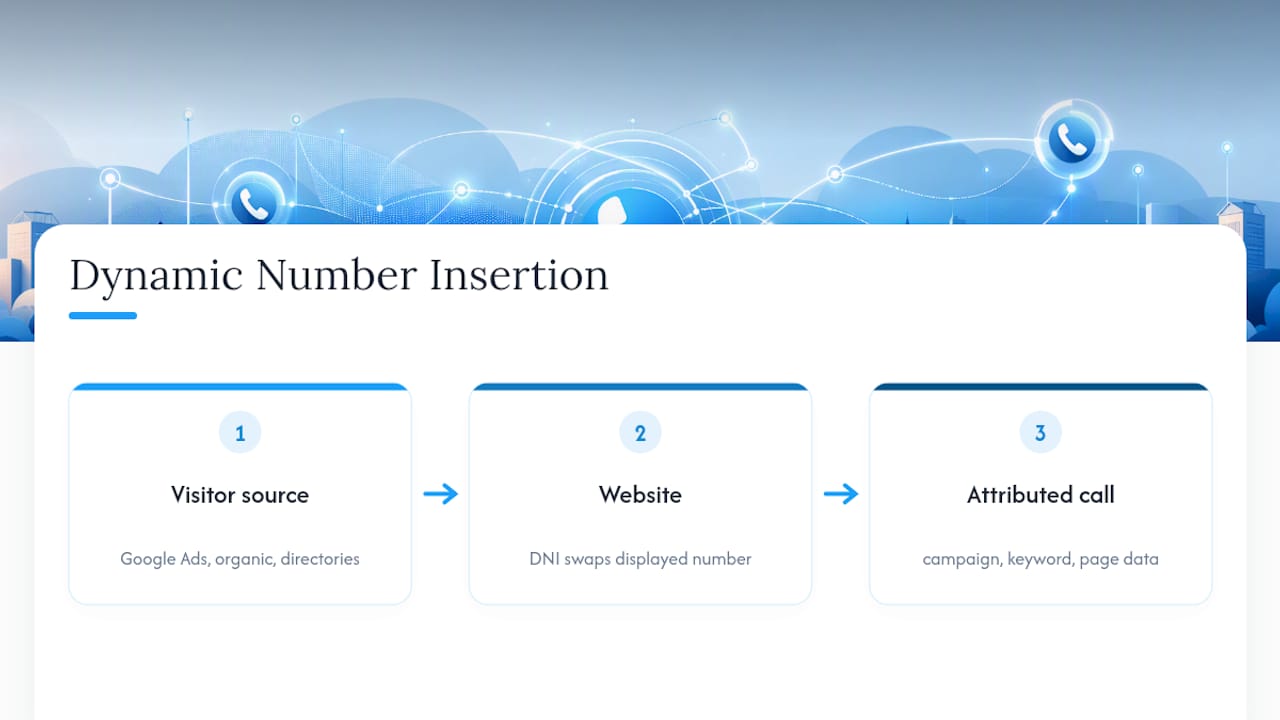
The mechanism behind this is dynamic number insertion, usually shortened to DNI. A snippet of code swaps the phone number displayed on your site based on how the visitor arrived, whether that's a Google Ads click, an organic search result, or a referral from a legal directory. The visitor never notices anything unusual. Your analytics platform, on the other hand, now knows exactly which campaign, keyword, and even which page generated that call.
This matters more for law firms than for almost any other professional service, because the phone call itself is the qualifying event. A dentist can track appointment bookings. A retailer tracks checkout completions. A law firm has to determine, from a five-minute conversation, whether the caller has a viable case, the right jurisdiction, and the budget or contingency fit to become a client. Lawyer call management tools exist specifically to make that filtering visible and measurable instead of something that lives only in an intake coordinator's head.
Curated Shortlist: Top Call Tracking Vendors for Law Firms
Some of these platforms were built with legal intake in mind. Others are general-purpose call tracking software for attorneys that happen to serve the vertical well. Both categories deserve a look before you sign anything.
- CallRail — Best for most firms that want reliable DNI, solid transcription, and integrations that already work with common legal CRMs without custom development.
- CallTrackingMetrics — Best for higher-volume firms running complex intake workflows that need custom routing rules across multiple offices or practice groups.
- Invoca — Best for firms buying television, connected TV, or heavy multichannel media that need offline attribution tying broadcast spend to actual calls.
- Nimbata — Best for firms that want practice-area tagging built in, so a personal injury lead and an estate planning lead get scored and routed differently from day one.
- CloudTalk — Best for firms that want call tracking bundled with an actual cloud phone system instead of layering tracking on top of existing telephony.
- Convirza — Best for firms that care more about intake coaching than raw attribution, since its conversation analytics flag missed qualification language on live calls.
- CallScaler — Best for firms that want simple source-level attribution and a lower-cost entry point without a long onboarding process.
- CallJolt — Best for firms prioritizing a fast-to-deploy intake analytics dashboard over deep customization.
- WhatConverts — Best for smaller firms that want straightforward DNI and form-to-call linking without paying for enterprise features they won't use.
- CallGauge AI — Best for firms curious about newer AI-first vendors offering automatic consultation summaries instead of raw transcripts.
- Ringba, Twilio, Phonexa, Retreaver, and DialogTech round out the field with programmable and pay-per-call infrastructure that agencies and larger marketing operations sometimes build custom legal intake stacks on top of.
None of these will hand you a finished system out of the box. Book demos with at least three, and ask each one to walk through a live call from click to CRM entry, not just a slide deck. A platform that can't demonstrate that flow in real time usually can't support it reliably either.
Comparing Price, Features, and Setup Across Vendors
Pricing tiers for call tracking software for attorneys follow a predictable shape. Basic plans commonly run $45 to $150 a month, covering DNI and call recording without much intelligence layered on top. Mid-tier plans with AI transcription and lead scoring typically cost several hundred dollars monthly, and that's where most single-office and small multi-office firms should be shopping. Enterprise plans with multi-channel and offline attribution can cost thousands of dollars per month, which only makes sense once you're spending real money on broadcast or CTV media.
| Vendor | Best for | Pricing shape | Standout feature | CRM/integration support |
|---|---|---|---|---|
| CallRail | Most firms needing reliable DNI plus CRM sync | Mid-tier, published tiers | Conversation Intelligence™ and broad app integrations | Wide integration library |
| Nimbata | Practice-area tagging and lead scoring | Mid-tier | Practice-area tagging, AI scoring | CRM syncing built for legal intake |
| CallTrackingMetrics | High-volume, multi-office routing | Mid to enterprise | Advanced routing and workflow automation | Custom workflow integrations |
| Invoca | TV/CTV buyers needing offline attribution | Enterprise | Offline/TV attribution, AI call scoring | Enterprise marketing stack integrations |
| Convirza | Intake coaching via conversation analytics | Mid-tier | Conversation Analytics® and intake automation | CRM webhook support |
| CloudTalk | Combined telephony and tracking | Mid-tier | AI-powered analytics and smart routing | Native phone system plus CRM connectors |
| CallScaler | Simple attribution, fast start | Entry to mid-tier | Source-level attribution | Basic CRM/webhook support |
| CallJolt | Fast-deploy intake dashboards | Entry to mid-tier | Intake analytics dashboard | Standard CRM connectors |
| WhatConverts | Smaller firms, straightforward setup | Entry-tier | Simple DNI and form tracking | Core CRM integrations |
| CallGauge AI | Firms testing newer AI-first tools | Entry to mid-tier | AI consultation summaries | Emerging integration set |
A small firm running one or two Google Ads campaigns rarely needs offline attribution or enterprise routing logic. CallScaler, WhatConverts, or CallJolt cover the basics at a price that won't distort the marketing budget. A firm buying local television or running campaigns across five office locations is a different animal entirely, and that's where Invoca's offline attribution or CallTrackingMetrics's routing engine start paying for themselves.
The real tradeoff isn't features versus price. It's how much attribution complexity your marketing mix actually justifies. Pay-per-call pricing models exist for firms that want costs to scale directly with call volume rather than paying a flat monthly rate regardless of how busy the phones are. That structure suits firms with unpredictable seasonal volume, like tax controversy or immigration practices tied to filing deadlines.
How to Choose Call Tracking for Your Firm
Vendor demos all sound similar after the third one. What separates a platform that solves problems from one that creates new ones comes down to six criteria worth interrogating directly.
- Attribution depth. Does it track down to keyword and ad level, or only down to campaign level? Keyword-level data is what actually lets you cut underperforming ad groups.
- DNI reliability. Ask how the platform handles single-page applications and cached pages, since this is the single most common cause of broken attribution.
- CRM compatibility. Confirm it has a tested integration, not just a generic webhook, with whatever legal CRM you actually run.
- Transcription accuracy. Legal terminology and case-specific jargon trip up generic speech-to-text models. Ask for a sample transcript from an actual legal intake call.
- Conversation analytics. Does the platform score calls automatically, or does someone on your team need to listen to every recording manually?
- Pricing model fit. Flat-rate versus pay-per-call changes your math depending on call volume and seasonality.
During the demo itself, ask pointed questions: What webhook format do you send to Clio, PracticePanther, or MyCase? Can you show offline attribution working with a real client example? What's your data retention policy for recorded calls? Will your legal team sign an NDA covering client call data, and does your platform support the disclosures our state's consent laws require?
Pro Tip: Ask every vendor to send a sample CRM webhook payload before you sign anything. If their sample data doesn't map cleanly to your CRM's required fields, plan on custom development work, and get a firm estimate on that cost before you commit to a contract.
Watch for a few red flags that should end the conversation quickly. No DNI support at all, opaque pricing that requires a sales call just to see a number, no CRM or webhook documentation you can review before signing, and an inability to demonstrate compliance disclosures for two-party consent states are all reasons to move to the next vendor on your list.
Setting Up DNI, Routing, and CRM Sync Without Breaking Your Site
Dynamic number insertion swaps a displayed phone number based on traffic source, and it needs to run on every page a visitor might land on: your homepage, practice-area pages, and every landing page tied to a paid campaign. Skip a page, and calls from that source get misattributed to "direct" or "unknown," quietly corrupting your data.
Before implementation day, get these items sorted with your vendor and your web team:
- Confirm who has admin access to your site's tag manager container, since most DNI scripts deploy through Google Tag Manager.
- Set up a staging environment identical to production so the script can be tested before it touches live traffic.
- Assign a test phone number and run at least ten test calls from different traffic sources to confirm attribution before rollout.
- Never place a tracking number on your Google Business Profile or other directory listings, since inconsistent phone numbers across the web damage local SEO by breaking NAP consistency.
- Confirm your vendor's automatic disclosure feature is configured correctly for your state's call recording consent rules before recording a single real client call.
Recording consent isn't a footnote. Leading platforms support automated compliance options, including an automatic spoken disclosure for two-party consent states, but that feature has to be turned on and tested, not assumed to work by default.
The Publisher's Checklist for DNI Setup Without SEO Damage
Most call tracking failures aren't the vendor's fault. They're caused by how the site itself handles caching, script loading, and page architecture, and that's the part law firm marketing teams often underestimate until numbers stop swapping correctly.
The most common failure point is server-side caching that stores a rendered page with the phone number already baked into the HTML. When that happens, every visitor sees the same cached number regardless of traffic source, no matter how correctly the vendor's script is configured. Single-page applications cause a similar problem: if the site navigates without a full page reload, the DNI script may never re-fire to swap the number for that session.
A clean handoff to your web developer should include:
- Confirmation of which tag manager container the DNI script loads through, and that it fires early in the page load sequence, not after cached content renders.
- A staging environment test with the vendor's sample script before touching the production site.
- A documented list of every page template where the number needs to swap, including practice-area pages and any landing pages built for specific campaigns.
- A rule that display phone numbers on directory listings and the Google Business Profile stay static and never use a tracking number.
Pro Tip: Run your DNI test on a private browser window and clear your cache between attempts. If the number doesn't swap on a fresh session every single time, the problem is almost always caching, not the vendor's code.
What to Expect in the First Six Months
Month one is about plumbing, not insight. Get DNI firing correctly on every page, confirm attribution matches reality against a handful of known test calls, and establish baseline numbers for answer rate and call volume before drawing any conclusions.
Months one through three are where the real work happens: coaching your intake team using call scoring to catch missed qualification language, fixing routing so calls reach the right attorney or paralegal on the first ring, and watching your qualified-call rate move as those fixes take hold.
By months three through six, you should have enough data to reallocate budget based on cost per signed case rather than cost per lead, which is the metric that actually separates a channel worth scaling from one that's quietly wasting spend.
How EPD Websites Supports Your Call Tracking Rollout
Call tracking lives or dies on the site it runs on, and that's the piece vendors rarely help with directly. Epdwebsites is the implementation partner for that side of the work, not a call tracking vendor itself, handling the script installation, staging tests, and caching checks that keep DNI accurate instead of silently broken.

If your current site was built years ago on a platform that doesn't play well with tag managers, or if nobody on staff can confirm whether your caching setup will interfere with dynamic number swapping, that's worth solving before you sign a call tracking contract, not after. Epdwebsites builds custom website design for attorneys and other professional service firms with exactly this kind of technical reliability in mind, alongside hosting, performance monitoring, and ADA compliance support. For firms that also want to catch calls they miss entirely, Epdwebsites offers an AI chatbot add-on that captures visitor questions around the clock. Request a site audit to see whether your current setup is ready for accurate call tracking, or start planning a rebuild that is.
Why the Months of Setup Matter More Than the Vendor Name
Everyone obsesses over which vendor logo to pick, and that decision genuinely matters less than firms think. CallRail and Nimbata and Convirza all do the core job competently. What separates firms that get clean data from firms that spend six months arguing over numbers that don't add up is almost always the implementation, not the platform.
I've seen firms sign six-figure enterprise contracts with Invoke-level attribution capability, only to have half their calls misattributed to "direct traffic" because nobody tested the script against their site's caching layer before launch. Meanwhile, a small firm running WhatConverts on a clean, simply built site gets more reliable data than the enterprise firm, because the plumbing actually works.
The uncomfortable truth is that most law firm marketing managers treat call tracking selection as the hard part and site implementation as an afterthought. It's backwards. Pick any competent mid-tier vendor, but insist on real testing before launch: staging environment, ten test calls from ten sources, a documented page list. That discipline is what turns call tracking for law firms from an expensive dashboard nobody trusts into the tool that actually tells you where your next client came from.
— Kate
FAQ
How Much Does Call Tracking Cost for a Law Firm?
Basic plans typically run $45 to $150 a month, mid-tier plans with AI transcription and scoring run $300 to $500 a month, and enterprise multi-channel attribution can exceed $2,000 a month depending on call volume and features.
Do Lawyers Make $500,000 a Year?
Attorney income varies enormously by practice area, firm size, and geography, and a single figure doesn't represent the profession. Firms focused on maximizing revenue per case tend to prioritize accurate lead attribution and intake qualification, since knowing which channels produce signed cases directly affects profitability.
What Is the Best Time Tracking Tool for Lawyers?
This falls outside call tracking specifically, and tools vary by firm size and billing structure. Many firms already using practice management software like Clio or PracticePanther handle time tracking within that same platform rather than a separate tool.
Does Epdwebsites Provide Call Tracking Software?
No. Epdwebsites is a site design and implementation partner that installs and tests the DNI scripts, tag manager containers, and caching setup call tracking vendors require, but the tracking platform itself comes from a dedicated vendor like the ones covered above.
How Long Does It Take to Get Actionable Data After Setup?
Most firms get clean baseline data within the first month once DNI is confirmed working on every page, with enough call volume to start coaching intake and adjusting routing by months two and three.