
For a law firm, a website redirect is an automatic rule that sends visitors and search engines from one URL to another — and when configured correctly, it preserves client access and the SEO equity your firm has built over years. Get it wrong, and you can lose rankings, break client bookmarks, and send prospective clients to dead pages.
Before you call a vendor, do these three things:
- Identify your protected assets. Your homepage, top practice-area pages, senior attorney profiles, and any pages with strong backlinks need one-to-one redirects, not a mass redirect to the homepage.
- Require 301s for any permanent move. If a URL is changing for good, a 301 is the only status code that reliably transfers ranking signals.
- Test redirects in a staging environment before going live. A broken redirect on launch day is far harder to fix than one caught in testing.
Brief your vendor with a URL map, or request a redirect audit before any redesign or domain move begins.
Table of Contents
- What does a website redirect mean for lawyers?
- Why correct redirects matter for law firms
- Common redirect scenarios law firms face
- Best practices for managing redirects on a law-firm website
- How to audit, test, and monitor redirects
- What does redirect implementation actually cost?
- How redirects affect load speed and user experience
- Risks of improper redirects
- Communicating website changes to clients and stakeholders
- How redirects interact with mobile and local SEO
- Key Takeaways
- What most firms get wrong about redirects
- Epdwebsites manages your redirects so rankings don't slip
- Useful sources and tools
What does a website redirect mean for lawyers?
A redirect is a server instruction that tells a browser (and Google) that a page has moved. The two main categories are server-side redirects, which use HTTP status codes and are processed before a page loads, and client-side redirects, which run in the browser after the page loads. Server-side redirects are what matter for SEO.
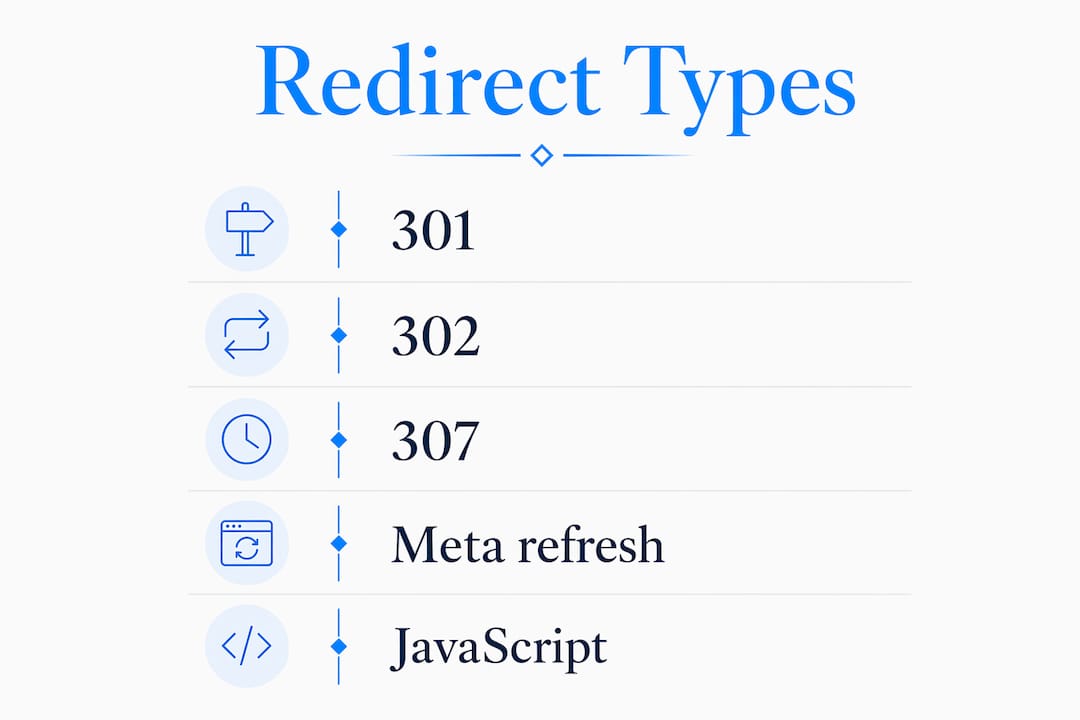
Here are the types your firm will actually encounter:
- 301 (Permanent Redirect): The URL has moved for good. A 301 transfers most of the original page's link equity to the destination. Use this for domain changes, URL restructures, and HTTP-to-HTTPS migrations.
- 302 (Temporary Redirect): Signals a short-term move. Google does not reliably transfer ranking signals through a 302, so using it during a permanent migration is a documented cause of post-migration ranking loss.
- 307 (Temporary Redirect, HTTP/1.1): Functionally similar to 302 but more precise about preserving the request method. Appropriate for short-lived campaign pages or A/B tests.
- Canonical tags: Not a redirect, but they tell Google which version of a page is authoritative when duplicate URLs exist. Useful alongside redirects during a redesign.
- Meta-refresh: A browser-level redirect set in HTML. Google now treats 301 redirects without the historic PageRank penalty, but meta-refresh still carries risks and should be avoided.
- JavaScript redirects: Processed only after the page renders. Googlebot may not follow them reliably. Avoid for any SEO-critical page.
| Scenario | Recommended redirect | Notes |
|---|---|---|
| Permanent domain change | 301 | Use GSC Change of Address tool too |
| HTTP to HTTPS | 301 | Update internal links after |
| Temporary campaign page | 302 or 307 | Switch to 301 if it becomes permanent |
| Duplicate content | Canonical tag | Complement with 301 where possible |
| Retiring a page | 301 to closest equivalent | Never redirect to homepage |
Why correct redirects matter for law firms
Law firm websites earn backlinks from legal directories, bar association profiles, media citations, and local news. Those links represent years of accumulated authority. A redirect chain — where URL A points to URL B, which points to URL C — bleeds link equity at every hop and adds latency. Every old URL should point directly to its final destination.

Broken links and 404 errors do more than hurt rankings. A prospective client who clicks a bookmarked page and lands on a 404 is gone. That's a lost consultation, not just a crawl error. Firms that have invested in Google Business Profile, Avvo, FindLaw, or Martindale-Hubbell listings are especially exposed: those directory links don't update automatically when you change your URLs.
Common technical risks to watch for:
- Redirect chains (A→B→C instead of A→C)
- Redirect loops (A redirects to B, B redirects back to A)
- Wrong status codes (302 used where 301 is needed)
- Redirects pointing to the homepage instead of equivalent pages
Pro Tip: Redirects are not a cure for existing SEO problems. A 301 redirect transfers ranking signals when used correctly, but it does not fix thin content, algorithmic penalties, or a weak backlink profile. Fix the underlying issue first.
Practitioners warn that a significant portion of organic traffic can be lost during redesigns that lack pre-launch redirect mapping. For a firm that depends on search visibility to generate consultations, that's a serious business risk, not a technical footnote.
Common redirect scenarios law firms face
-
Domain rebrand or name change. A firm merging or rebranding from
smithlaw.comtosmithjohnsonlegal.comneeds 301 redirects from every old URL to its exact equivalent on the new domain, plus a Google Search Console Change of Address notification. -
Site redesign with URL structure changes. Moving practice-area pages from
/services/personal-injury/to/personal-injury-lawyer/requires a one-to-one redirect for each changed URL. Missing even a handful of high-traffic pages means those pages restart from zero in Google's index. -
Merging two firm sites after a partnership. Remove or match pages before redirecting; mass-redirecting everything to the homepage looks manipulative and is often discounted by Google. Let Google reindex for a month, then redirect matched pages to their closest equivalents.
-
Retiring a practice area or attorney profile. Redirect to the most relevant remaining page, not the homepage. A redirect to the homepage is treated as a soft 404 and passes no ranking signals.
-
Vanity domains for marketing campaigns. A domain like
chicagoinjurylawyer.comredirected to your main site only helps if that domain has relevant, law-related backlinks. Redirecting keyword-stuffed domains without content or backlinks is ineffective and can appear manipulative. -
HTTP to HTTPS migration. Every HTTP URL needs a 301 to its HTTPS equivalent. This is also the moment to update all internal links — don't rely on the redirect chain to do the work permanently.
Best practices for managing redirects on a law-firm website
A solid redirect implementation starts with a URL map, not with code. Here's the checklist:
- Export a full crawl of your current site before any changes.
- Build a spreadsheet: old URL, new URL, redirect type, and a "protected" flag for your 20–30 high-value pages (homepage, top practice areas, senior profiles, top publications).
- Export backlink data from Google Search Console, Ahrefs, or Moz. Every page with inbound links is a protected asset.
- Mark every permanent move as 301. Never use meta-refresh or JavaScript redirects for SEO-critical pages.
- After launch, update all internal links to point directly to new URLs. Internal links left pointing to old URLs are a sign of unfinished architecture and reduce direct equity transfer.
- Add canonical tags and update your XML sitemap to reflect new URLs, then resubmit to Search Console.
Pro Tip: Redirects deployed in the routing layer (Next.js config, Apache/Nginx rules) are testable, version-controlled, and far more reliable than WordPress plugin-based redirects or ad-hoc .htaccess edits. If your developer is managing redirects through a plugin, ask why.
For implementation, numbered steps matter:
- Implement redirects in the server config or routing layer, not a plugin.
- Keep the redirect map in version control alongside the codebase.
- Deploy to a staging environment and run a full crawl with Screaming Frog before launch.
- Verify that no chains exist: every old URL should resolve in a single hop.
- Update the XML sitemap and submit it in Search Console on launch day.
How to audit, test, and monitor redirects
Tools you need: Google Search Console (Coverage and URL Inspection), Screaming Frog SEO Spider (full-site crawl), Redirect Path (browser extension for spot-checking), server logs, and a staging environment for end-to-end validation.
Step-by-step audit sequence:
- Crawl the live site with Screaming Frog and export all URLs.
- Cross-reference with your URL map to identify any unmapped pages.
- Check every redirect for status code (301 vs. 302), destination URL, and chain length.
- Fix any chains so each old URL points directly to the final destination.
- Run the same crawl on staging after implementation.
- Submit the updated XML sitemap in Search Console and use the Change of Address tool for domain moves.
- Use URL Inspection in Search Console to spot-check your highest-priority pages.
For monitoring after launch: run a weekly crawl for the first month, then monthly. Set Search Console alerts for a spike in 404 errors or a drop in indexed pages.
Pro Tip: Log every redirect with its implementation date and the developer who added it. Post-launch forensics — figuring out why a page lost rankings six weeks after launch — are far easier when the redirect history is documented.
What does redirect implementation actually cost?
| Phase | Estimated duration | Notes |
|---|---|---|
| Audit and URL mapping | 2–5 business days | Longer for larger sites |
| Implementation and staging | 3–7 business days | Depends on site size and CMS |
| QA and crawl validation | 1–3 business days | Includes chain checks and 404 review |
| Post-launch monitoring | 4 weeks minimum | Weekly crawls, Search Console review |
Cost varies by scope. A small firm site (under 100 pages) with a clean URL structure is a fixed-scope project. A large firm with hundreds of pages, multiple domains, or an existing tangle of old redirects may need hourly-rate remediation on top of the migration work. Budget separately for SEO remediation if rankings drop post-launch — recovery can take 2–6 weeks even with correct redirects in place.
How redirects affect load speed and user experience
Every redirect adds a round-trip between the browser and the server. A single well-placed 301 adds roughly 100–300 milliseconds. A chain of three redirects multiplies that delay, and on mobile connections it's noticeable. For law firm clients, many of whom are searching on a phone after an accident or urgent legal situation, a slow or broken page is a reason to call the next firm on the list.
Google's Core Web Vitals measure load performance, and redirect chains directly hurt Largest Contentful Paint (LCP) scores. A law firm website that scores poorly on LCP loses both rankings and conversions simultaneously.
Risks of improper redirects
The most common mistake is redirecting everything to the homepage. Google treats this as a soft 404 and passes no ranking signals. You lose the authority of every redirected page.
Redirect loops crash crawlers and browsers. A user hitting a loop sees an error message; Googlebot stops crawling that section of the site. Both outcomes are bad. Wrong status codes — using 302 where 301 is needed — tell Google the move is temporary, so it holds the old URL in its index and withholds authority transfer from the new one. These aren't edge cases. They're the three most common causes of post-migration ranking loss, and they're entirely preventable with a proper pre-launch audit. If you're wondering why your site gets traffic but no calls, a broken redirect chain is one of the first things worth checking.
Communicating website changes to clients and stakeholders
Tell clients before you change anything visible. If your firm's URL is printed on business cards, court filings, email signatures, or directory listings, those need to be updated. A redirect buys time, but it's not a permanent substitute for updating the source.
Internally, brief your marketing team, IT contact, and any staff who manage directory listings (Avvo, FindLaw, Google Business Profile) at least two weeks before launch. Give them the new URLs in writing. For clients who have bookmarked your client portal or contact page, a brief email with the new URL is worth sending. Redirects handle the technical side; communication handles the trust side.
How redirects interact with mobile and local SEO
Google uses mobile-first indexing, which means Googlebot crawls your site as a mobile user. If your redirects behave differently on mobile (a common issue with older responsive setups or separate m. subdomains), you can end up with a desktop site that ranks and a mobile site that doesn't. Always test redirects on mobile explicitly, not just desktop.
For local SEO, your Google Business Profile, legal directories, and local citations all carry your URL. A domain change without updating those citations creates a mismatch that can suppress your local pack rankings. Update your NAP (Name, Address, Phone) data across every directory as part of the migration, not as an afterthought. Your website sitemap should also reflect new URLs before you resubmit to Search Console.
Key Takeaways
Correct 301 redirects, a pre-launch URL map, and updated internal links are the three non-negotiables for any law firm website migration that needs to preserve search rankings and client access.
| Point | Details |
|---|---|
| Use 301 for permanent moves | A 301 transfers most of the original page's link equity to the destination; a 302 does not reliably transfer authority. |
| Map every URL before launch | Missing a high-traffic page means it restarts from zero in Google's index. |
| Eliminate redirect chains | Point every old URL directly to its final destination to avoid equity dilution and added latency. |
| Update internal links | Internal links pointing to old URLs reduce direct equity transfer and signal unfinished architecture. |
| Epdwebsites handles migrations | Since 2009, Epdwebsites has managed staged redirect implementations and post-launch monitoring for professional service sites. |
What most firms get wrong about redirects
The conventional wisdom treats redirects as a purely technical task — hand it to the developer, check the box, move on. That framing misses the real risk. The pages that matter most to a law firm's search visibility are often the ones that get the least attention during a migration: a three-year-old personal injury page with 40 inbound links, an attorney bio that ranks for a specific name search, a blog post that drives 15% of organic traffic. Those pages need to be identified, flagged as protected assets, and mapped one-to-one before a single line of redirect code is written.
The other thing firms underestimate is how long Google takes to process a migration. Even with perfect 301s, a full re-crawl for a 100–300 page site can take 2–6 weeks. Rankings will fluctuate during that window. That's normal. What's not normal is a firm that launches a redesign without a redirect map and then calls their SEO vendor in a panic six weeks later wondering why traffic dropped 40%. By that point, the damage is done and recovery takes months.
Redirects done right are invisible. Done wrong, they're expensive.
Epdwebsites manages your redirects so rankings don't slip
Law firm migrations are too high-stakes for guesswork. Epdwebsites has handled website builds, domain moves, and staged redirect implementations for attorneys and professional service firms since 2009. The process starts with a dedicated URL map, flags your protected assets before any code changes, and deploys redirects in a version-controlled staging environment so every hop is verified before your site goes live.

Ongoing hosting and maintenance plans include post-launch monitoring so redirect regressions get caught in the first weekly crawl, not six weeks later. If you're planning a rebrand, domain move, or redesign, the right time to involve a technical partner is before the URL structure is decided, not after. View the full service features or reach out to request a redirect audit for your firm's current site.
Useful sources and tools
| Tool / Resource | What it does |
|---|---|
| Google Search Console | Monitors indexed URLs, crawl errors, and 404s; includes Change of Address tool for domain moves |
| Screaming Frog SEO Spider | Full-site crawl that identifies redirect chains, status codes, and broken links |
| Redirect Path (Chrome extension) | Spot-checks individual URLs for redirect status codes in real time |
| Google Search Console (backlink export) | Free backlink data to identify which pages carry inbound links and must be protected |
| Inoriseo: Law Firm Migration SEO | Detailed migration guide covering redirect maps, status codes, and post-launch monitoring |
| Rocket Clicks: Redirect Errors Guide | Practical guide to preventing, fixing, and recovering from redirect errors |
| Epdwebsites: Law Firm Rebranding Checklist | Step-by-step checklist for preserving SEO and redirects during a law-firm rebrand |