
For most law firms, Epdwebsites is the strongest starting point: custom design, managed hosting, clear edit workflows, and legal-focused maintenance built in from day one. If you want ownership of your site without the technical overhead of running WordPress yourself, that combination is hard to beat.
Here is the shortlist by firm type:
-
Solo practitioners and referral-driven firms: DIY site builders (Squarespace, Wix) or a publisher-managed custom build like Epdwebsites for a step up in credibility
-
Small to mid-size firms: Epdwebsites or a managed legal platform (LawLytics, The Modern Firm) for legal-specific templates and content workflows
-
Boutique and brand-conscious firms: Premium agency-built custom sites (PaperStreet, Great Jakes, Postali) or Epdwebsites for design fidelity
-
Enterprise and multi-location firms: Scorpion, Rankings.io, or a full-service agency with dedicated account management
-
Firms prioritizing SEO ceiling and content volume: WordPress with managed hosting and a legal-optimized theme
The side-by-side comparison table is in the next section. Jump there if you want the numbers and dimensions before the narrative.
Statistic: Sites that integrate intake forms, booking, or client portals consistently outperform brochure-style sites on lead conversion, according to Lawyerist's analysis of top-performing law firm websites.
Table of Contents
- How do the main legal website design options compare?
- Why Epdwebsites is the recommended pick for most law firms
- How do you vet a law firm web design vendor?
- What does a law firm website actually need to convert clients?
- How we selected and evaluated these options
- Key Takeaways
- What most law firm website advice gets wrong
- Epdwebsites builds law firm websites that work after launch
- Sources and further reading
How do the main legal website design options compare?
| Provider / Category | Best For | Pricing Model | CMS & Ownership | Hosting & Maintenance | Turnaround | Conversion Features | SEO & Performance | Compliance & Security | Support |
|---|---|---|---|---|---|---|---|---|---|
| Epdwebsites | Solo to mid-size firms | One-time design + monthly hosting | Custom CMS, client owns site | Included: backups, updates, monitoring | Weeks, not months | Intake forms, integrations | Built-in SEO, performance monitoring | HTTPS, ADA checks, disclaimer workflows | Dedicated, named support |
| Managed legal platform (LawLytics, The Modern Firm) | Small firms wanting hands-off content | Monthly subscription | Proprietary; limited portability | Fully managed | Fast (template-based) | Basic forms | Decent; platform-constrained | HTTPS; disclaimer templates | Platform support |
| Premium agency custom (PaperStreet, Great Jakes, Postali) | Boutique to enterprise | Project fee + retainer | WordPress or custom; firm owns | Varies by agency | 8 weeks | Full suite possible | High; custom schema | Strong; agency-managed | Account manager |
| WordPress + managed hosting | SEO-focused, content-heavy firms | Hosting fee + dev costs | WordPress; full ownership | Self-managed or add-on | 6 weeks | Plugin-dependent | Highest ceiling | Requires discipline | Developer-dependent |
| DIY site builders (Squarespace, Wix) | Solo, referral-driven | Monthly subscription | Proprietary; no export | Fully managed | Days to 2 weeks | Basic forms, scheduling | Limited schema control | HTTPS; manual disclaimers | Platform support only |
| Scorpion | Enterprise, high-volume PI/criminal | High monthly retainer | Proprietary | Fully managed | 6–10 weeks | Full intake suite | Aggressive PPC + SEO | Managed | Dedicated team |
| Rankings.io | PI and criminal defense firms | Project + monthly | WordPress | Managed | 10 weeks | Strong | SEO-first | Solid | Specialist account mgmt |
| JurisPage | Small to mid-size | Project-based | WordPress | Optional | 6–10 weeks | Forms, CTA optimization | Strong local SEO | Standard | Agency support |
| Gladiator Law Marketing | PI firms, aggressive growth | Monthly retainer | Proprietary/WordPress | Managed | 8 weeks | Full suite | PPC-heavy | Standard | Dedicated |
| Thrive | Small to mid-size, multi-service | Project + monthly | WordPress | Managed hosting available | 6–10 weeks | Forms, chat | Solid | Standard | Account manager |
| iLawyerMarketing | PI and criminal defense | Monthly retainer | Proprietary | Fully managed | 8 weeks | Full intake | Strong | Managed | Dedicated |
| Omnizant | Small to mid-size | Monthly subscription | Proprietary | Fully managed | 4–8 weeks | Forms, chat | Decent | Standard | Platform support |
| Above the Bar Marketing | Small firms, boutique | Project-based | WordPress | Optional | 6–10 weeks | Standard forms | Solid | Standard | Agency support |
| Grow Law | Growth-focused small firms | Monthly retainer | Proprietary/WordPress | Managed | 6–10 weeks | Forms, CRM integration | Solid | Standard | Account manager |
| Justia Elevate | Solo to small | Monthly subscription | Proprietary | Fully managed | Fast | Basic forms | Decent | HTTPS, disclaimers | Platform support |
| LawSEO | SEO-focused firms | Monthly retainer | WordPress | Managed | 8 weeks | Standard | SEO-first | Standard | Specialist support |
| ParallelHQ | Design-forward boutique firms | Project-based | Custom/Webflow | Client-managed or agency | 8 weeks | Custom intake | High performance | Custom | Project-based |
| Postali | Mid-size to enterprise | Project + monthly | WordPress | Managed | 10 weeks | Full suite | Strong | Solid | Dedicated |
| Law Firm Sites | Solo to small | Monthly subscription | Proprietary | Fully managed | Fast | Basic | Decent | Standard | Platform support |
| Everything Design | Boutique, brand-focused | Project-based | Custom | Client-managed | 8 weeks | Custom | High | Custom | Project-based |
| The Modern Firm | Solo to small | Monthly subscription | Proprietary | Fully managed | Fast | Basic forms | Decent | HTTPS, disclaimers | Platform support |
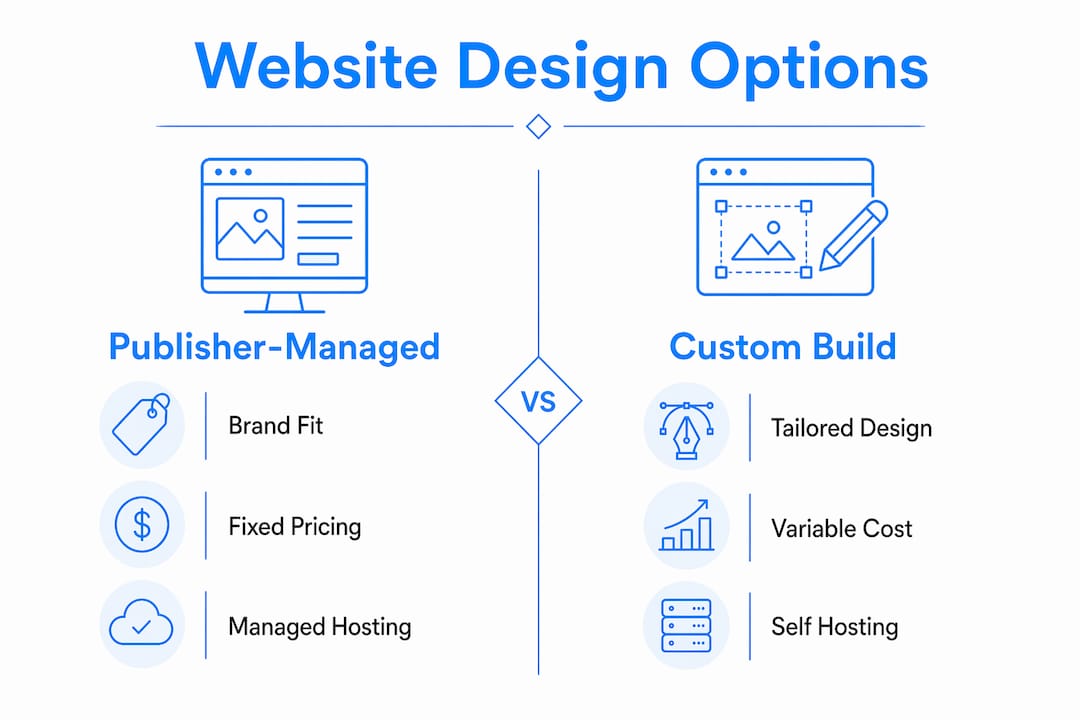
Category profiles: who should consider what
Publisher-managed custom builds (Epdwebsites) sit in a useful middle ground. You get a site built to your brand, not a template, with hosting and maintenance handled for you, and you own the asset. The trade-off versus a full agency is cost: you pay less upfront, and the scope is more focused. The trade-off versus a DIY builder is control: someone with real design experience is making the decisions, not a drag-and-drop editor.

Managed legal platforms like LawLytics, The Modern Firm, Justia Elevate, and Law Firm Sites are fast to launch and require almost no technical involvement. The catch is portability. Platform choice trade-offs are real: managed legal platforms can lock your content and limit your SEO ceiling compared to WordPress. If you ever want to leave, migration is painful.
Premium agency-built custom sites from firms like PaperStreet, Great Jakes, Postali, Omnizant, and Everything Design deliver the highest design fidelity. They suit boutique or enterprise firms where brand differentiation is a genuine competitive lever. Budget accordingly: project fees run high, and ongoing updates typically require going back to the agency.
WordPress with managed hosting gives you the highest long-term SEO ceiling, but only if you have technical support. JurisPage, Rankings.io, LawSEO, Thrive, and Above the Bar Marketing all build on WordPress. Without a developer relationship, security patches and plugin conflicts become your problem.
DIY site builders are the right call for solo practitioners who need something live this week and whose business runs on referrals. Squarespace's default typography is closer to a professional services firm than any other builder out of the box. The ceiling is low for deep practice-area SEO, but the floor is high for looking credible fast.
Why Epdwebsites is the recommended pick for most law firms
Epdwebsites has been building sites for professional service providers, including attorneys, since 2009. The offering covers custom design, development, hosting, maintenance, performance monitoring, and built-in SEO, with add-ons for AI chatbots and Google Reviews integration. That is a complete package, not a design-only engagement that leaves you hunting for a host and a developer separately.
The detail that matters most for law firms is the edit workflow. Bar compliance requires not just disclaimers but an operational ability to update jurisdictional disclosures and attorney information quickly. Sites that force developer edits for routine changes create real compliance exposure. Epdwebsites builds a clear change process into the engagement, so attorney bios, practice-area pages, and jurisdictional language can be updated without waiting on a developer queue.
The service scope includes design, development, CMS access, backups, security, ADA and accessibility checks, and client intake integrations. Post-launch, the monthly hosting plan covers ongoing maintenance and performance monitoring. For pricing, the model is a one-time design and setup fee plus a monthly hosting fee. Current rates are on the features and pricing page; the structure is transparent and does not require a long-term retainer commitment.
Real portfolio examples and client testimonials are on the Epdwebsites portfolio page. The work spans attorneys, CPAs, real estate agents, and medical practices, which gives you a sense of the design range across professional services.
"The most common firm mistake is treating the site as a brochure. Top sites act as platforms with tools that build trust before contact." — Lawyerist, "Good vs. Great: What Best Law Firm Websites Get Right"
Pro Tip: Ask any vendor, including Epdwebsites, to show you the exact process for updating an attorney bio or adding a jurisdictional disclaimer. If the answer involves submitting a ticket and waiting a week, that is a compliance risk. The answer should be a documented workflow with a named turnaround time.
How do you vet a law firm web design vendor?
The vetting checklist
Run every proposal through this list before signing anything:
- Ownership clause: Does the contract state explicitly that you own the domain, content, and site files? If the vendor owns the site, you are renting it.
- CMS access: Can your staff log in and make routine edits without developer help? Test this during the demo.
- Hosting responsibilities: Who handles uptime monitoring, security patches, and backups? Get the SLA in writing.
- Portability: If you leave, can you export the site and take it to another host? Proprietary platforms often say no.
- Update turnaround: What is the documented SLA for routine content changes (bio updates, new practice-area pages, disclaimer edits)?
- Security: Is HTTPS standard? Who handles SSL renewal, malware scanning, and plugin updates?
- ADA/accessibility: Has the vendor built accessibility into the code, or is it a retrofit? The American Bar Association urges accessibility to be integrated from the start, not added later.
- Backups: How often are backups taken, and how quickly can the site be restored from one?
- Escalation path: Who do you call when the site goes down at 9 PM before a big case?
Questions to ask vendors directly
- Who owns the domain and site files on day one and on the day we part ways?
- What is your process for a routine content change, and what is the turnaround time?
- How do you handle a security incident or site outage?
- Can you show me a sample timeline for a firm our size, from kickoff to launch?
- What SEO work is included, and what requires a separate engagement?
- If we need to migrate to a new platform in two years, what does that look like?
Red flags in proposals
Watch for vague scope language ("we will build a professional website"), no mention of who owns the domain, retainer requirements with no clear deliverables, no accessibility plan, and no documented backup or restoration policy. Common attorney website design errors often trace back to exactly these gaps in the original contract.
Normalizing cost across pricing models
Different vendors price differently, which makes comparison hard. Convert everything to an annual cost:
- DIY builder: $29/month = roughly $350/year, but add your time for design and updates
- Managed legal platform: $150–$400/month = $1,800–$4,800/year, all-in
- Publisher-managed custom build (Epdwebsites): One-time design fee plus monthly hosting; check the hosting plans page for current rates
- Premium agency custom: $10,000–$40,000 project fee plus $500–$2,000/month for ongoing support
- WordPress with managed hosting: $3,000–$15,000 build plus $100–$500/month hosting and maintenance
Timeline expectations: solo firms can launch a DIY or publisher-managed site in a few weeks. Small firms using a managed legal platform typically go live within several weeks. Premium agency builds require multiple weeks, and enterprise projects with complex integrations take longer.
What does a law firm website actually need to convert clients?
Conversion features that move the needle
The difference between a good and great law firm website is almost always the presence of tools that build trust before a prospect picks up the phone. Insist on these in any RFP:
- Intake forms connected to your CRM or case management system (Clio Grow, MyCase, Lawmatics), not a Gmail inbox
- Online scheduling for consultations, either native or via Calendly or Acuity
- Downloadable guides or checklists that give prospects something useful before they commit to a call
- FAQ structured content that answers the questions your clients actually type into Google
- Clear trust signals above the fold: bar admissions, office address, real attorney photos, a phone number large enough to tap on mobile
Technical and UX requirements
Pages that load in over three seconds risk higher bounce rates, and that bounce rate directly affects your organic visibility. Industry guidance recommends that law firm websites should load in three seconds or less for optimal user retention and search performance. Prioritize fast hosting with a CDN, Core Web Vitals optimization, and mobile-first responsive design. LegalService schema markup helps search engines understand your practice areas and location. These are not nice extras; they are table stakes for competitive local search.
Accessibility is both a compliance issue and a conversion issue. Sites built with semantic markup and proper contrast ratios perform better for assistive technologies and for AI indexing. For law firm website layout decisions, accessible structure and clear navigation should drive the choices, not just visual aesthetics.

Maintenance and content processes
Failing to update bios, practice areas, and disclaimers quickly creates both compliance and marketing problems. Set a content cadence before launch: who owns attorney bio updates, who approves new practice-area pages, and who is responsible for jurisdictional disclaimer changes when your firm expands to a new state. Attorney website content best practices recommend a quarterly audit at minimum, with a named owner for each content type.
Pro Tip: If your vendor requires a developer ticket for every bio update or disclaimer change, calculate the annual cost of that friction in delayed compliance and missed marketing windows. A site with a documented self-serve edit workflow pays for itself in the first year.
How we selected and evaluated these options
Selection criteria
Every option in this comparison was evaluated against the following dimensions:
- Fit for firm size: Does the solution scale from solo to enterprise, or is it optimized for a specific segment?
- CMS ownership: Does the firm own the site and its files, or is it locked to a proprietary platform?
- Hosting and maintenance: Is maintenance included, documented, and covered by an SLA?
- Compliance features: Does the vendor support ADA accessibility, HTTPS, and jurisdictional disclaimer workflows?
- SEO and technical performance: Does the build include schema, Core Web Vitals optimization, and mobile-first design?
- Conversion features: Are intake forms, scheduling, and CRM integrations part of the standard build?
- Pricing transparency: Are pricing ranges publicly available or disclosed on request?
- Portfolio quality: Does the vendor show real examples of law firm work, not just generic professional sites?
Weighting used for the shortlist
For most small to mid-size firms, the weighting applied was: ownership and maintenance (25%), SEO and technical performance (20%), conversion features (20%), pricing transparency (15%), portfolio and trust signals (10%), and support quality (10%). Enterprise firms should weight SEO and account management higher; solo practitioners should weight cost and speed to launch higher.
Data sources
Vendor feature disclosures and published pricing ranges were drawn from public vendor pages. Portfolio evidence was assessed from publicly available work. Industry best-practices guidance came from the American Bar Association, Lawyerist, MyCase, and Attorney at Law Magazine. Platform comparison data came from FlashCrafter's 2026 builder analysis. Third-party review signals were used as one supporting input, not the primary ranking factor.
Key Takeaways
For most law firms, a publisher-managed custom build with clear ownership, documented edit workflows, and managed hosting delivers the best balance of quality, compliance readiness, and long-term value.
| Point | Details |
|---|---|
| Own your site from day one | Confirm the ownership clause before signing; proprietary platforms can trap your content and complicate migration. |
| Prioritize edit workflows over aesthetics | A site you can update without a developer ticket reduces compliance risk and keeps marketing current. |
| Match the solution to firm size | Solo firms can launch fast with a DIY builder; small to mid-size firms get the best balance from a publisher-managed custom build. |
| Demand conversion features in the RFP | Intake forms connected to your CRM, online scheduling, and structured FAQ content separate converting sites from brochures. |
| Epdwebsites for ownership plus support | Epdwebsites offers custom design, managed hosting, ADA checks, and a documented change workflow suited to solo and mid-size law firms. |
What most law firm website advice gets wrong
The conventional wisdom in legal marketing circles is that design is the primary lever. Pick the right template, get the right colors, and clients will come. That framing is wrong in a specific and costly way.
The sites that actually generate consultations are the ones that treat the website as an operational system, not a brochure. That means intake forms that route to your case management software, not a Gmail inbox. It means practice-area pages written for the specific long-tail queries your clients actually search, not a generic "Our Services" page. It means attorney bios that are current, because a bio listing a partner who left eighteen months ago is a trust signal in reverse.
The vendor selection question most firms ask is "who does the best design work?" The question that actually matters is "who has the best process for keeping the site current and compliant after launch?" Those are different vendors. A firm that spends $25,000 on a beautiful custom site and then cannot update a disclaimer without a two-week developer queue has made a worse decision than a firm that spent $5,000 on a simpler build with a documented edit workflow.
Epdwebsites is worth considering precisely because the post-launch process is part of the product, not an afterthought. For firms that want a site that works as a system rather than a static credential, that operational focus is the real differentiator.
Epdwebsites builds law firm websites that work after launch
Epdwebsites has served attorneys and professional service firms since 2009, with a model built around one thing most agencies skip: what happens after the site goes live. The typical engagement covers discovery, custom design, development, launch, and then ongoing monthly hosting and maintenance with a documented change workflow.

Included deliverables span custom design, CMS access, backups, security monitoring, performance tracking, ADA accessibility checks, and intake form integrations. Add-ons like AI chatbots and Google Reviews widgets are available for firms that want them. Turnaround from kickoff to launch typically runs a few weeks for standard builds, not the months a full agency project requires.
Pricing follows a one-time design fee plus a monthly hosting plan. For current rates, the features and pricing page has the full breakdown. If you want to see real work before committing to a conversation, the portfolio shows completed projects across legal and professional services.
Ready to scope your firm's site? Reach out through the features page to start a discovery conversation and get a clear picture of what your build would include.
Sources and further reading
The following sources informed the comparison, criteria, and best-practice guidance in this article:
- Designing your law firm's website — American Bar Association: Primary guidance on accessibility obligations, jurisdictional disclaimer requirements, and the compliance risks of sites that require developer edits for routine updates.
- Good vs. Great: What Best Law Firm Websites Get Right — Lawyerist: Analysis of conversion features (calculators, client portals, intake integrations) that separate high-performing law firm sites from brochure sites.
- Law Firm Website Design Tips and Best Practices — MyCase: Practical guidance on page speed thresholds, maintenance cadence, and the cost of failing to keep attorney bios and disclaimers current.
- Best Website Builder for Law Firms 2026: 7 Compared — FlashCrafter: Platform comparison covering WordPress SEO ceiling, managed legal platform portability trade-offs, and builder-by-builder scoring for legal use cases.
- Best Law Firm Websites in 2026 — Attorney at Law Magazine: Review of award-winning law firm sites highlighting the combination of UX, brand clarity, and interactive features that define top performers.
- Types of Law Firm Website Layouts: 2026 Guide — Epdwebsites Blog: Layout and structure guidance for legal practices, covering navigation, homepage hierarchy, and practice-area page architecture.
- Attorney Website Content Best Practices — Epdwebsites Blog: Content maintenance guidance including update cadence, bio ownership, and practice-area page strategy for ongoing SEO.