
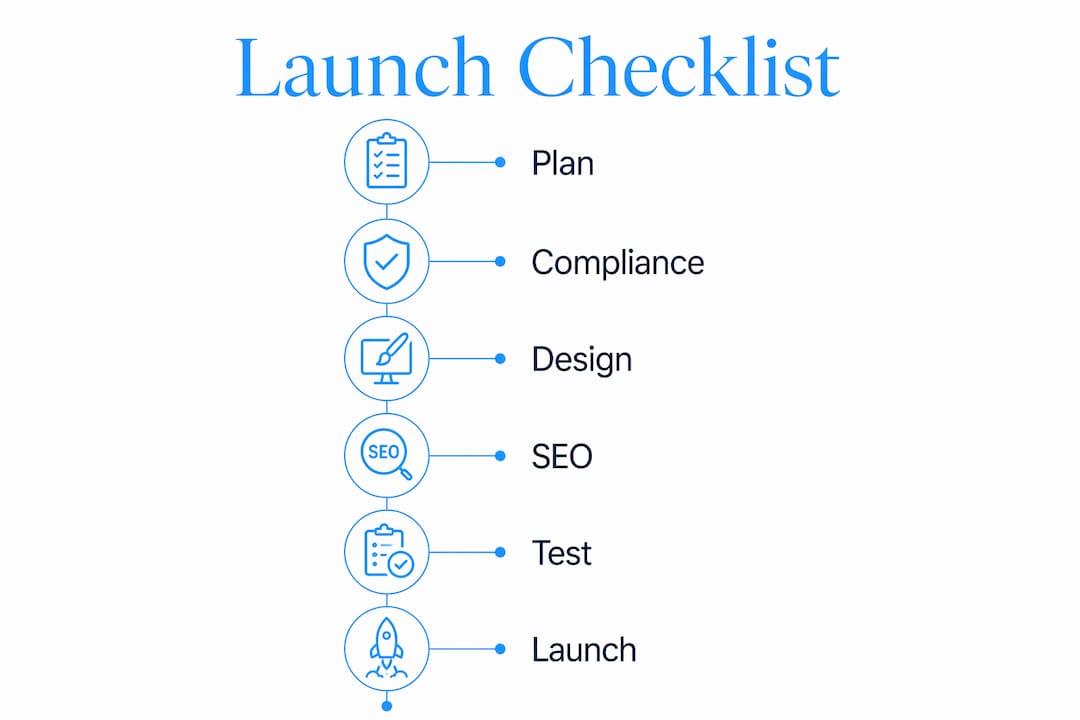
A medical practice website launch checklist is a step-by-step framework that confirms your site meets technical, legal, and patient experience standards before going live. Launching without one exposes your practice to HIPAA violations, WCAG 2.1 AA accessibility penalties, and SEO failures that can take months to reverse. This guide covers every critical checkpoint: compliance requirements tied to Section 504 deadlines, pre-launch SEO tasks using Google Search Console and Google Analytics 4, design standards that build patient trust, and a post-launch maintenance plan that keeps your site performing long after opening day.
What technical and compliance requirements must your medical website meet before launch?
Technical readiness and legal compliance are the two non-negotiable pillars of any physician practice website launch checklist. Skip either one and you risk patient data breaches, federal enforcement actions, or a site that turns away the patients you worked to attract.
HIPAA and data security requirements
HIPAA compliance governs how your website handles any protected health information (PHI). Every contact form, appointment request field, and patient portal must use HTTPS encryption. Unencrypted data transmission is a direct HIPAA violation, not a gray area. Your hosting environment must also support Business Associate Agreements (BAAs) with any third-party vendor that processes patient data, including scheduling platforms like Zocdoc or Phreesia.
A privacy policy is mandatory, not optional. It must explain what data you collect, how it is stored, and who can access it. Place a visible link to this policy in your site footer and on every form page. If your practice uses Google Analytics 4 for traffic tracking, configure it to anonymize IP addresses to avoid inadvertently capturing identifiable data.
Accessibility standards under WCAG 2.1 AA
Healthcare organizations with 15 or more employees must comply with WCAG 2.1 Level AA by May 11, 2027 under Section 504. That deadline sounds distant, but enforcement can begin earlier through individual complaints filed with the HHS Office for Civil Rights. Starting your accessibility audit now is the only way to avoid costly remediation under pressure.
WCAG 2.1 AA compliance requires more than running an automated scanner. Real compliance requires ongoing manual testing by qualified experts and users who rely on assistive technologies like JAWS or NVDA screen readers. Automated tools catch roughly 30% of accessibility issues. The rest require human judgment.

Your vendor contracts matter here too. Organizations remain legally responsible for accessibility even when digital services are outsourced. Any third-party patient portal, scheduling widget, or telehealth tool embedded in your site must include WCAG 2.1 AA conformance clauses in its service contract.
Pre-launch compliance checklist:
- Confirm HTTPS is active on every page, including subdomains
- Verify all forms use encrypted submission and display a privacy notice
- Complete an accessibility audit using tools like axe DevTools or WAVE, then schedule manual testing
- Add WCAG 2.1 AA conformance requirements to all vendor contracts
- Publish a privacy policy and link it from the footer and all data-collection pages
- Document your accessibility remediation progress in writing
Pro Tip: Starting accessibility audits and documentation now reduces legal risk significantly. Written records of your compliance efforts demonstrate good faith if a complaint is filed before your deadline.
How to prepare your medical practice website for SEO before launch?
SEO recovery from launch errors can take months. Pre-launch audits substantially reduce time to rank and prevent the common mistake of going live with a site search engines cannot crawl or index. A solid medical website launch plan treats SEO as a pre-launch requirement, not a post-launch fix.
Follow this numbered sequence before your site goes live:
-
Verify your robots.txt file. Confirm it allows search engine crawlers to access all public pages. Development environments often block crawlers by default, and leaving noindex tags from development is one of the most common launch failures. Check every page template, not just the homepage.
-
Create and submit your XML sitemap. Generate a sitemap that includes all indexable pages and submit it through Google Search Console. A sitemap tells Google exactly what to crawl and accelerates initial indexing.
-
Install Google Analytics 4 and Google Search Console. Both tools must be configured before launch so you capture baseline data from day one. Verify your Search Console property and confirm the GA4 tracking code fires on every page using Google Tag Assistant.
-
Optimize title tags and meta descriptions. Every page needs a unique title tag under 60 characters and a meta description under 160 characters. For a medical practice, these should include your specialty, city, and a patient-facing benefit. "Pediatric Dentist in Phoenix, AZ | Same-Day Appointments" outperforms "Home Page" in every measurable way.
-
Add descriptive alt text to all images. Alt text serves two purposes: it helps visually impaired users understand images, and it gives search engines context. Write alt text that describes the image content specifically. "Dr. Maria Chen reviewing patient X-ray in exam room" beats "doctor image."
-
Test mobile friendliness and page speed. Google PageSpeed Insights scores above 70 on mobile are achievable targets that directly affect both rankings and patient experience. Compress images using tools like Squoosh or ShortPixel, and defer non-critical JavaScript.
-
Audit and fix broken links. Use Screaming Frog or Sitebulb to crawl your staging site and identify 404 errors. If you are migrating from an old domain or URL structure, set up 301 redirects before launch to preserve any existing search equity.
Pro Tip: Review your healthcare SEO strategy alongside your technical checklist. Keyword research specific to your specialty and location should inform your page titles and content structure before you write a single word.
What design and content best practices ensure a patient-friendly medical website at launch?
A patient visiting your website for the first time makes a trust judgment within seconds. That judgment is based on visual clarity, navigation logic, and content quality. Poor design does not just look bad. It signals to patients that your practice may be equally disorganized.
The most common medical website design mistakes include cluttered homepages, missing contact information above the fold, and inconsistent branding. Your homepage must answer three questions immediately: who you are, what you treat, and how to reach you. Place your phone number, specialty, and location in the header. Do not make patients scroll to find your address.
Navigation structure directly affects both patient experience and accessibility compliance. Review clinic website navigation best practices to confirm your menu labels are clear, your most-visited pages (services, contact, patient forms) are reachable in two clicks or fewer, and your navigation works correctly on mobile devices.
Design and content checklist before launch:
- Confirm logo, brand colors, and typography are consistent across all pages
- Place contact information, specialty, and location in the site header
- Write a medical disclaimer on any page containing health information
- Use grammar and spell-check tools like Grammarly to eliminate errors that undermine credibility
- Include patient testimonials with proper consent documentation
- Add clear calls to action on every service page: "Request an Appointment," "Call Our Office," or "View Patient Forms"
- Test all navigation links on desktop, tablet, and mobile before launch
Content accuracy carries legal weight in healthcare. A typo on a dosage page or an outdated insurance list creates liability and erodes patient trust. Assign a staff member to review every page for factual accuracy, not just grammar. For healthcare website design standards that go beyond aesthetics, a structured review process before launch is non-negotiable.
How to execute a smooth and secure medical website launch?
Launch day is not the finish line. It is the beginning of a continuous compliance and performance cycle. A staged rollout with post-launch maintenance helps identify and correct issues early, minimizing disruption to patients and staff.
Pre-launch QA sequence:
- Test every form submission end-to-end, including confirmation messages and email notifications
- Run cross-browser testing in Chrome, Firefox, Safari, and Edge
- Test all pages on iOS and Android devices at multiple screen sizes
- Perform a security scan using tools like Sucuri SiteCheck or Wordfence
- Confirm 301 redirects are working if you migrated from a previous URL structure
Staged launch approach:
- Soft launch: Share the live URL with staff and a small group of trusted patients. Collect feedback on navigation, form functionality, and content clarity before broad promotion.
- Full launch: Announce via email, social media, and Google Business Profile once QA issues are resolved.
- Fallback plan: Keep a backup of your previous site or a maintenance page ready in case a critical issue surfaces on launch day.
Post-launch monitoring priorities:
- Monitor Google Search Console weekly for crawl errors, manual actions, and indexing issues
- Review Google Analytics 4 data monthly to identify high-exit pages and underperforming content
- Schedule quarterly accessibility retesting, including manual review with assistive technology
- Update vendor contracts annually to confirm third-party tools remain WCAG 2.1 AA compliant
Healthcare websites require ongoing compliance governance beyond the launch date. Broken form submissions and navigation errors are among the most common launch-day issues that damage patient experience. Thorough QA that includes forms, validations, and cross-device usability is the single best investment you make before going live.
Key takeaways
A medical practice website launch requires simultaneous compliance with HIPAA, WCAG 2.1 AA, and SEO technical standards to be effective from day one.
| Point | Details |
|---|---|
| Compliance is pre-launch work | HIPAA encryption, privacy policies, and WCAG 2.1 AA audits must be completed before going live. |
| SEO errors cost months of recovery | Verify robots.txt, remove noindex tags, and set up Google Search Console before launch day. |
| Vendor contracts carry legal weight | Third-party tools embedded in your site must include WCAG 2.1 AA conformance clauses. |
| Design clarity builds patient trust | Contact info, specialty, and calls to action must appear above the fold on every device. |
| Launch is the start, not the end | Schedule quarterly accessibility retesting and monthly SEO reviews as ongoing practice operations. |
Why I stopped treating website launches as one-time events
After working with medical practices on their web presence for years, the pattern I see most often is the same: a practice invests real effort in building a site, launches it, and then treats it as a completed project. Six months later, forms are broken, the accessibility audit has never been done, and Google Search Console is showing crawl errors nobody noticed.
The practices that avoid this are the ones that treat their website the way they treat their clinical protocols: as a living document that requires scheduled review. The May 2027 WCAG 2.1 AA deadline under Section 504 is not a distant abstraction. Complaints can trigger enforcement before that date, and remediation under legal pressure costs far more than proactive auditing.
The other mistake I see constantly is rushing the launch to meet an arbitrary date. A soft launch with a small audience is not a sign of weakness. It is the same logic as a pilot program before a full clinical rollout. You find the broken form, the missing alt text, the page that loads in eight seconds on mobile, before your patients do.
The practices with the strongest online presence are not the ones with the most expensive sites. They are the ones that launched carefully, fixed issues quickly, and kept improving. That discipline is available to any practice willing to use a checklist and stick to it.
— Kate
Ready to launch your medical practice website the right way?
Epdwebsites has been building professional websites for medical practices and healthcare providers since 2009. Every site we deliver is built with HIPAA-aware hosting, accessibility standards, and SEO technical foundations already in place, so you are not starting from zero on compliance.

If you are planning a new site or rebuilding an existing one, our web design and hosting features are designed specifically for professional service providers who cannot afford to get the details wrong. We also offer dedicated website accessibility solutions for practices working toward WCAG 2.1 AA compliance ahead of the 2027 Section 504 deadline. Contact Epdwebsites today for a consultation tailored to your practice's specific needs.
FAQ
What is a medical practice website launch checklist?
A medical practice website launch checklist is a structured list of technical, compliance, design, and SEO tasks that must be completed before a healthcare website goes live. It covers requirements including HIPAA encryption, WCAG 2.1 AA accessibility, Google Search Console setup, and content accuracy review.
When must healthcare websites comply with WCAG 2.1 AA?
Healthcare organizations with 15 or more employees must meet WCAG 2.1 Level AA standards by May 11, 2027 under Section 504. Enforcement through individual complaints can begin before that deadline, so starting accessibility audits now is strongly recommended.
What SEO steps are most critical before launching a medical website?
The most critical pre-launch SEO steps are verifying your robots.txt file allows crawler access, removing any noindex tags left from development, submitting an XML sitemap through Google Search Console, and installing Google Analytics 4 on every page.
Do third-party tools on my medical website need to be WCAG compliant?
Yes. Your practice remains legally responsible for the accessibility of all digital services embedded in your site, even those provided by third-party vendors. Vendor contracts must include WCAG 2.1 AA conformance requirements to protect your organization.
How long does SEO recovery take after a flawed website launch?
SEO recovery from launch errors such as blocked crawlers or missing redirects can take several months. Completing a thorough pre-launch SEO audit eliminates most of these issues and significantly reduces the time needed to achieve search rankings.