
If your site looks dated, your rankings are sliding, or visitors leave without booking a consultation, you need a full law firm website redesign, not a patch job. If the bones are solid and you just need updated photos, new attorney bios, or a color refresh, a lighter refresh will do. Either way, the first move this week is the same: run a content and performance audit before anyone touches a design file.
Before any design work starts, lock in three protections:
- Preserve your SEO equity by exporting every ranking URL and keyword now.
- Back up all existing content, including metadata and images, before migration.
- Build a staging site so changes never touch your live domain until tested.
A content audit that maps traffic and conversions to each page is the step most firms skip, and it's the one that determines whether the redesign gains ground or loses it.
Key Takeaways
A successful law firm website redesign depends on a content audit, a tested 301 redirect map, and firm-owned CMS ownership more than on visual polish alone.
| Point | Details |
|---|---|
| Audit before design | Map traffic and conversions to every page before any redesign work begins. |
| Redirects protect rankings | Build and test a 1:1 301 redirect map on staging before launch. |
| Own your CMS | Avoid vendor-owned platforms that limit control and raise long-term costs. |
| Speed and accessibility convert | Target sub-3-second loads and WCAG-aligned accessibility for legal clients. |
| Epdwebsites builds ownership in | Epdwebsites delivers firm-owned sites with SEO-safe migration and post-launch monitoring built into the process. |
Table of Contents
- What Does a Law Firm Website Redesign Process Look Like?
- How Do You Protect SEO During a Legal Website Redesign?
- Which Pages Should You Keep, Merge, or Retire?
- What Design and Accessibility Choices Actually Convert Clients?
- How Long Does a Law Firm Website Redesign Take?
- What Does a Law Firm Website Redesign Cost?
- What Results Should a Redesign Actually Deliver?
- What Should You Ask Vendors Before You Sign?
- Why Most Redesign Advice Gets the Priorities Backward
- How Epdwebsites Handles Law Firm Redesigns and Migrations
- Sources
What Does a Law Firm Website Redesign Process Look Like?
A redesign runs in five phases, and skipping any of them is how firms lose leads mid-project.
- Discovery. Pull a full content inventory, export analytics, and interview partners and intake staff about what's working and what isn't.
- Strategy. Set measurable goals (consultation requests, form fills, call volume), define KPIs, map your target client, and outline a content plan for practice areas and bios.
- Design and build. Choose templates, select a CMS the firm will own, and plan integrations with your CRM, intake software, and calendaring tools.
- Prelaunch testing. Check every redirect, form, and mobile view on staging before the domain switch.
- Post-launch monitoring. Track rankings, traffic, and conversions daily for 30 days, then weekly through day 90, adjusting content and CTAs as data comes in.
Pro Tip: Bring your SEO specialist into the discovery phase, not after wireframes are done. Treating SEO as co-counsel from day one means your URL structure and taxonomy are built to rank, not retrofitted later.
How Do You Protect SEO During a Legal Website Redesign?
Rankings die during migrations for one reason more than any other: nobody built a redirect map before launch. A 1:1 301 redirect map for every URL that changes is the single most important technical safeguard in the entire project, and testing it on staging catches broken paths before real clients hit them.
Before you launch, confirm:
- Every existing URL is documented with its traffic, backlinks, and ranking keywords.
- The redirect map is tested on staging, not assumed to work on go-live day.
- Title tags, meta descriptions, and structured data like LegalService or Attorney schema carry over or improve.
- Robots.txt, sitemap.xml, and canonical tags are checked for crawl errors before the domain switch.
| Migration Task | When to Complete It |
|---|---|
| Export URLs, traffic, and rankings | Before design begins |
| Build and test 301 redirect map | On staging, pre-launch |
| Verify structured data and metadata | Final staging review |
| Monitor Search Console and rankings | Daily for first 30 days |
The Canadian Bar Association's redesign guidance treats staging checks for crawlability, indexability, and structured data as mandatory, not optional. A redirect explainer built specifically for legal sites walks through the mapping process in more detail.
Which Pages Should You Keep, Merge, or Retire?
Traffic and conversion data should decide a page's fate, not partner preference. A practice-area page with steady organic traffic but zero conversions needs a content rewrite, not deletion. A blog post with high bounce and no backlinks is a merge candidate. A page nobody has visited in a year and that no one links to is a retire candidate.
- Keep and strengthen practice-area pages that already rank, adding clearer calls to action.
- Merge thin or overlapping blog posts into single authoritative guides.
- Retire outdated bios, expired promotions, or duplicate service pages.
- Rewrite attorney bios and FAQs to reflect current cases, credentials, and client-focused language.
Internal linking matters more than most firms realize. Grouping related practice-area pages into a content silo, then linking bios to the practice areas attorneys handle, signals topical relevance to search engines. Use a consistent metadata template across every page so titles, schema, and descriptions don't drift page by page.
Pro Tip: Don't retire a page just because it looks stale. Check its backlinks first. A page with inbound links from bar associations or news outlets can be rewritten and kept, even if traffic has dropped.
What Design and Accessibility Choices Actually Convert Clients?
Legal clients are anxious, often searching after an accident, arrest, or dispute. Your design has to feel authoritative without feeling cold. That means professional headshots over stock photography, concise attorney bios over dense credential lists, and clear service pages that lead directly to a consultation request.
- Place calls to action above the fold and repeat them at logical scroll points.
- Simplify contact forms to name, phone, and case type. Extra fields cost conversions.
- Build mobile-first, since most legal searches start on a phone during a stressful moment.
- Meet basic accessibility standards: alt text on images, full keyboard navigation, and contrast ratios that meet WCAG guidelines, which also supports ADA compliance for public-facing legal sites.
Speed matters just as much as design. Pages should load in roughly three seconds or less; anything slower and visitors bounce before they read a word. Heavy image files and bloated third-party scripts are the most common culprits behind failed Core Web Vitals scores.
How Long Does a Law Firm Website Redesign Take?
Timeline depends on firm size and scope. A solo or small-firm site typically takes 6 to 10 weeks. A mid-size firm with multiple practice areas runs 10 to 16 weeks. Enterprise or multi-office firms should plan for 4 to 6 months or longer, especially with custom integrations.
- Executive sponsor approves budget and final direction.
- Project manager keeps phases on schedule and coordinates vendors.
- Content owners (partners, marketing staff) supply bios, case results, and practice descriptions.
- SEO co-counsel reviews URL structure, redirects, and metadata before each approval gate.
- Developer or hosting owner manages the build and staging environment.
Four approval gates keep the project honest: sitemap signoff, template and CMS signoff, staging review, and final redirect verification before the domain goes live.
What Does a Law Firm Website Redesign Cost?
Pricing typically follows one of three shapes: a fixed-project fee for a defined scope, a phased structure that bills by milestone, or a retainer model that bundles ongoing updates and hosting into a monthly fee.
Cost drivers include:
- Custom UX work versus template-based design.
- Volume of content requiring migration or rewriting.
- Integrations with CRM, intake software, or scheduling tools.
- Security and hosting requirements, which matter more for firms handling sensitive client data.
Budget a contingency for scope changes, time for staff training on the new CMS, and a post-launch optimization window based on real visitor behavior.
What Results Should a Redesign Actually Deliver?
Case studies from agency work in the legal space show what a well-run redesign delivers: measurably faster load times and increased qualified leads when UX, technical performance, and content strategy are handled together instead of as separate workstreams. Firms that move off vendor-owned platforms and onto a firm-owned CMS also tend to reduce recurring costs and regain control over their own content.
Ask any vendor for raw, verifiable metrics, before and after: page load time, organic traffic, and consultation requests, plus a reference contact from a completed law firm project. A case study without numbers is a testimonial, not evidence.
When reviewing a case study, watch for:
- Specific percentage or time-based improvements, not vague claims like "better performance."
- A named reference client willing to confirm the results.
- Evidence the firm's SEO rankings held steady or improved post-launch, not just that the site looks better.
Epdwebsites has built its process around exactly these proof points, treating SEO-safe migration and measurable outcomes as the baseline, not the upsell.
What Should You Ask Vendors Before You Sign?
Your RFP should force vendors to show their work, not just their portfolio.
- Request a written migration plan, including a full redirect map before any contract is signed.
- Confirm who owns the CMS and code after launch. You should own it, not the vendor.
- Ask for SLAs on uptime, support response time, and post-launch fixes.
- Request two or three case studies with raw metrics: traffic, leads, and load time, plus a reference contact.
- Ask directly: "Walk me through how you protect our rankings during migration."
Pro Tip: If a vendor can't name the exact tools they use to build a redirect map, that's a red flag, not a technicality. Redirect mapping is table-stakes work, and any experienced vendor should be able to describe their process in one sentence.
Watch for vendors who build on platforms they control instead of ones you own, who resist providing a redirect plan in writing, or who can't produce a single case study with real numbers attached. Reviewing common design errors other firms have made is a useful gut check before you sign anything.
Why Most Redesign Advice Gets the Priorities Backward
Most redesign guidance leads with design: colors, fonts, hero images. That's backwards. The firms that come out of a redesign with more leads and better rankings are the ones that treated the redirect map and content audit as the actual deliverable, with design as the wrapper around it.
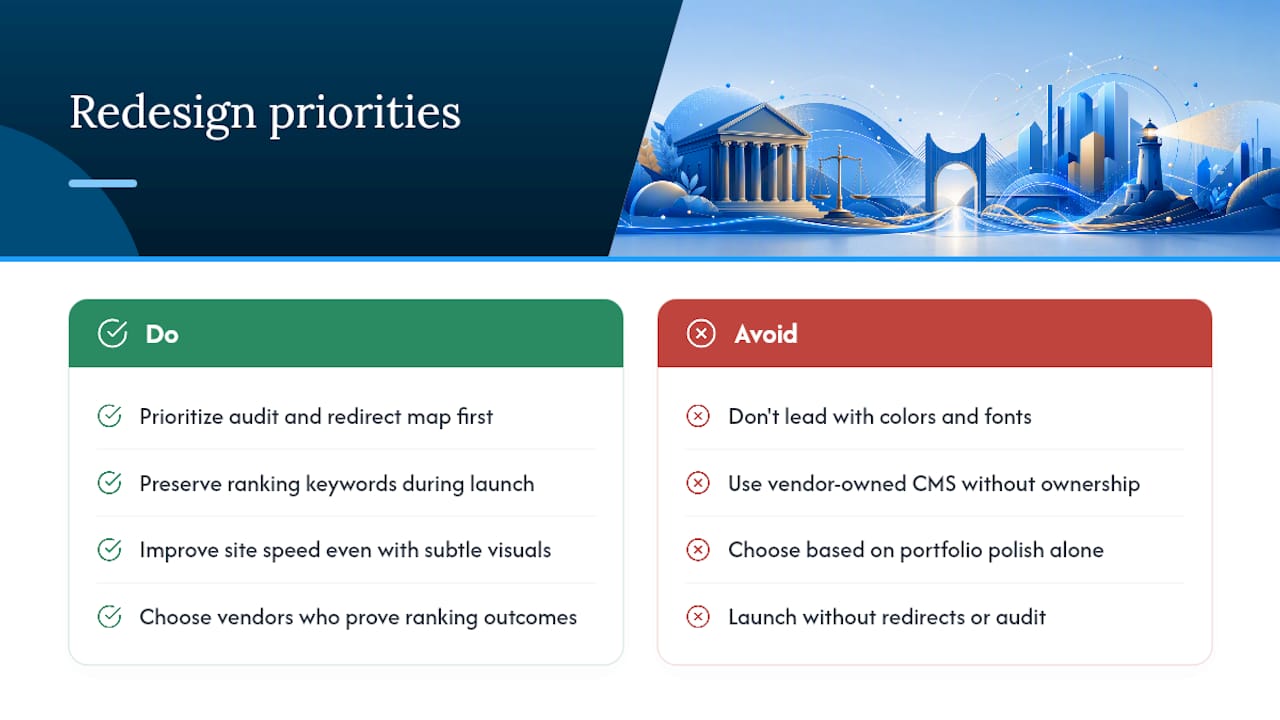
The conventional advice also underrates how much damage a vendor-owned platform does over time. A firm that doesn't own its CMS is negotiating from a weaker position every year that contract renews, regardless of how the site performs. Ownership isn't a technical footnote. It's leverage.
If you take one thing from this article, prioritize the audit and the redirect map before you evaluate a single template. A gorgeous site that loses rankings during launch is a net loss, not a redesign. A modest visual refresh that preserves every ranking keyword and gains site speed is a win, even if the homepage looks similar to what you had before. Judge vendors on whether they can prove that second outcome, not on their portfolio's polish.
— Kate
How Epdwebsites Handles Law Firm Redesigns and Migrations
Epdwebsites builds firm-owned websites, not vendor-locked platforms, which means the CMS, hosting, and code stay in your hands after launch, not tied to a company you'd have to fight to leave.

The process starts with a content and performance audit, moves into a 301 redirect map tested on staging before anything goes live, and continues with post-launch monitoring so rankings and lead volume are tracked, not assumed. Built-in SEO, performance monitoring, and add-ons like AI chatbots and Google Reviews integration come standard rather than as costly upsells. Since 2009, Epdwebsites has focused specifically on professional service providers, including law firms, so the design language lands on the right side of authoritative without feeling stiff.
If your firm is weighing a redesign, start by reviewing the website features and hosting options Epdwebsites offers, or browse the portfolio to see completed law firm projects before you request a quote.
Sources
- Law firm website design — MyCase blog
- Law firm website design: Scarinci Hollenbeck — Mettevo
- Anatomy of a law firm website (re)design — Canadian Bar Association