
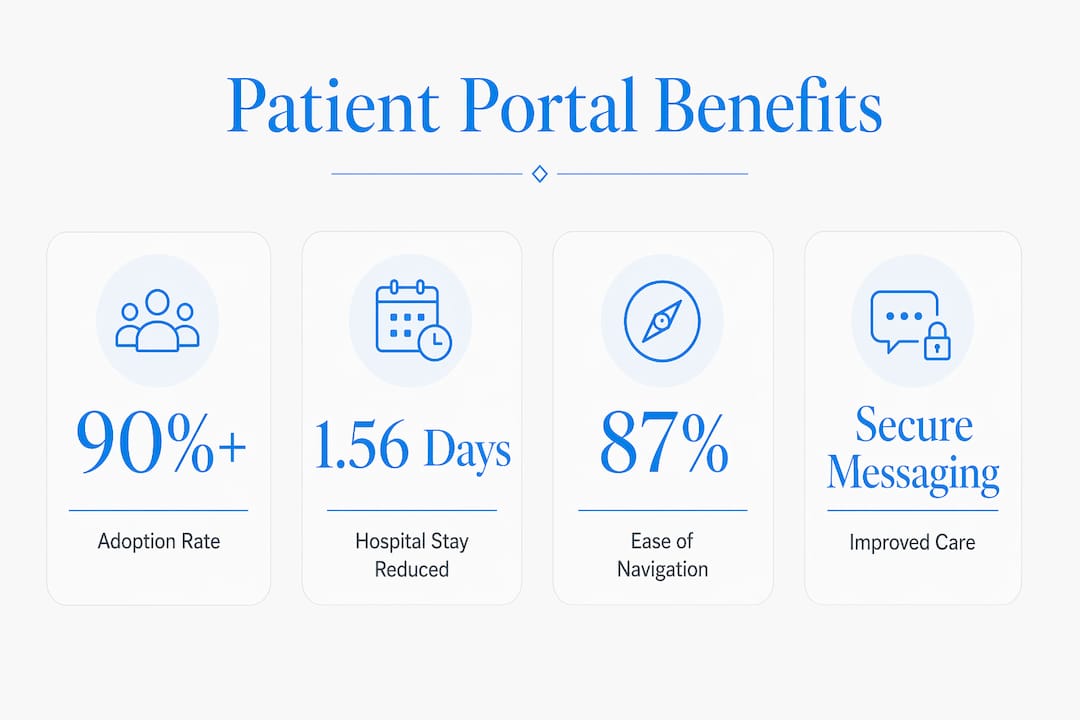
A patient portal is a secure online platform, linked directly to a medical website, that gives patients and caregivers real-time access to personal health records, test results, appointment scheduling, and direct messaging with care teams. The role of patient portal on medical websites has grown from a convenience feature to a core component of modern healthcare delivery. Over 90% of healthcare settings offered patient portals as of 2018, up from just 43% in 2013. That rapid adoption reflects a fundamental shift in how patients and providers communicate. If you or someone you care for has access to a portal and is not using it fully, this guide explains exactly what you are missing.
What are the main features of patient portals and how do they support patient engagement?
Patient portals give you direct, on-demand access to the information and tools that once required a phone call or an office visit. The core features available on most portals include:
- Secure messaging: Send questions to your doctor or nurse without waiting on hold. Messages are private and logged in your health record.
- Lab and test results: View results as soon as they are released, often before a follow-up call is scheduled.
- Appointment scheduling: Book, reschedule, or cancel visits at any time, including evenings and weekends.
- Medication refill requests: Submit refill requests directly through the portal, reducing delays.
- Clinical notes access: Read your provider's visit notes, which increases transparency and helps you understand your diagnosis and treatment plan.
- Billing and insurance summaries: Review charges and explanation-of-benefits documents without calling the billing department.
One feature that many patients overlook is shared access. Shared access through a secondary login allows a trusted caregiver or family member to help manage appointments, refills, and messages on your behalf. This is especially valuable for elderly patients, children, or anyone managing a complex condition.
Portal navigation is rated easy by 87% of patients who use one. That high usability score means most people can get started without technical expertise.

Pro Tip: Set up email or text notifications within your portal so you receive an alert every time a new result or message arrives. You will never miss a critical update.
Good clinic website navigation makes it easier for patients to find and log into their portal from the homepage, which directly increases how often they use it.
What benefits do patient portals provide to patients and caregivers?
The benefits of patient portals go well beyond convenience. Research links portal use to measurable improvements in health outcomes, communication quality, and cost savings.
| Benefit | What the evidence shows |
|---|---|
| Shorter hospital stays | Portal enrollment linked to a 1.56-day average reduction in length of stay for hospitalized children |
| Chronic disease management | Secure messaging improves glucose control and patient satisfaction in diabetes and hypertension care |
| Communication efficiency | Patients avoid phone wait times for appointments, refills, and billing questions |
| Caregiver support | Shared access lets family members assist with healthcare tasks for vulnerable patients |
| Transparency | Access to clinical notes increases patient understanding of their own care |
The most striking finding comes from a study of 40,377 hospitalized children. Portal enrollment reduced hospital stays by an average of 1.56 days and lowered the likelihood of critical care admission. That is not a marginal improvement. It suggests that when patients and caregivers stay informed and engaged, clinical outcomes change.
"Efficiency and transparency are core patient portal advantages, moving administrative tasks online and giving patients faster control over care communications."
Secure messaging enhances chronic disease outcomes when combined with active care management, particularly for conditions like diabetes and hypertension. The key word is "combined." A portal alone does not replace a care plan. It strengthens one.
For caregivers, the time savings are real. Scheduling an appointment or requesting a prescription refill through a portal takes minutes instead of the 20-plus minutes a phone call often requires. That time adds up across weeks and months of managing someone else's care.
Pro Tip: Use your portal's messaging feature to send a brief summary after each office visit. Confirm the diagnosis, the next steps, and any medications discussed. This creates a written record and catches miscommunications early.
What challenges and limitations exist in patient portal use?
Patient portals are not without friction. Understanding the barriers helps you work around them rather than abandon the tool entirely.
The most common obstacles include:
- Digital literacy gaps: Patients who are less comfortable with technology may struggle to register, log in, or navigate portal features without help.
- Unequal access: Not every patient has reliable internet access or a smartphone, which limits who can realistically use a portal.
- Anxiety from clinical notes: Reading a pathology report or a specialist's note without context can cause unnecessary worry. Releasing complex medical records without sufficient explanation risks increasing patient anxiety and generating more provider queries.
- Fragmented care: A portal tied to one clinic does not show records from another provider's system. Patients with multiple specialists may need to manage several separate portals.
- Notification overload: Without customized settings, some patients receive too many alerts and start ignoring them.
Individualized, hands-on training is the most effective way to increase portal adoption among patients who face these barriers. A personal walkthrough outperforms an email invitation every time. If your clinic offers an onboarding session, take it.
Balanced transparency with provider training is also critical. Providers who share clinical notes should prepare patients for what they will read. A brief note in the portal explaining a result in plain language prevents confusion and reduces unnecessary follow-up calls.
Pro Tip: If you feel anxious after reading a clinical note, use the portal's secure messaging feature to ask your provider a specific question. Write it down while the concern is fresh. You will get a clearer answer than you would by searching online.
For patients who struggle with technology, ask a clinic staff member to walk you through the portal in person. Hands-on patient portal training addresses adoption barriers far more effectively than self-guided setup.
How to effectively use a patient portal to maximize your healthcare engagement
Getting the most from a patient portal requires a few deliberate habits. The technology does the heavy lifting once you set it up correctly.
- Register as soon as possible. Most clinics send a portal invitation by email after your first visit. Click the link within 48 hours before it expires. If you missed it, ask the front desk to resend it.
- Complete your profile fully. Add your pharmacy, insurance information, and emergency contacts. This saves time at every future visit and ensures your care team has accurate data.
- Set up notifications. Choose email or text alerts for new messages, lab results, and appointment reminders. Customize the frequency so alerts feel useful, not overwhelming.
- Use secure messaging for non-urgent questions. Ask about medication side effects, request a referral, or clarify discharge instructions. Most practices respond within one to two business days.
- Grant shared access to a trusted caregiver. If you have a family member who helps coordinate your care, shared access features let them view your records and send messages on your behalf without sharing your password.
- Review your visit summary after every appointment. Check the diagnosis, the medications listed, and the follow-up plan. Flag anything that does not match what you discussed.
- Request prescription refills early. Submit refill requests at least five business days before you run out. Portal requests are processed faster than phone calls in most practices.
The impact of patient portals grows with consistent use. Patients who check their portal regularly catch errors in their records, stay on top of preventive screenings, and communicate more clearly with their providers. That consistency is the real driver of better outcomes.
Pro Tip: Bookmark your portal's login page on your phone's home screen. The fewer steps between you and your health information, the more often you will actually check it.
A well-designed medical website with portal integration makes all of these steps easier by placing the portal login prominently and providing clear instructions for new patients.
Key Takeaways
Patient portals are the most direct tool patients and caregivers have for staying informed, communicating efficiently, and improving health outcomes through their medical provider's website.
| Point | Details |
|---|---|
| Rapid adoption | Over 90% of healthcare settings offered portals by 2018, making them a standard feature of medical websites. |
| Proven health outcomes | Portal enrollment is linked to a 1.56-day reduction in hospital stays for pediatric patients. |
| Shared access matters | Caregivers can manage appointments and messages through a secondary login, a critical but underused feature. |
| Training drives use | Hands-on onboarding is more effective than email invitations for patients who face digital barriers. |
| Consistent use wins | Patients who check their portal regularly catch record errors, stay current on screenings, and communicate better with providers. |
What I have learned from watching portals change patient care
I have followed the growth of patient portals for years, and the thing that still surprises me is how many patients treat them as a passive tool. They log in to check a result, then forget the portal exists until the next appointment. That is the wrong approach, and it leaves most of the value on the table.
The research on hospitalized children is the clearest signal I have seen. A 1.56-day reduction in hospital stays is not a small effect. It tells me that when caregivers stay actively engaged through a portal, clinical teams respond differently. Communication improves. Discharge planning tightens. The portal becomes a coordination tool, not just a records viewer.
The challenge I see most often is the anxiety problem. Patients read a clinical note, encounter a term they do not recognize, and spiral into worry before they have talked to anyone. Providers need to write notes with the patient reader in mind. Until that becomes standard practice, patients should treat every confusing note as a prompt to send a secure message, not a reason to search online.
The portals that work best are the ones built into medical websites that prioritize clear navigation and easy login. When a patient has to hunt for the portal link or reset a forgotten password every time, they stop using it. The design of the website matters as much as the technology behind the portal.
— Kate
How Epdwebsites helps medical practices build portal-ready websites
Medical practices that want patients to actually use their portal need a website designed around that goal. A portal buried in a confusing menu or behind a slow-loading page loses patients before they ever log in.

Epdwebsites has designed professional medical websites since 2009, with a focus on clear navigation, fast load times, and layouts that make patient tools easy to find. The website features Epdwebsites builds for medical practices include prominent portal access points, mobile-friendly design, and secure hosting that meets professional standards. If your practice's website is not helping patients engage with their portal, that is a design problem with a straightforward solution. Epdwebsites builds sites that work as hard as your care team does.
FAQ
What is a patient portal on a medical website?
A patient portal is a secure online platform linked to a medical website that gives patients access to their health records, test results, appointment scheduling, and direct messaging with their care team.
How do patient portals improve health outcomes?
Research shows that portal enrollment reduces hospital stays by an average of 1.56 days in pediatric patients and improves management of chronic conditions like diabetes through secure messaging.
Who can access a patient portal on my behalf?
Most portals offer a shared access feature that allows a trusted caregiver or family member to log in through a secondary account and help manage appointments, refills, and messages.
What should I do if a clinical note confuses or worries me?
Use the portal's secure messaging feature to send your provider a specific question about the note. Avoid searching online for medical terms without context, as this often increases anxiety without providing accurate answers.
Are patient portals easy to use?
87% of patients report that portal navigation is easy. Patients who struggle with setup benefit most from hands-on onboarding offered directly by their clinic.