
A website care plan is a recurring monthly service that keeps your live site secure, updated, and recoverable after a failure. Most small business owners running a WordPress site need at least a mid-tier plan. Here is why: a site left unmanaged for 60 days can accumulate outdated plugins with known security vulnerabilities, and a single malware injection can cost more to clean up than six months of professional maintenance.
Every credible website maintenance plan rests on five core pillars:
- Automated offsite backups with tested restore procedures
- Uptime monitoring with real-time incident alerts
- Security scanning, firewall (WAF), and malware cleanup
- Staged software updates (core, plugins, themes tested before going live)
- Reactive support hours for edits, bug fixes, and incident response
For U.S. small businesses, realistic monthly pricing breaks down like this: budget plans run roughly $30–$100/month and are mostly automated; mid-tier plans run $100–$300/month and add human-tested updates and limited support; premium plans run $300–$1,000+/month and include staging environments, dedicated developer hours, and defined SLAs. According to WP Engine, managed hosting and application-level maintenance are related but distinct services, so do not assume your hosting fee covers everything on this list.
For most professional service firms, a mid-tier WordPress care plan is the right starting point.
Key Takeaways
A professional website care plan covering staged updates, offsite backups, and a defined incident SLA is the minimum standard for any small business site that generates leads or revenue.
| Point | Details |
|---|---|
| Mid-tier is the baseline | Most professional service sites need $100–$300/month to get staged updates, malware cleanup, and real support hours. |
| Staging prevents most downtime | Updates tested in a staging environment before going live eliminate the most common cause of preventable outages. |
| Backups must be offsite and tested | Backups stored only on the host server are not recoverable if the server is compromised; monthly restore tests confirm they work. |
| Verify SLA before signing | Get incident response time and remediation scope in writing; a provider without a written SLA has no accountability when things break. |
| Epdwebsites fits professional service firms | Since 2009, Epdwebsites has delivered staged updates, daily offsite backups, and defined support for attorneys, CPAs, and consultants. |
Table of Contents
- What a website care plan actually includes
- Optional deliverables: what to add and what to skip
- Realistic U.S. pricing by tier
- How to evaluate a care plan provider
- A maintenance calendar you can copy right now
- The tools and technical components behind a reliable plan
- When to DIY and when to hire a professional
- How Epdwebsites delivers care plans for professional service firms
- What most agencies get wrong about selling care plans
- Epdwebsites manages your site so you can focus on your clients
- Sources
What a website care plan actually includes
Understanding what you are buying matters more than the price tag. Each of the five pillars does a specific job, and a gap in any one of them creates real exposure.
Automated offsite backups
Backups stored only on your hosting server are not backups in any meaningful sense. If the server is compromised, the backup goes with it. A solid wordpress maintenance plan runs automated daily backups, stores copies in at least two offsite locations (think Amazon S3 or a dedicated backup service), and retains versions for a minimum of 30 days. The part most providers skip: restore testing. A backup you have never tested is a backup you cannot trust. Monthly restore drills on a staging environment confirm the files are actually usable.

Uptime monitoring and incident alerts
Uptime monitors check your site every one to five minutes and alert you the moment it goes down. The alert itself is table stakes. What matters is what happens next: does your provider have a defined response procedure, or do they just forward you an email? A good wordpress care plan specifies a response time (often 1–4 hours for critical outages) and documents who does what when the alert fires.
Proactive security scanning, WAF, and malware cleanup
There is a meaningful difference between detecting malware and removing it. Budget plans often include scanning but charge separately for cleanup. Mid-tier and premium plans typically bundle remediation. A web application firewall (WAF) sits in front of your site and blocks known attack patterns before they reach WordPress. Tools like Wordfence and Sucuri are common at the application level; Cloudflare operates at the network level. Know which layer your plan covers, because they are not interchangeable.
Staged software updates
Pushing a plugin update directly to a live site is the single most common cause of preventable downtime. A staging environment is a private copy of your site where updates are applied first. Visual regression testing then compares the staged version against the live version to catch layout breaks before anyone sees them. If something breaks in staging, the update gets rolled back. Pantheon describes this split clearly: proactive scheduled maintenance (staged updates, monitoring, backups) is fundamentally different from reactive support, and the two should be priced and scoped separately.
Reactive support: edits, bug fixes, and incident response
"Support hours" means different things to different providers. Some plans include a fixed number of monthly hours for content edits and bug fixes; others offer "unlimited edits" with fine print that limits each task to 30 minutes. Before signing, get a written definition of what counts as an edit versus a development task. Swapping a headshot is an edit. Rebuilding a contact form integration is not.
Pro Tip: Ask your provider to show you the last three monthly reports they sent a client. If they cannot produce them, their "monthly reporting" is probably a checkbox, not a real accountability tool.
Optional deliverables: what to add and what to skip
The five core pillars cover the baseline. Beyond that, what you bundle depends on your site's complexity and what it costs you when it underperforms.
Worth adding for most professional service sites:
- Managed hosting (when the provider controls the stack, incident response is faster)
- Premium plugin licenses (form builders, SEO tools, security plugins) included in the plan fee
- Monthly performance checks (Core Web Vitals, page speed, image optimization)
- Website accessibility reviews, especially for medical practices and law firms subject to ADA compliance expectations
Worth adding for lead-gen and transactional sites:
- Scheduled content edits (bio updates, service page refreshes, seasonal copy)
- Peak-season prep: load testing and caching configuration before high-traffic periods
- CRO spot checks tied to form submission and call tracking data
- Add-ons like an AI chatbot that require their own update and integration monitoring
Leave these out of your care plan:
Full SEO campaigns, large-scale content production, and email hosting each carry their own scope and billing logic. Bundling them into a monthly maintenance plan creates scope creep fast. A provider who offers "full SEO" as part of a $99/month care plan is either underdelivering on SEO or underdelivering on maintenance. Neither is a good trade.
Realistic U.S. pricing by tier
WP Engine's breakdown and Hyperping's cost analysis both confirm a consistent three-tier pattern in the U.S. market. DIY tooling runs $0–$100/month; professional plans start around $250 and scale past $2,000/month for enterprise scope.
| Tier | Monthly Range | What's Typically Included |
|---|---|---|
| Budget | $30–$100 | Automated backups, uptime monitoring, automated security scans, plugin updates pushed live (no staging), email support |
| Mid-Tier | $100–$300 | All budget features plus staging-tested updates, monthly restore test, WAF, malware cleanup, 1–2 support hours, monthly report |
| Premium | $300–$1,000+ | All mid-tier features plus dedicated developer hours, defined incident SLA (1–4 hr response), visual regression testing, performance optimization, priority support |
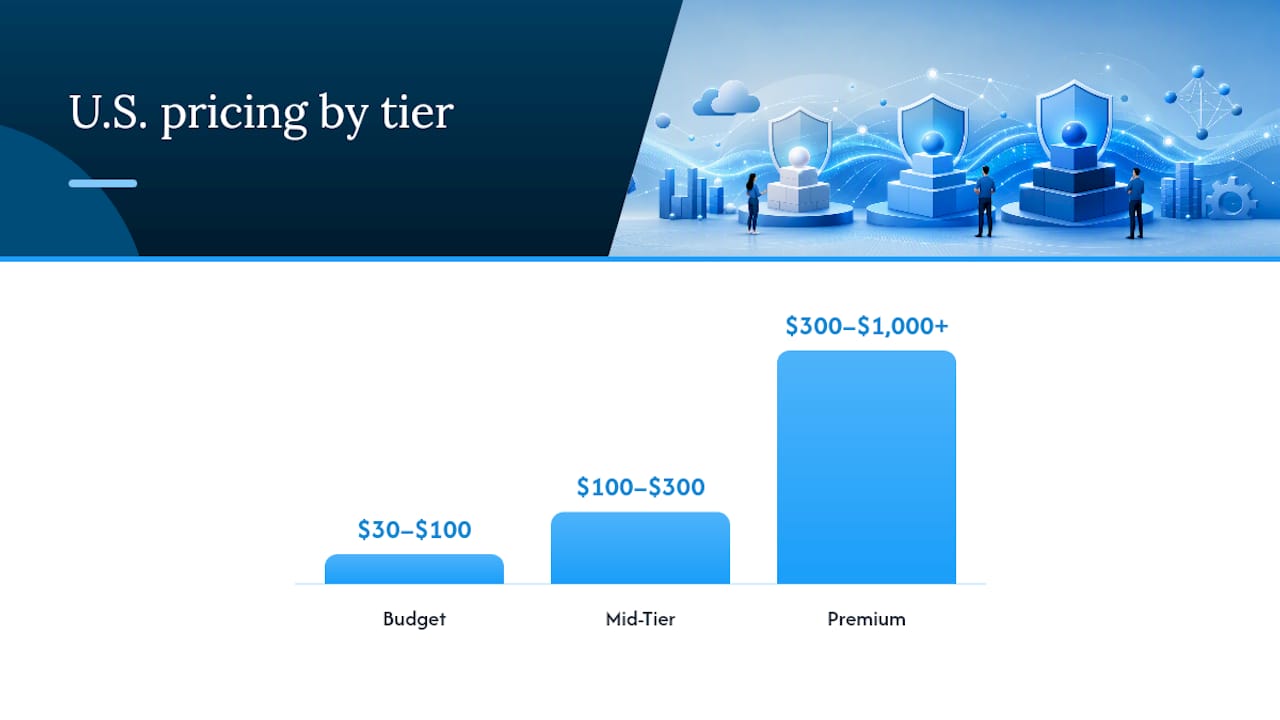
The practical difference between budget and mid-tier is not the feature list. It is whether a human reviews the update before it touches your live site. At the budget tier, updates are automated. At mid-tier, a developer runs them in staging first. That single difference explains most of the price gap.
WitsCode's three-tier model (Essential, Growth, Commerce) ties escalating response SLAs directly to plan level, which is a useful benchmark when comparing providers. A commerce or transactional site should never be on a budget plan.
How to estimate your baseline cost: add up your hosting fee, the cost of any premium plugin licenses, a realistic estimate of monthly support hours at your provider's hourly rate, and a contingency buffer for one incident per quarter. That math usually lands you squarely in the mid-tier range for a typical professional service site.
How to evaluate a care plan provider
The sales page will always look good. These questions and checks cut through to what the plan actually delivers.
Verification checklist before you sign:
- Ask for the backup retention policy in writing: how many days, where stored, and how often restore tests are run
- Confirm staging is used for every update, not just major releases
- Get the incident SLA in the contract: maximum response time for a site-down event and who is on call
- Check whether malware cleanup is included or billed separately
- Ask what happens if an update breaks your site: is remediation covered, and is there a rollback procedure?
- Review the monthly report format: does it show completed tasks, uptime percentage, and security scan results, or just a generic "your site is healthy" note?
Questions to ask on the sales call:
"If a plugin update breaks my contact form at 9 PM on a Friday, what happens?" The answer should include a specific response time and a named escalation path, not "we will look into it."
"Where are my backups stored, and can you restore from 14 days ago right now?" A provider who hesitates on this question stores backups on the same server as your site.
"What does 'unlimited edits' mean in practice?" Get the per-task time cap and the definition of an edit in writing. CauseLabs' care plan model is a useful reference: they define daily offsite backups, staging-first updates, and a fixed number of monthly support tasks with clear scope, which is the kind of transparency you should expect from any provider.
Red flags:
- "Unlimited edits" with no written scope definition
- Updates pushed directly to live without staging
- Backups stored only on the hosting server
- No written incident SLA or restoration time commitment
- Monthly reports that show no task-level detail
- Pricing that bundles full SEO or content production into a maintenance fee
Pro Tip: Check the provider's Trustpilot or G2 reviews and filter specifically for comments about incident handling and response times. Support responsiveness under pressure tells you more than any feature list.
A maintenance calendar you can copy right now
Wordpress scheduling housekeeping tasks, backups, and update checks at regular intervals, with many upkeep tasks falling on a three-to-six-month cycle. Here is a practical calendar that maps to that guidance.
| Frequency | Task |
|---|---|
| Weekly | Verify backup completed successfully; review uptime alert log; check high-priority security scan results |
| Monthly | Run staged plugin/theme/core updates; perform restore test on staging; review Core Web Vitals and page speed; check for broken links on key pages; review monthly report |
| Quarterly | Audit user roles and permissions; run full broken-link scan; accessibility spot check; SEO metadata review after updates; review plan scope and SLA with provider |
| Annually | Full site audit (performance, security, architecture); review hosting contract and care plan terms; major performance audit with load testing; update emergency contact and escalation procedures |
Hyperping recommends reviewing your plan quarterly and doing a full overhaul annually, which aligns with this calendar. Drop this table into Asana, Notion, or a shared Google Sheet and assign task owners. If you are on a professional plan, your provider should be handling the weekly and monthly rows; the quarterly and annual reviews are where you stay involved.
The tools and technical components behind a reliable plan
A care plan is only as good as the tooling underneath it. Here is what the technical stack typically looks like and why each layer matters.
Backup solutions run on a 3-2-1 strategy in practice: three copies of your data, on two different media types, with one stored offsite. For WordPress, this usually means a plugin like UpdraftPlus or BlogVault writing incremental daily backups to an S3-compatible bucket or Google Drive, separate from the hosting environment.
Uptime monitors like UptimeRobot or Better Uptime ping your site every one to five minutes and trigger alerts via SMS, email, or Slack when response time degrades or the site goes down. The key metric is not just uptime percentage but time-to-alert, because a monitor that checks every 30 minutes can miss a 25-minute outage entirely.
WAF and vulnerability scanners operate at two layers. Application-level tools (Wordfence, Sucuri) scan WordPress files and the database for malware signatures and block known attack patterns. Network-level tools (Cloudflare) intercept traffic before it reaches the server. A complete security setup uses both, though budget plans often include only one.
Staging environments and version control are where the real quality separation happens between tiers. A proper staging workflow clones the live site, applies updates, runs visual regression tests (comparing screenshots of key pages before and after), and only promotes changes to live after a human sign-off. Git-based version control adds a rollback layer: if something breaks post-deployment, reverting to the previous commit takes minutes rather than hours.

CDN and performance tools (Cloudflare, WP Rocket, or server-level caching) reduce load times and absorb traffic spikes. These overlap with hosting features, which is exactly the point Pantheon makes: managed hosting handles infrastructure-level performance, but application-level optimization (image compression, database cleanup, caching rules) still requires care-plan-level attention.
When to DIY and when to hire a professional
Managed hosting alone handles infrastructure. A care plan handles the application. That distinction determines whether you need one.
DIY or managed hosting is probably enough if:
- Your site is a simple brochure with no forms, no e-commerce, and no client portal
- You have in-house technical staff who can run staged updates and respond to incidents
- The site generates no direct revenue and downtime costs you nothing measurable
- You are comfortable reading security scan output and acting on it
You need a professional care plan if:
- Your site generates leads, bookings, or direct revenue
- You have more than 10 active plugins or third-party integrations
- You lack the time or skill to run staged updates and restore tests monthly
- A site outage during business hours would cost you a client or a deal
The hidden cost of DIY is not the tooling. Hyperping puts DIY tooling at $0–$100/month, which sounds cheap until you account for the hours. A typical monthly maintenance cycle (updates, backups, security review, performance check) takes 3–5 hours for someone who knows what they are doing. For a professional service provider billing $200–$400/hour for their own time, that math resolves quickly.
For law firms and CPA offices specifically, managed hosting for law firms and hosting selection guidance for CPA firms can clarify where hosting ends and application-level care begins. The short answer: hosting keeps the server running; a care plan keeps the application secure and functional.
How Epdwebsites delivers care plans for professional service firms
Epdwebsites has served attorneys, CPAs, real estate agents, consultants, and medical practices since 2009. The care approach reflects that client base: professional service sites are revenue-dependent, client-facing, and often subject to accessibility and compliance expectations that a generic maintenance plan does not address.
A typical Epdwebsites engagement includes:
- Daily offsite backups with defined retention
- Staged plugin and core updates before any change touches the live site
- Monthly reporting showing completed tasks and site health status
- Defined support tasks for content edits, with clear scope on what is included
- Hosting bundled with maintenance so incident response does not require coordinating between two vendors
- Optional add-ons including website add-ons like AI visibility tools and performance boosters
The onboarding process starts with a site health audit: Epdwebsites reviews your current plugin stack, backup status, security posture, and hosting configuration before recommending a plan tier. That audit prevents the common mistake of signing up for a plan that does not match your site's actual risk profile.
For professional service firms that need a site that works reliably and represents their brand accurately, the portfolio shows the range of completed projects across legal, financial, and medical practices.
What most agencies get wrong about selling care plans
Care plans are often sold as insurance policies, which is the wrong frame entirely. "Protect your site from hackers" is technically accurate but positions the plan as a fear purchase. Clients who buy on fear cancel when nothing bad happens for three months. They do not see the value because the value is invisible: the malware that did not get in, the update that did not break the checkout, the backup that was ready when the server failed.
The better frame is operational reliability. A care plan is what keeps a revenue-generating asset performing at the level it was built to perform. That is a business argument, not a security argument, and it holds up under scrutiny.
The "unlimited edits" problem is worth naming directly. Agencies bundle unlimited edits to win deals, then quietly limit task scope in the fine print. This creates resentment on both sides: the client feels misled, the agency feels undercompensated. The cleaner approach is to define exactly what is included (number of tasks, time per task, task type) and price it honestly. Clients who understand what they are buying stay longer and complain less.
One practical note on onboarding: the first 30 days of a care plan are the highest-risk period. You are learning the site's quirks, running the first staged updates, and establishing the backup baseline. Set client expectations accordingly. A smooth month one builds the trust that makes the relationship durable.
Epdwebsites manages your site so you can focus on your clients
Professional service firms with revenue-dependent websites get one thing from Epdwebsites that most generic maintenance providers cannot match: a team that has built and maintained sites for attorneys, CPAs, and consultants since 2009 and understands what those clients actually need from a site.

The starting point is a site health audit covering your backup status, plugin security, hosting configuration, and performance baseline. From there, Epdwebsites recommends the right plan tier and handles onboarding within a defined timeline. You get monthly reports showing exactly what was done, a clear scope for edit requests, and a direct contact when something needs attention. Review the service details and hosting options or check the FAQ on onboarding and support scope to see what a typical engagement looks like. When you are ready, request your site audit and get a clear picture of where your site stands today.
Sources
These references are worth bookmarking if you want to go deeper on any section of this guide.
- Website Maintenance Plans: Checklist, Tools, ROI & Cost Breakdown (2026) — Hyperping
- What WordPress maintenance plans actually include and cost | Pantheon
- Wordpress
- What is a WordPress maintenance plan? — WP Engine
- Website Care Plans | Maintenance and Security | WitsCode
- Premium Website Care Plans - CauseLabs