
For U.S. law firms, the right hosting approach is managed hosting on an isolated environment — either managed VPS, managed WordPress, or private cloud — chosen based on firm size and whether you run client portals or practice management integrations.
Here is why that matters immediately:
- Confidentiality and isolation. Legal-technology guidance frames professional-grade hosting as part of a firm's duty to protect client confidentiality, not just a technical preference. Shared servers put client-facing data and communications at risk from other tenants on the same machine.
- SLA-backed uptime and managed security. Reliable providers offer uptime backed by a formal SLA with credit terms, and they handle patching, monitoring, and backups so your team does not have to.
- Reduced IT overhead. Managed hosting means the provider handles server setup, automated security updates, monitoring, and backups — freeing attorneys to focus on billable work rather than server tickets.
Your immediate next step: run the vendor question checklist in Section 5 below, or contact Epdwebsites directly for a tailored hosting proposal built around your firm's specific needs.
Table of Contents
- Which hosting plan fits your firm's size and use case?
- What security and reliability features should law firms demand?
- What does law firm hosting cost, and how long does migration take?
- How do you evaluate hosting vendors before signing?
- Why Epdwebsites is built for law firm hosting
- How does hosting connect to your practice management software?
- Key Takeaways
- What most law firms get wrong about hosting
- Epdwebsites offers a tailored hosting plan for your law firm
- Useful resources for law firm hosting decisions
Which hosting plan fits your firm's size and use case?
Not every firm needs the same setup. The five main hosting categories each serve a different profile, and picking the wrong tier costs you either money or security.
- Shared hosting puts your site on a server alongside dozens or hundreds of other websites. Monthly costs are low, but so is isolation. Technical reviews warn that inexpensive shared hosts often lack managed security and the environment separation legal practices need. Avoid this for any firm handling sensitive client data.
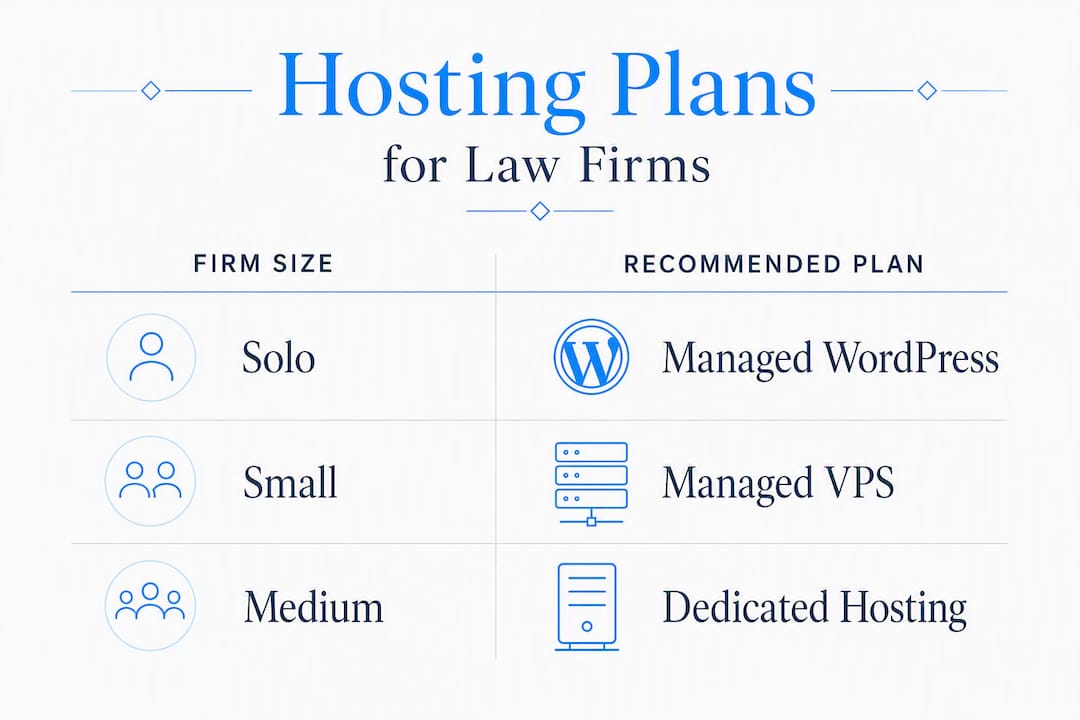
- Managed WordPress hosting is a solid fit for solo practitioners and small firms whose site is primarily a marketing presence with no client portal. The provider handles WordPress core updates, plugin patches, and daily backups. You get more isolation than shared hosting without the cost of a full VPS.
- Managed VPS (Virtual Private Server) gives your firm a dedicated slice of server resources with full isolation from other tenants. This is the sweet spot for small-to-midsize firms — better security posture than shared or managed WordPress, predictable performance, and a price point that does not require enterprise-level budget.
- Dedicated server reserves an entire physical machine for your firm. Midsize firms running client portals, document management integrations, or high-traffic practice area pages often move here when VPS resources feel constrained.
- Private cloud suits large or multi-office firms that need rapid scaling, geographic redundancy, and support for heavy integrations with practice management platforms. Cloud hosting lets firms handle traffic spikes and grow without a full infrastructure migration — useful when adding remote attorney access or expanding to new markets.
| Firm profile | Recommended tier |
|---|---|
| Solo practitioner, marketing site only | Managed WordPress |
| Small firm (2–10 attorneys), no portal | Managed VPS |
| Midsize firm with client portal | Managed VPS or dedicated |
| Large or multi-office firm | Private cloud |
Pro Tip: Watch out for the "noisy neighbor" problem on shared servers. When another tenant on your server gets blacklisted for spam or hit with a traffic spike, your site pays the price in speed and deliverability. A managed VPS eliminates that exposure at a price most small firms can absorb — typically affordable monthly fees — making it the best risk-to-cost ratio for the majority of legal practices.
What security and reliability features should law firms demand?
Security on a law firm website is not optional configuration. The ABA Model Rules require reasonable measures to protect client information, and hosting choices directly affect whether you meet that standard. Here is the non-negotiable checklist:
- Web Application Firewall (WAF). Filters malicious traffic before it reaches your site. Without one, your contact forms and login pages are exposed to automated attacks.
- TLS 1.3. The current encryption standard for data in transit. Any provider still defaulting to TLS 1.2 or below is behind the curve.
- Encrypted backups at rest and in transit. Backups that are not encrypted are a liability. Confirm the provider encrypts backup files on disk and during transfer.
- Daily automated backups with easy restore. Vendor guides list daily backups as a baseline feature for law firm sites. Verify you can restore a single file, not just a full-site rollback.
- Staging environment. A staging site lets you test plugin updates or design changes before they go live. One bad plugin update on a live site can take your firm offline during business hours.
- Automatic security patches. Firms without dedicated IT staff need the provider to handle patching. Unpatched WordPress core or plugins are the most common entry point for site compromises.
- DDoS protection. Distributed denial-of-service attacks can take a site offline for hours. A CDN layer or provider-level DDoS mitigation keeps you available during an attack.
- 24/7 support with defined response times. A hosting issue at 11 PM before a filing deadline is not a business-hours problem. Confirm the SLA specifies response time, not just availability.
- Uptime SLA with credit terms. Reliable providers offer at least 99.9% uptime guarantees backed by a formal SLA. Read the credit terms — some providers offer credits so small they provide no real incentive to perform.
- Data residency options. Firms with jurisdictional requirements or clients in regulated industries may need data stored in specific U.S. regions. Confirm the provider can commit to this in writing.
- SPF, DKIM, and DMARC support. Misconfigured email DNS records cause legitimate legal correspondence to land in spam. This is a communication liability, not just a technical nuisance. Your host should either configure these records for you or provide clear documentation.
- Audit-compatible logging. Specialized legal hosting highlights audit logging as a differentiator for compliance-sensitive work. Logs that capture access events and changes support incident response and, if needed, forensic review.
Pro Tip: Prioritize providers that bundle managed patching, real-time monitoring, and forensic-compatible logs into the base plan rather than selling them as add-ons. When a security incident happens, you want those logs already running — not something you wish you had turned on.
For a deeper look at what hosting reliability means in practice for legal sites, Epdwebsites publishes a dedicated guide covering uptime, backups, and confidentiality controls.

What does law firm hosting cost, and how long does migration take?
Typical monthly pricing by tier
Hosting costs vary by resource allocation, managed services included, and whether compliance features like data residency or audit logging are bundled.
- Shared hosting: $5–$15/month. Not recommended for law firms, but included here for reference.
- Managed WordPress: $25–$60/month. Covers automated updates, daily backups, and basic security scanning.
- Managed VPS: $30–$150/month depending on RAM, storage, and SLA tier. This is where most small-to-midsize firms land.
- Dedicated server or private cloud: $150–$500+/month. Justified when you run client portals, heavy integrations, or need guaranteed resource allocation.
Beyond the monthly hosting fee, budget for: migration fees (often $200–$500 for a professional migration), developer time for any custom configuration, SSL certificate management if not included, and recurring maintenance for updates and monitoring.
Realistic migration timeline
- Discovery (1–3 days). Audit the existing site: inventory plugins, custom code, email accounts, DNS records, and any integrations. Identify dependencies that could break during cutover.
- Staging and testing (3–7 days). Clone the site to the new hosting environment. Test all forms, integrations, and email routing. Confirm SSL is active and staging performance meets expectations.
- DNS cutover (1 day, scheduled off-peak). Industry guidance recommends scheduling cutover during low-traffic periods — nights or weekends — with full backups in place before you touch DNS.
- Post-migration testing (1–2 days). Verify email delivery, check all pages, confirm integrations are live, and monitor uptime for 48 hours. Email is the most common failure point after DNS changes.
Total realistic timeline for a straightforward law firm site: one to two weeks from kickoff to stable live environment.
How do you evaluate hosting vendors before signing?
Vendor questions to ask on every call
- What is your uptime SLA, and what credits do clients receive when you miss it?
- How often do you run automated security patches, and how are clients notified?
- Can you demonstrate a backup restore — specifically a single-file restore, not just full-site rollback?
- Where are your data centers located, and can you commit to U.S.-only data residency in writing?
- What is your average first-response time for critical support tickets, and is that backed by the SLA?
- Do you include WAF, DDoS protection, and malware scanning in the base plan or as add-ons?
- How do you handle SPF, DKIM, and DMARC configuration for hosted email domains?
- What integrations or APIs do you support for practice management platforms?
- Do you provide a staging environment, and is it included or billed separately?
- Will you sign a Data Processing Agreement (DPA), and what does your incident notification timeline look like?
Red flags that should end the conversation
- No formal SLA or an SLA with credits so small they are meaningless.
- SSL certificates or daily backups listed as paid add-ons rather than standard features.
- Shared IP addresses with a history of blacklisting — check the IP reputation before committing.
- Support available only by email with no defined response time.
- Vague or scripted answers about recovery procedures and incident timelines.
- Refusal to sign a DPA. For a firm handling client data, this is a non-starter.
Pro Tip: Before signing a contract, ask for a short migration pilot on a test domain and request two or three references from professional service clients — ideally other law firms or CPA offices. A provider confident in their service will not hesitate. One that hedges on references is telling you something.
For a parallel checklist built around professional service firms, the CPA website hosting selection guide from Epdwebsites covers procurement questions that translate directly to law firm decisions.
Why Epdwebsites is built for law firm hosting
Epdwebsites has served attorneys, CPAs, and professional service providers since 2009. That history matters because law firm hosting is not a generic product — it requires someone who understands confidentiality obligations, professional presentation, and the operational reality of a firm with no in-house IT team.
What Epdwebsites provides for law firms:
- Managed hosting with security defaults configured from day one, not bolted on later.
- Daily backups, staging environments, and automated updates included in the hosting plan.
- Migration assistance so the transition from your current host does not become a project your attorneys have to manage.
- A dedicated account manager model — you reach a person who knows your site, not a generic support queue.
- Built-in SEO, performance monitoring, and optional add-ons including AI chatbots and Google Reviews integration for client-facing pages.
- A portfolio of completed professional sites spanning attorneys, consultants, and medical practices — proof that the work holds up across regulated industries.
Pricing is transparent, with one-time design and setup fees paired with ongoing monthly hosting. Contact Epdwebsites for a tailored hosting proposal that maps your firm's size, integrations, and compliance requirements to the right plan.
How does hosting connect to your practice management software?
Integration between your website and legal practice management platforms is increasingly a hosting consideration, not just a software one. Platforms like Clio, MyCase, and PracticePanther offer client portal features, intake forms, and payment processing that need to communicate with your website in real time.
Your hosting environment needs to support HTTPS-secured API calls, handle webhook traffic without throttling, and maintain consistent uptime so intake forms and portal logins do not fail during business hours. A managed VPS or private cloud environment handles this reliably; shared hosting often cannot sustain the concurrent connections that portal integrations generate.

For firms embedding scheduling tools, document upload portals, or e-signature workflows directly into their site, confirm with your host that the server configuration supports the required API endpoints and that SSL is active across all subdomains used by those integrations. Legal website compliance considerations also apply here — client-facing portals that collect personal information carry their own data handling obligations that your hosting environment must support.
Key Takeaways
Managed, law-firm-focused hosting on an isolated environment is the right default for U.S. firms of any size — it protects client confidentiality, reduces IT overhead, and delivers the uptime reliability that a professional practice requires.
| Point | Details |
|---|---|
| Choose managed hosting | Managed VPS or managed WordPress covers security, patching, and backups without requiring in-house IT staff. |
| Match tier to firm size | Solo firms fit managed WordPress; small-to-midsize firms need managed VPS; large or multi-office firms should evaluate private cloud. |
| Demand a written SLA and DPA | Uptime guarantees and data processing agreements are non-negotiable for firms with client confidentiality obligations. |
| Run the vendor checklist | Ask every prospective host the 10 questions in Section 5 and walk away from any provider that refuses to sign a DPA. |
| Epdwebsites for law firms | Epdwebsites has provided managed hosting and professional web design for attorneys since 2009, with migration assistance and a dedicated account manager model. |
What most law firms get wrong about hosting
The firms that call Epdwebsites after a bad experience usually share one of three stories: their site went down the morning of a hearing and no one answered the support line, their email started bouncing because the shared IP got blacklisted by another tenant, or they discovered their "daily backups" were actually weekly — and the restore failed anyway.
These are not edge cases. They are predictable outcomes of choosing a host based on price rather than fit. Generic shared hosting is priced for bloggers, not for practices where a missed client email or a two-hour outage has real professional consequences.
The firms that avoid these problems are not necessarily spending more. They are asking better questions before they sign. A managed host that includes real-time monitoring, forensic-compatible logs, and a named account manager costs roughly the same as a mid-tier unmanaged VPS — but the operational difference is significant. When something goes wrong at 10 PM, you want someone who already knows your site picking up the phone, not a ticket number.
Epdwebsites offers a tailored hosting plan for your law firm
Epdwebsites gives law firms a done-for-you alternative to piecing together hosting, security, and maintenance from separate vendors. Since 2009, the firm has built and hosted professional websites for attorneys across the country, with every plan including managed security defaults, daily backups, staging, and migration support from day one.

A tailored hosting proposal from Epdwebsites includes a security baseline review, a migration plan mapped to your current setup, and a plain-language SLA summary so you know exactly what you are getting. There are no hidden fees for SSL or backups, and you work with a dedicated account manager rather than a generic support queue.
View hosting plans and features to see what is included at each tier, or explore the full website features to understand how design, hosting, and built-in SEO work together for professional service firms. Ready to get started? Contact Epdwebsites today for a hosting readiness audit tailored to your firm's size and compliance requirements.
This article provides general information about hosting options for law firms and does not constitute legal or compliance advice. Confirm your firm's specific data handling and confidentiality obligations with qualified legal counsel and your state bar's professional responsibility guidance.
Useful resources for law firm hosting decisions
Before finalizing any hosting decision, cross-reference these authoritative sources. Also check your state bar's professional responsibility rules for any guidance on data residency or cloud storage that affects your confidentiality obligations.
- Guide to Legal Website Hosting | Clio — Practical overview of hosting requirements framed around a firm's duty to protect client confidentiality.
- What to Look for in a Law Firm Website Hosting Provider | MyCase — Vendor-neutral checklist covering SLAs, uptime, and support expectations.
- ABA Model Rule 1.6 Comment | American Bar Association — The primary source for understanding a lawyer's confidentiality obligations and how technology choices connect to them.
- Best Law Firm Hosting and Website Builders | HostingAdvice — Independent technical reviews of hosting options with notes on isolation, security, and managed features.
- Hosting Reliability for Law Firms | Epdwebsites Blog — Epdwebsites's own guide to uptime, backups, and confidentiality controls for attorney websites.
- Attorney Website Hosting Reliability Guide | Epdwebsites Blog — Focused on SLAs, monitoring, and what attorneys should expect from a managed hosting provider.
- Legal Website Accessibility Compliance Guide for 2026 | Epdwebsites Blog — Covers accessibility requirements relevant to law firm websites and how hosting configuration supports compliance.