
Your practice's website does more than tell patients where you're located. Understanding what does medical website design involve reveals a layered system where HIPAA compliance, accessibility law, patient experience, and local search visibility all depend on each other. Healthcare web design, as the industry calls it, is fundamentally different from standard professional web design. Get it wrong and you're looking at compliance penalties, inaccessible experiences for disabled patients, and a front door that search engines can't find. This article breaks down every component so you can make informed decisions for your practice.
Table of Contents
- Key Takeaways
- What does medical website design involve at its core
- Accessibility requirements every healthcare site must meet
- Architecting for patient engagement and local search visibility
- Technology integration and compliance challenges
- My honest perspective on medical website design
- Build a medical website that works as hard as your practice does
- FAQ
Key Takeaways
| Point | Details |
|---|---|
| Compliance is structural | HIPAA protections must be built into site architecture, not added after launch. |
| Accessibility has a legal deadline | Many healthcare providers must meet WCAG 2.1 Level AA by May 11, 2026. |
| Local SEO drives appointments | Structured data, consistent NAP, and location pages are core design elements, not optional extras. |
| Technology integrations carry risk | Every vendor handling patient data needs a Business Associate Agreement. |
| Patient experience shapes trust | Navigation, provider bios, and scheduling tools directly affect whether a visitor books an appointment. |
What does medical website design involve at its core
At its foundation, healthcare web design means building a secure, patient-friendly platform that integrates compliance controls, clinical tools, and discoverability into a single cohesive system. That's a meaningfully different brief than designing a law firm's website or an accountant's landing page.
The core components fall into five categories that no medical practice can afford to treat as separate projects:
- Secure architecture. Every layer of the site, from the hosting environment to form submissions, must protect patient data. TLS/SSL encryption is the baseline. Role-based access controls for patient portals, compliant intake forms, and routine security audits are standard requirements, not optional upgrades.
- Patient-facing tools. Online appointment scheduling, patient portals, and telehealth integration are now expected by patients. These aren't features you add later. They shape how the site is built from the first wireframe.
- Regulatory compliance features. HIPAA requirements embed themselves throughout the design, particularly at every point where protected health information (PHI) is created or transmitted.
- Local SEO architecture. Structured data, consistent NAP information (name, address, phone number), and service-specific location pages are what connect your website to patients searching nearby. These belong in the site architecture from day one.
- Trust content. Provider biographies, board certifications, patient testimonials, and clearly written service descriptions convert visitors into booked appointments. Thin content on a medical site signals low credibility instantly.
Pro Tip: Review every page of your existing site and ask: does this page answer a question a new patient would actually have? If the answer is no, that page is working against your conversion rate.
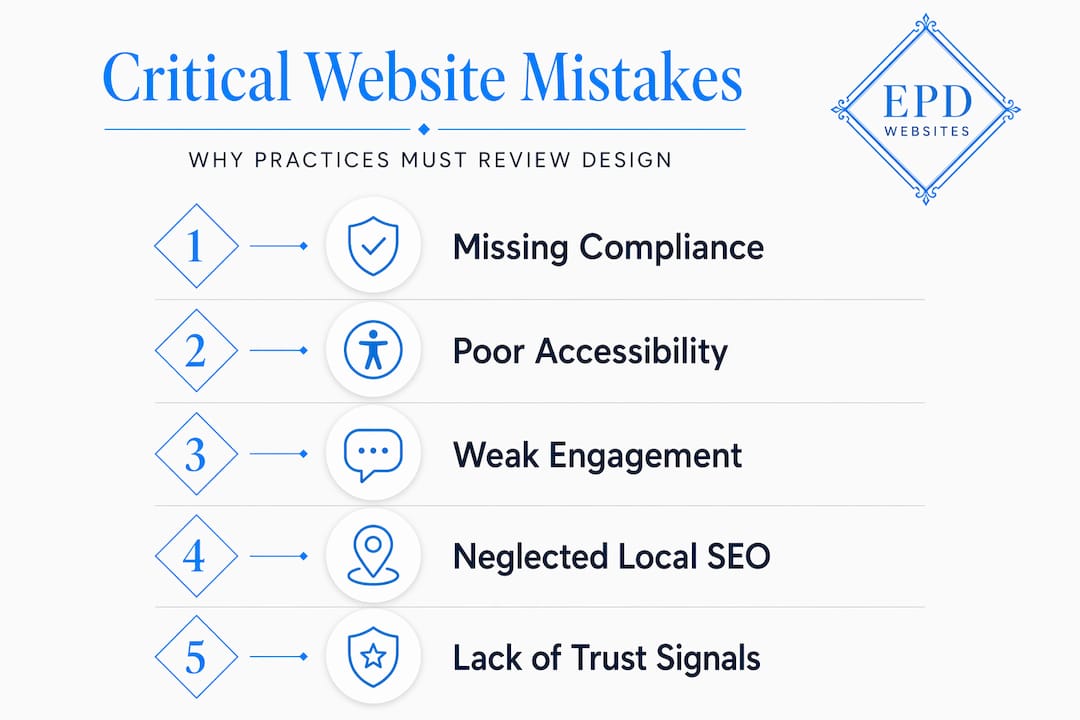
A useful way to think about it is to review common medical website mistakes that practices repeat. Most of them trace back to treating these five components as separate checklists rather than an integrated system.
Accessibility requirements every healthcare site must meet
This section deserves more attention than most practice administrators give it. Federal accessibility law applies to healthcare websites, and the compliance window is narrowing fast.
Here's what the legal and technical requirements actually look like in practice:
-
Understand your legal exposure. The Americans with Disabilities Act and Section 504 of the Rehabilitation Act both apply to healthcare organizations receiving federal funding. ADA guidance is explicit that websites must be accessible to people with disabilities, including those using screen readers, voice navigation, or alternative input devices.
-
Meet the WCAG 2.1 Level AA standard. Healthcare providers covered by federal programs must meet WCAG 2.1 Level AA by May 11, 2026. This applies to websites, patient portals, mobile apps, and kiosks. If your practice accepts Medicare or Medicaid, this deadline is real and enforceable.
-
Implement concrete technical features. Accessible healthcare sites require alt text on all images, captions on video content, full keyboard navigation (no mouse required), adequate color contrast ratios, and form fields that work with screen readers. These are not cosmetic changes. They require deliberate decisions in code and content structure.
-
Avoid the most common failure pattern. Many sites look accessible visually but fail in user flow. A patient who is blind can't complete your intake form if the fields aren't properly labeled, even if the form looks clean on screen. Accessibility is about user flow, not just visual design.
-
Build governance into your workflow after launch. This is where most practices fall short. Content editors who add photos without alt text, or upload video without captions, create accessibility regressions silently. Ongoing governance means editor training, content checklists, and periodic audits with assistive technology. The build is not the finish line.
Pro Tip: Run your site through a screen reader yourself before your next content update. The experience will tell you more in ten minutes than any automated audit report.
One more point worth emphasizing: providers retain full responsibility for digital accessibility even when they outsource web design. You cannot delegate liability to your vendor. Your practice administrator needs to understand this before signing any web design contract.
You can also learn more about website accessibility services purpose-built for professional practices to see what compliant implementation looks like in production.
Architecting for patient engagement and local search visibility
Getting patients to your site is a different problem than keeping them there. Both require deliberate architectural choices that most general web designers don't think about.

Start with the patient journey. Before any designer touches a color palette, your practice needs to map the specific actions a new patient takes: landing on the homepage, finding a relevant service, reading about a provider, and booking an appointment. Every navigation decision should shorten that path. Clinic website navigation that buries "Schedule an Appointment" three clicks deep costs real bookings every day.
| Design element | What it does for patients | What it does for search |
|---|---|---|
| Provider biography pages | Builds personal trust before the first visit | Creates indexable content for physician searches |
| Service-specific location pages | Clarifies scope for patients | Captures local search intent by condition or treatment |
| Schema markup for physicians | Not patient-facing | Enables rich results in Google for provider searches |
| Verified patient reviews | Social proof that overcomes skepticism | Positive signals for local pack rankings |
| Appointment scheduling widget | Converts intent to action immediately | Reduces bounce rate and improves dwell time |
Trust signals deserve more thought than practices usually give them. Verified reviews, credential badges, hospital affiliations, and board certifications on provider pages aren't just decorative. They answer the unspoken question every new patient has: "Can I trust this person with my health?" A site that answers that question confidently converts far better than one that doesn't.
On the SEO side, local SEO architecture must be planned from the beginning, not retrofitted. That means building structured data markup for services and physicians into the site framework, optimizing and maintaining your Google Business Profile, and creating genuinely useful, location-specific content that matches how patients actually search. "Cardiologist near Glendale AZ" is a different page than "Cardiologist near Phoenix AZ," and both require dedicated, well-written content to rank.
Technology integration and compliance challenges
The most technically demanding part of healthcare web design is managing the intersection between third-party tools and HIPAA compliance. Most practice administrators don't realize how many of their website components qualify as PHI touchpoints until something goes wrong.
Here's where the risk concentrates:
- Intake forms and appointment requests. These are underestimated compliance hotspots where PHI flows every time a patient fills in their name, date of birth, or insurance details. If that form data routes through a vendor without a Business Associate Agreement (BAA), you have a HIPAA exposure.
- Telehealth platforms. Embedding HIPAA-compliant video consultation tools directly within your site dramatically improves patient retention. Telehealth integrated directly into the patient journey outperforms offsite redirects because patients who get bounced to a third-party platform drop off at a measurably higher rate.
- Patient portals. EHR-connected portals require role-based access controls, audit logging, and end-to-end encryption. These aren't features a generic hosting plan provides.
- Marketing vendors. This is a compliance gap that surprises practices regularly. Marketing vendors often lack BAAs even when they handle contact form data or appointment request information. Every vendor with access to patient-identifiable data needs a signed BAA before that integration goes live.
Pro Tip: Build a simple spreadsheet listing every third-party tool connected to your website. Next to each, note whether it can receive patient data. Every row where the answer is "yes" needs a BAA before that tool touches your site.
The failure mode to avoid here is the segmented vendor approach: one company for the website, another for the patient portal, a third for telehealth, with no one accountable for the compliance gaps between them. That model creates duplicate data entry burdens for staff and compliance holes that are genuinely hard to audit. HIPAA-compliant website architecture treats these integrations as a single system, with compliance as the connective logic throughout.
My honest perspective on medical website design
I've worked with enough professional practices over the years to see a pattern repeat itself. A practice administrator decides the current website looks dated, hires a general web designer who builds something attractive, and then discovers six months later that the intake forms weren't HIPAA-compliant, the portal integration broke the scheduling tool, or the site fails a screen reader audit right before a regulatory review.
The root cause is always the same. Medical websites get treated as marketing collateral when they are actually clinical infrastructure. The front desk of your physical office wouldn't be designed by someone who's never worked in healthcare. Your digital front door shouldn't be either.
What I've found consistently is that compliance isn't something you bolt on after a design is done. It has to be part of every architectural decision from the beginning. The same goes for accessibility. I've seen practices spend real money on visual redesigns that still fail WCAG criteria because the designer focused on colors and fonts rather than how a user with a motor impairment actually completes a form.
Local SEO is the piece I see underestimated most often. Practices assume that having a website is enough. It isn't. Without structured data, location-specific content, and a properly managed Google Business Profile, you're invisible to the patients who are actively looking for you right now.
The practices that get this right treat their website as they treat their EHR: something that requires specialized expertise to build, ongoing maintenance to keep compliant, and regular evaluation to stay effective.
— Kate
Build a medical website that works as hard as your practice does

Most medical practices don't need a prettier website. They need one that's built correctly from the start: HIPAA-compliant architecture, accessible for all patients, optimized for local search, and integrated with the scheduling and telehealth tools your patients expect. That's exactly where Epdwebsites specializes.
Since 2009, Epdwebsites has designed and hosted websites for medical practices, attorneys, consultants, and other professional service providers who can't afford compliance shortcuts or generic builds. Every project starts with understanding your regulatory environment and patient experience goals, not just a color palette.
If you're ready to see what a properly architected professional medical website looks like, or if you're overdue for a redesign that takes compliance and accessibility seriously, Epdwebsites is ready to help. Explore the practice web design portfolio to see the quality standard your site should meet.
FAQ
What does medical website design involve technically?
Medical website design involves HIPAA-compliant architecture, patient portal and telehealth integration, ADA-compliant accessibility features, local SEO structure, and trust content like provider bios and verified reviews. It's a specialized discipline distinct from standard professional web design.
What is the WCAG 2.1 Level AA compliance deadline for healthcare?
Healthcare providers covered by federal funding must meet WCAG 2.1 Level AA by May 11, 2026. This applies to websites, patient portals, mobile apps, and kiosks, and the practice cannot delegate this responsibility to its web vendor.
Which parts of a medical website require HIPAA compliance?
Any component that collects or transmits protected health information requires HIPAA protections. This includes online intake forms, appointment request tools, patient portals, and telehealth platforms. Every vendor connected to these tools must have a signed Business Associate Agreement.
How does local SEO factor into healthcare web design?
Local SEO must be built into the site architecture from the beginning through structured data markup, consistent name-address-phone information, and location-specific service pages. These elements connect your practice to patients searching for providers nearby and directly affect appointment bookings.
What is a Business Associate Agreement and why does a website need one?
A Business Associate Agreement (BAA) is a HIPAA-required contract with any vendor who accesses or manages patient-identifiable data. Marketing platforms, form tools, and portal vendors that handle patient information all require a BAA before they are connected to your medical website.