
Yes, a practice-hosted AI chatbot is worth adding to a medical website, but only within a limited scope: answering FAQs, surfacing booking links, and capturing basic contact information without touching protected health information. The value comes fast and the risk stays low, as long as staff know what the bot can never ask or store. Run the compliance checklist below before launch, or bring in a vendor like Epdwebsites to build it correctly from day one.
TL;DR:
- A medical website chatbot should focus on answering FAQs, surfacing booking links, and capturing non-sensitive contact information, avoiding protected health data.
- Ensure the chatbot never prompts for or stores protected health information unless the system is HIPAA-compliant with a signed BAA and encryption, especially for SMS.
- Build and test the chatbot using real patient questions, with a clear primary goal like appointment booking, and involve external testers to catch UX issues early.
- Keep the chatbot simple, focus on clear, upfront communication about its AI nature, and route sensitive questions directly to a staff member.
- Use a hybrid approach with a public-facing chatbot for front-door functions and separate clinical systems for PHI, avoiding trying to combine them into one platform.
Table of Contents
- What Can an AI Chatbot for Medical Websites Actually Do?
- What Can't Your Chatbot Ask or Store? (HIPAA and TCPA Basics)
- How Do You Actually Build and Launch One?
- Writing Chat Flows That Book Appointments, Not Frustration
- Chatbot vs. Booking System vs. EHR: Where Does It Fit?
- How Do You Know If the Chatbot Is Working?
- What Most Practices Get Wrong About Chatbots
- Get a Compliance-Ready Chatbot Built for Your Practice
- Sources
What Can an AI Chatbot for Medical Websites Actually Do?
The practices getting real return from a chatbot aren't asking it to do too much. They're using it to answer the same twenty questions the front desk fields every day, then routing anything sensitive to a human.
A WordPress healthcare chatbot works well as a public-facing front door precisely because it doesn't need EHR access to be useful. It handles the repetitive stuff so staff can handle the complicated stuff.
The highest-value use cases for a medical website chatbot:
- FAQ automation covering insurance accepted, parking, office hours, new patient paperwork, and what to bring to a first visit.
- Booking link surfacing that points visitors straight to your scheduling page instead of making them hunt for it.
- Lead capture for non-PHI intake, name, reason for inquiry, preferred contact method, without asking about symptoms or diagnoses.
- After-hours acknowledgment that confirms a message was received and sets a callback expectation, rather than pretending to triage anything clinical.
- Handoff routing that recognizes when a question is too specific or too sensitive and immediately offers a phone number or a "message a staff member" option.
Notice what's missing from that list: nothing on it requires the bot to know a patient's medical history.
What Can't Your Chatbot Ask or Store? (HIPAA and TCPA Basics)
This is the section that determines whether your chatbot is a smart upgrade or a liability. The line is simple to state and easy to cross without noticing: a public chatbot should never collect, store, or discuss protected health information unless the whole stack behind it is built for that.

HIPAA-compliant chat requires a signed Business Associate Agreement, end-to-end encryption using TLS 1.3 and AES-256, role-based access controls, and audit logging. Consumer-grade chat widgets almost never meet that bar, even when a vendor claims they do. If your bot isn't backed by all four of those controls, keep it away from anything a patient would consider private medical information.
Pro Tip: If a patient types a symptom or a medication name into the chat, don't try to make the bot smarter about handling it. Program an immediate, polite redirect to a phone number instead. That's a feature, not a limitation.
Text messaging adds a second layer of rules. When your bot collects a phone number for appointment reminders, TCPA regulations require explicit opt-in consent captured with a timestamp, not a pre-checked box or an assumption based on the patient giving you their number.
Before launch, run through this:
- Confirm the bot never prompts for symptoms, diagnoses, medications, or insurance ID numbers.
- Verify a signed BAA exists if any PHI could touch the platform, even accidentally.
- Check that SMS consent language appears in the chat flow itself, not buried in a separate terms page.
- Test that encryption and access logging are active, not just promised in a sales deck.
- Document who reviews chat transcripts and how often.
How Do You Actually Build and Launch One?
Most practices overcomplicate this. The build itself is often the easy part. The planning and testing are where launches succeed or stall.
- Pull real questions from your call logs and inbox. Your front desk already knows what patients ask. Use six months of calls and messages as your content source instead of guessing.
- Pick one primary conversion goal. Usually that's "book an appointment." Design every conversation branch to nudge toward that single outcome rather than trying to serve five goals equally.
- Choose your platform tier. A marketing-site plugin fits practices that want FAQs and booking links live fast. A healthcare-grade platform makes sense if you eventually want intake forms or PHI handling built in. Start with the staged approach specialists recommend: low-risk uses first, custom builds only when the workflow demands them.
- Configure the booking flow, consent language, and handoff rules together. These three pieces work as a set. A booking flow without a clear handoff rule just creates a patient who thinks they booked something when they didn't.
- Test it like a patient would, not like a developer would. Type real symptom questions into it. Try to break the handoff. Confirm the after-hours message actually triggers a callback process on your end.
Pro Tip: Have someone outside your practice, a spouse, a friend, anyone unfamiliar with your workflows, try to book an appointment through the bot before launch. If they get confused, your patients will too.
Writing Chat Flows That Book Appointments, Not Frustration
The words matter more than the technology. A well-coded bot with clumsy dialogue still loses patients; a simple bot with sharp copy converts far better than it has any right to.
Start with a greeting that names what the bot can do, instead of a generic "How can I help you today?" Something like "Hi, I can help you find office hours, check what insurance we accept, or point you to our booking page" sets expectations immediately and cuts down on dead-end conversations.
Keep qualification short. Three or four questions is the practical ceiling before patients abandon the chat. Tag each answer so staff see context without re-asking the same questions on the phone.
- Show actual calendar slots when your booking system supports it, rather than promising "someone will call you back."
- Say plainly that the assistant is AI, not a staff member, right in the first message.
- Route anything emotionally charged, a cancer worry, a medication concern, straight to a human with a warm, specific message rather than a cold error.
- Avoid cheerful language on sensitive topics; match tone to what the patient is actually asking about.
Pro Tip: Being upfront that patients are talking to an AI assistant isn't just good practice, it builds the kind of trust that keeps people from abandoning the chat halfway through.
Chatbot vs. Booking System vs. EHR: Where Does It Fit?
Understanding where your chatbot ends and your clinical systems begin prevents a lot of wasted budget. These are three different layers, and conflating them is the most common mistake practices make.
A marketing-site plugin is a front door: fast to install, cheap to run, and limited to public information. A calendar or CRM integration goes a layer deeper, automating confirmations, reminders, and lead tagging once a patient books. Full EHR integration is a different project entirely, usually requiring vendor certification, HL7/FHIR data standards, and its own BAA negotiation.
- Front-door plugin: live in days, handles FAQs and booking links, zero PHI exposure.
- Calendar/CRM integration: automates confirmations and reminders, moderate setup time.
- EHR-integrated platform: weeks of technical work and certification, justified only when clinical workflows demand it.
For most practices, the smart architecture is a public chatbot handling the front door while a separate clinical platform manages anything touching PHI. That hybrid model balances speed and safety better than trying to force one system to do both jobs.
How Do You Know If the Chatbot Is Working?
A chatbot you install and forget will drift out of date within months. Patients ask new questions, insurance panels change, and stale answers erode trust faster than no chatbot at all.
Track a small set of numbers: chats started, clicks on the booking link, completed bookings that originated from chat, and how much phone volume the bot deflects. If those numbers aren't moving, the content needs work, not the platform.
- Review transcripts daily for the first 30 days, then weekly once patterns stabilize.
- Refresh FAQ content monthly based on what patients are actually asking.
- Run a compliance review quarterly to confirm no PHI has crept into the conversation flow.
- Name one staff member as the transcript owner, someone accountable for reviewing chats and updating the knowledge base on a set schedule.
What Most Practices Get Wrong About Chatbots
Most of the chatbot advice aimed at medical practices treats this like a marketing decision. It isn't. It's a compliance decision with a marketing benefit attached, and getting that order backwards is how practices end up with a bot that quietly collects information it was never supposed to touch.
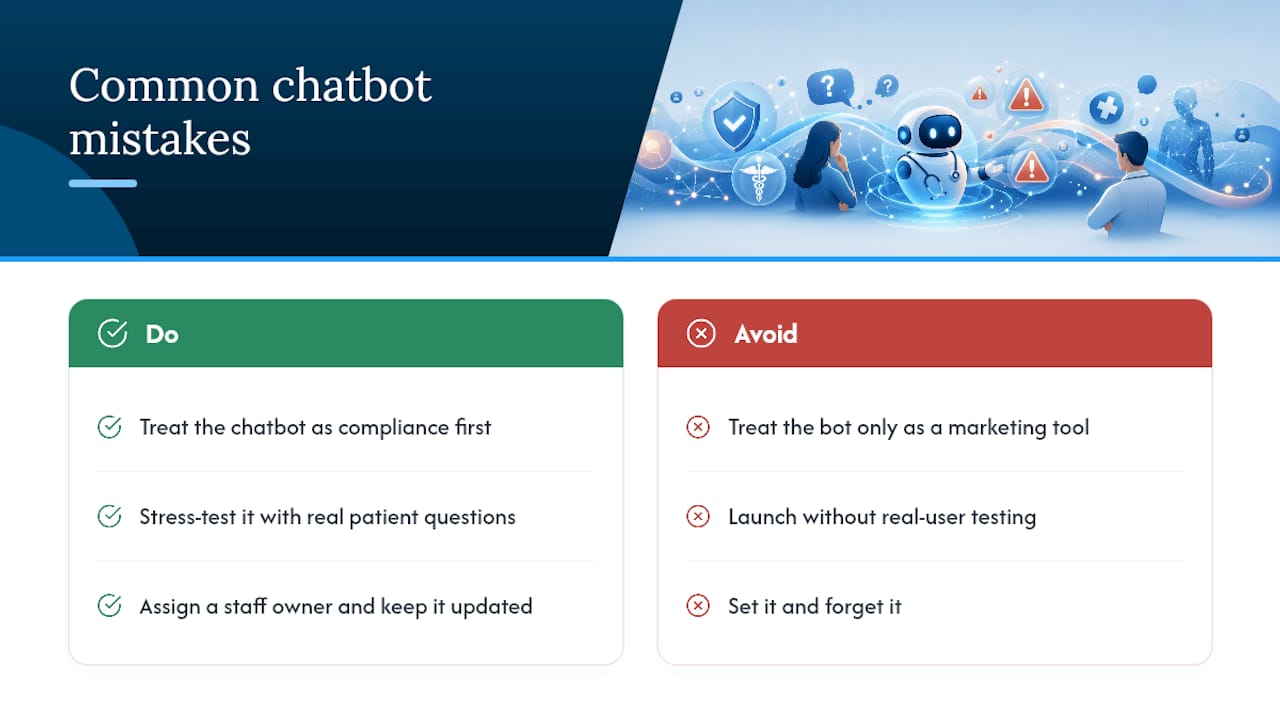
The bigger blind spot, though, is testing. Practices spend weeks debating which platform to buy and then launch without anyone actually typing a real patient question into the thing. I'd argue the testing phase deserves more attention than the vendor selection, because a mediocre platform tested rigorously beats a sophisticated platform nobody stress-tested against edge cases.
The other overlooked piece is ownership. A chatbot is not a "set it and forget it" tool, and practices that treat it that way end up with stale hours listed, outdated insurance panels, and a bot that starts frustrating the exact patients it was meant to help. Someone on staff needs to own it the way someone owns your patient portal or your appointment book. Skip that step and the technology stops mattering.
— Kate
Get a Compliance-Ready Chatbot Built for Your Practice
Epdwebsites builds chatbots as part of a full website package, not a bolt-on plugin you're left to configure alone. That means your bot gets built with the same attention to your practice's compliance needs, booking flow, and brand as the rest of your site, instead of living as a disconnected widget nobody on staff fully understands.

Since 2009, Epdwebsites has built websites for professional practices, including medical offices, that need to look credible and function reliably from day one. When we scope a chatbot add-on, we start with the same checklist covered above: what the bot will and won't ask, how booking links surface, and how handoff to staff actually works before launch, not after a patient gets frustrated. For technical integrations beyond a standard plugin, partners like Emergent IT Services support deeper automation and calendar/CRM connections when a practice's scope calls for it.
If your practice is ready to add a chatbot the right way, explore our website features and hosting options and request a compliance review to see what a practice-hosted build would look like for your site.
Sources
- Healthcare Chatbot for WordPress: Guide for Clinics
- How to Add an AI Chat Widget to a Wellness Website: A 7-Step Chicago Playbook (2026) | Health and Wellness GHL Snapshot
- Healthcare Website Chat in 2026: HIPAA-Compliant Solutions Guide | GreetNow Blog