Your law firm's website can lose a potential client in seconds. Not because of a weak bio or an outdated photo. Because the page timed out, loaded too slowly, or threw a security warning. This attorney website hosting reliability guide exists to change that. 85% of consumers search online before contacting a firm, and they judge you on speed and professionalism before they ever read a single word you wrote. Hosting is the foundation underneath all of it, and most attorneys give it almost no thought at all.
Table of Contents
- Key takeaways
- Attorney website hosting reliability: what to evaluate first
- How to assess and choose a reliable hosting provider
- Common hosting pitfalls attorneys make
- How to verify and maintain hosting reliability over time
- My take on why attorneys keep getting this wrong
- Hosting built for law firms that cannot afford downtime
- FAQ
Key takeaways
| Point | Details |
|---|---|
| Uptime guarantees mislead | SLA exclusions can quietly reduce 99.99% uptime to 99.5% actual availability. |
| Speed directly impacts clients | Faster LCP scores cut bounce rates by up to 23% and lift conversions by up to 34%. |
| Security requires tested backups | Off-site, immutable backups tested quarterly are the most effective defense against ransomware. |
| Third-party monitoring is non-negotiable | Vendor self-reporting is unreliable; independent tools catch outages before your clients do. |
| Mobile performance matters most | Google's mobile-first indexing means your mobile Core Web Vitals carry more ranking weight than desktop. |
Attorney website hosting reliability: what to evaluate first
Selecting the right hosting provider is not a one-time checkbox. It is a set of criteria that directly affects your credibility, your search rankings, and your client pipeline. Here is what actually matters.
Speed and Core Web Vitals
Your hosting environment determines how fast your pages load, and page speed shapes both SEO and client retention. The metric to watch first is Largest Contentful Paint, or LCP, which measures how quickly your main content loads. Improving LCP from poor to good reduces bounce rates by up to 23% and increases conversions by up to 34%. For an attorney relying on web leads, that gap represents real cases and real revenue.
Google prioritizes Core Web Vitals in this order: LCP first, then CLS, then INP. Focus your hosting evaluation on whether the provider's server infrastructure can deliver LCP scores under 2.5 seconds for most users. Shared hosting plans packed with thousands of sites on one server almost never can.
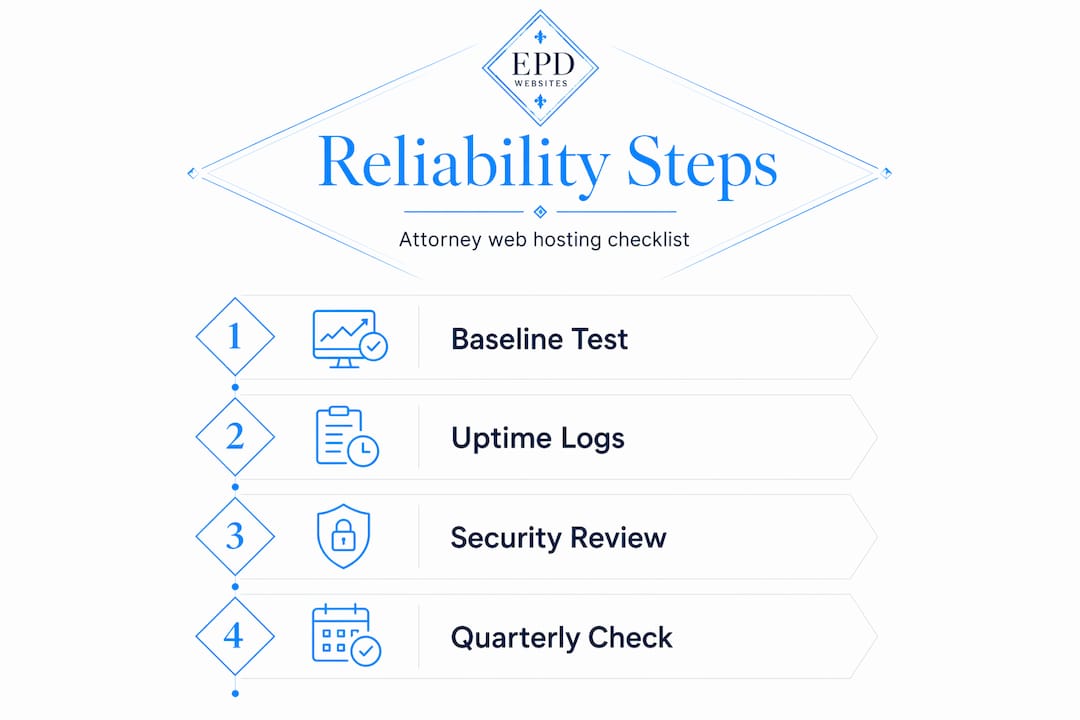
Pro Tip: Run your current site through Google PageSpeed Insights before you switch hosts. You need a baseline so you can measure real improvement, not just take a vendor's word for it.
Uptime guarantees and SLAs explained
Most hosting agreements advertise 99.99% uptime. That sounds close to perfect. It translates to roughly 52 minutes of downtime per year. But the reality is more complicated. SLA exclusions like scheduled maintenance can quietly reduce that guarantee to 99.5% effective uptime, which is over 43 hours of potential downtime annually. For a law firm, 43 hours of an inaccessible website is not a technical nuisance. It is lost consultations and clients who called your competitor instead.
Always read the SLA exclusions section, not just the headline percentage. Ask the provider in writing what events are excluded from uptime calculations.
Security requirements for law firm hosting
Law firm websites handle contact forms, intake questionnaires, and sometimes client portals. That data carries professional responsibility obligations. At minimum, your host must provide SSL certificates, web application firewalls, DDoS mitigation, and automatic malware scanning. Beyond that, backup infrastructure matters enormously. Critical vulnerabilities should be patched within 24 hours based on NIST-aligned security standards, and your host should be able to confirm that is standard practice.

Here is a quick reference for evaluating law firm hosting security:
| Security feature | Why it matters for attorneys |
|---|---|
| SSL certificate | Encrypts data; required for client trust and Google rankings |
| Web application firewall | Blocks malicious traffic before it reaches your site |
| Automated malware scanning | Detects infections before they damage your reputation |
| DDoS mitigation | Keeps your site accessible during coordinated attacks |
| Offsite backups | Protects your data if the primary server is compromised |
Support, scalability, and server location
When something breaks at 11 PM before a big case announcement, you need a human being available. Not a ticket queue. Confirm your host offers 24/7 live support, and test it by actually calling or chatting before you sign up. Server location also matters for speed. Hosting your site on servers closest to your primary client geography reduces latency. If you practice in Arizona, a server cluster in Phoenix or Los Angeles will outperform one in Germany.
Scalability means your hosting plan can handle traffic spikes without crashing your site. If a news mention or a viral case sends a surge of visitors, shared hosting plans often buckle. Look for hosting that offers resource scaling or managed cloud infrastructure.
How to assess and choose a reliable hosting provider
Use this process to evaluate any host you are considering, whether you are switching providers or vetting your first one.
- Request documented uptime history. Ask for at least 12 months of uptime data from a third-party monitoring source, not from the vendor's own dashboard.
- Test site speed with real tools. Use Google PageSpeed Insights and GTmetrix to measure LCP, CLS, and INP. Run tests on mobile and desktop separately. Mobile CWV scores carry more ranking weight due to Google's mobile-first indexing policy.
- Confirm backup policies in writing. Verify that backups run daily at minimum, that they are stored off-site, and that you retain copies for at least 30 days.
- Test customer support before committing. Submit a technical question via every support channel the host offers. Track response time and quality.
- Review contract terms for scalability. Your practice may grow. Confirm you can upgrade resources without migrating to an entirely different hosting environment.
- Check for legal-specific hosting features. Some providers understand the needs of professional service firms and offer managed hosting with proactive security monitoring. Look for these as differentiators, not just marketing language.
Pro Tip: If a hosting provider cannot give you third-party uptime logs within 48 hours of a request, treat that as a red flag. Transparency in uptime reporting is a baseline expectation for any provider serious about reliability.
For additional context on what attorney website design requires beyond hosting, the foundation of good design and solid infrastructure go hand in hand.
Common hosting pitfalls attorneys make
Most hosting mistakes are not made by careless attorneys. They are made by busy attorneys who trusted a vendor's marketing copy and moved on. Here are the traps that surface repeatedly:
- Accepting uptime claims at face value. Vendors may exclude DDoS events and scheduled maintenance from uptime calculations. Both of those events directly affect your clients' ability to reach you.
- Never testing backups. A backup that has never been tested is an untested assumption. Immutable off-site backups tested quarterly represent the most effective single step toward ransomware resilience. Not having them tested is the equivalent of assuming your fire extinguisher still works.
- Choosing the cheapest plan available. Budget hosting exists for personal blogs and hobby projects. It typically runs on overcrowded shared servers without dedicated security monitoring. A law firm site on that infrastructure carries real professional risk.
- Ignoring mobile performance. Many attorneys check their site on a fast desktop connection and declare it fine. But the majority of your prospective clients are searching on a smartphone during a commute or a lunch break. Mobile performance deserves equal attention.
- Relying solely on vendor self-reporting. Third-party monitoring tools alert you to outages faster and more accurately than vendor dashboards, which have an inherent conflict of interest in reporting their own failures.
Reliability is not a feature your hosting provider sells you. It is something you verify, monitor, and enforce through independent tools and documented agreements.
How to verify and maintain hosting reliability over time
Choosing a good host is step one. Keeping your site reliable over months and years is an active process. Here is how to build ongoing verification into your practice's operations:
- Set up independent uptime monitoring immediately. Tools like UptimeRobot or StatusCake check your site every few minutes from multiple locations and alert you the moment a problem is detected. Do not wait for a client to tell you your site is down.
- Track Core Web Vitals monthly in Google Search Console. After any significant hosting or site change, expect a 4 to 6 week delay before improvements show up in Search Console data due to Google's rolling 28-day CrUX data window. Patience is required, but monitoring confirms the trajectory.
- Schedule quarterly backup recovery drills. Choose a backup file, restore it to a staging environment, and verify the site functions correctly. This is the only way to know your backups actually work.
- Apply security patches promptly. Whether your site runs on WordPress or another CMS, outdated plugins and themes are the most common entry point for attackers. Your host or a managed hosting service should handle this automatically or alert you when updates are needed.
- Review hosting performance data quarterly. Look at server response times, error rates, and bandwidth usage. A sustained increase in any of these metrics often signals that your current hosting plan has outgrown your site's needs.
Pro Tip: Block 30 minutes each quarter on your calendar specifically for a hosting review. Check uptime reports, run a PageSpeed Insights test, and confirm backups are current. Most firms that experience major hosting failures had warning signs they simply did not stop to read.
| Maintenance task | Recommended frequency |
|---|---|
| Independent uptime monitoring | Continuous, automated |
| Google Search Console review | Monthly |
| Backup recovery test | Quarterly |
| Security patch review | Monthly |
| Full hosting performance audit | Quarterly |
My take on why attorneys keep getting this wrong
I have worked with professional service providers long enough to recognize a pattern. Attorneys are extraordinarily rigorous about documentation, liability, and due diligence inside the courtroom. Outside of it, when it comes to digital infrastructure, that same standard often disappears entirely.
The most common thing I hear is some variation of "my web person handles that." And maybe they do. But in most cases, when I ask attorneys to produce their hosting SLA, their last uptime report, or evidence that a backup was ever tested, the room gets quiet. The assumption that someone else has it covered is where the risk lives.
What I have seen work is treating your hosting provider the way you would treat any other vendor with access to client-facing operations. You would not sign a vendor contract without reading it. Apply the same standard to a hosting agreement. Ask for documentation. Require transparency. Set a calendar reminder to check on it.
The attorneys who get this right are not necessarily more technical. They are just more deliberate. They understand that a slow or unavailable website is not an IT problem. It is a client acquisition problem, a credibility problem, and in some practices, potentially an ethics problem if client data is exposed. Investing in quality hosting is not a luxury for large firms. It is a baseline professional obligation.
— Kate
Hosting built for law firms that cannot afford downtime
If you have been running your firm's site on a basic shared hosting plan and hoping for the best, this is the moment to change that.

Epdwebsites has provided premium hosting solutions for attorneys and professional service providers since 2009. Every hosting plan includes proactive security monitoring, regular backups, and the kind of personal support that means a real person answers when something goes wrong. You can also explore hosting plans and pricing to find the right fit for your practice. If you want a website that your clients can always reach and that you can always be proud of, Epdwebsites is ready to build and host it.
FAQ
What does attorney website uptime actually mean?
Uptime refers to the percentage of time your website is accessible to visitors. A 99.9% uptime guarantee still allows for over 8 hours of downtime annually, and SLA exclusions can make actual availability considerably lower.
How do Core Web Vitals affect my law firm's search ranking?
Core Web Vitals are a confirmed Google ranking factor. Passing the threshold removes ranking penalties, and improving LCP scores from poor to good can reduce bounce rates by 23% and lift conversions by 34%.
How often should I test my website backups?
Quarterly backup recovery tests are the recommended standard. Immutable, off-site backups that are never tested offer false security. A tested backup is the only backup you can rely on.
What makes hosting reliable for a legal website?
Reliable legal website hosting combines verified uptime above 99.9%, daily off-site backups, active security patching, 24/7 live support, and independent uptime monitoring. No single feature is enough on its own.
Do I need a specialist host for my law firm website?
Not necessarily a legal-specific host, but you need a provider experienced with professional service firms. They will understand your credibility requirements, your security obligations, and the importance of having your site available every time a potential client searches for you.