
Displaying credentials online professionally means using verified links, structured data, and consistent presentation across platforms to establish trust and enhance your professional reputation. 88% of hiring managers have encountered fabricated credentials, which means unverified listings actively hurt your credibility. Attorneys, CPAs, real estate agents, and medical professionals who rely on client trust cannot afford inconsistent or unverifiable online profiles. The tools that solve this problem include schema.org markup, verified digital badges from platforms like Credly, and dedicated credentials pages built with clear, factual descriptions. This guide covers exactly how to implement each layer.
How to display credentials online professionally
Professional credentials are the documented proof of your qualifications. They include academic degrees, state licenses, industry certifications, and formal awards. Each type functions as a trust signal. Clients and recruiters use them to decide whether you are worth their time before they ever speak to you.
The stakes are real. When credentials appear inconsistently across platforms, or exist only as static PDFs with no verification path, they raise doubt rather than build confidence. Cross-platform inconsistencies reduce AI and employer confidence in your professional identity. That matters more in 2026 than it did five years ago, because AI-powered hiring tools and search engines now cross-reference your name across LinkedIn, your personal website, and industry directories automatically.
Here is what a complete credential set typically includes for a white-collar professional:
- Academic degrees: Bachelor's, Master's, JD, MD, or equivalent, with issuing institution and year
- State licenses: Bar admission, CPA license, medical license, real estate license, with license number and state board link
- Industry certifications: CFA, PMP, CFP, CISSP, and similar, with issuing body and expiration date
- Awards and recognitions: Named awards from recognized organizations, not self-assigned titles
- Continuing education: Relevant completed courses from accredited providers
Each item on that list needs a verification path. A credential without a link to the issuing authority is just a claim. Recruiters and clients know the difference.
How to prepare your credentials for online display

Organization comes before publication. Rushing to post credentials without a clean inventory creates the exact inconsistencies that undermine trust.
Follow these steps to build a solid foundation:
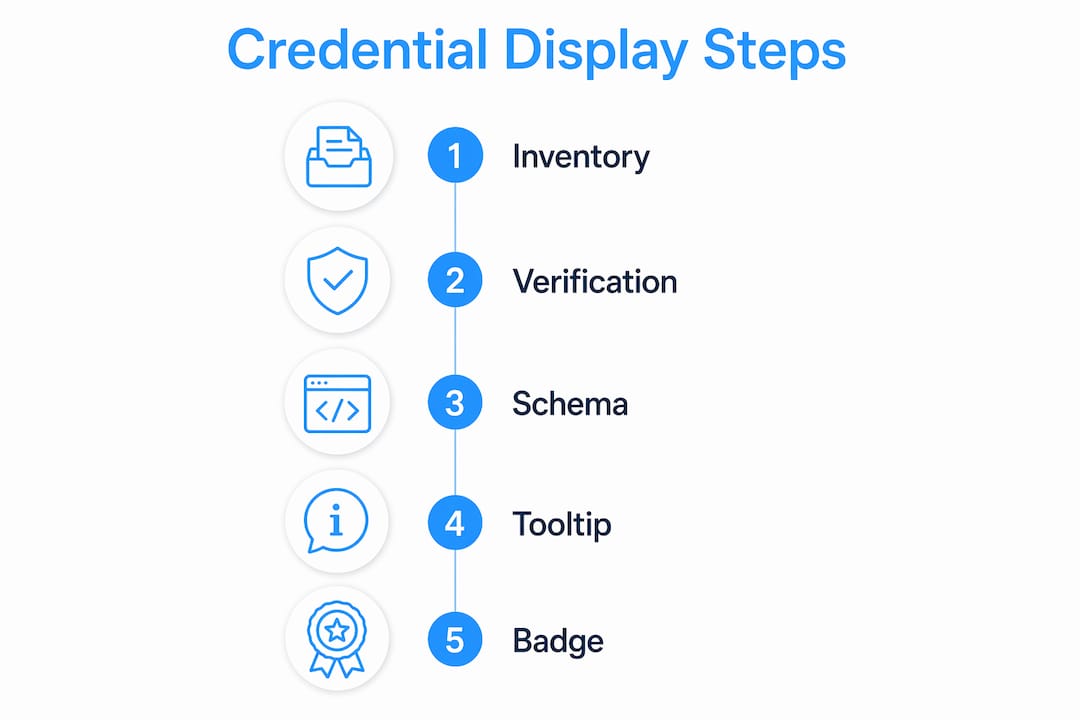
- Create a master credential inventory. List every credential you hold with the exact name as it appears on the official certificate, the issuing organization's full legal name, the date issued, and any expiration date.
- Obtain official verification URLs. Most licensing boards and certification bodies publish public verification pages. Find the direct URL for your specific license or certification and save it.
- Request verified digital badges. Many certification bodies now issue badges through Credly or BadgeCert. Claim every badge you have earned. These embed verification data directly into the image file.
- Check name consistency. Your name on every platform must match your government ID exactly. A mismatch between "Robert J. Smith" on your license and "Bob Smith" on LinkedIn creates friction during background checks.
- Gather evidence links. For each credential, identify at least one public project, case study, or published work that demonstrates the credential in practice. Verifiable project links are more persuasive than static credential lists alone.
A verified professional profile can be built in as little as 30 minutes when you use official verification URLs and align your name with government records. That 30-minute investment pays dividends every time a recruiter or client searches your name.
Pro Tip: Set a calendar reminder every six months to audit your credentials inventory. Expired certifications left on your profile signal neglect, not authority.
What are the best practices for showcasing credentials on your website?
Your personal website is the one platform you fully control. That makes it the most important place to get credential presentation right.
Build a dedicated credentials page
A dedicated /credentials page listing each credential with brief factual descriptions and issuer links makes verification faster for clients and recruiters. Keep descriptions factual and specific. "Licensed CPA, Arizona State Board of Accountancy, License #12345, issued 2018" outperforms "experienced accounting professional" every time.
Implement Schema.org structured data
Schema.org markup is the single most underused tool in professional credential presentation. Use the Person type with hasCredential and EducationalOccupationalCredential properties, and include recognizedBy URLs pointing to the issuing authority. This makes your credentials machine-readable for Google Knowledge Panels and AI discovery tools. Structured data implementation increases organic traffic by 2.7 times. That is not a marginal gain.
Use plain-language tooltips for post-nominals
Post-nominal letters like "CFP," "CISSP," or "Esq." carry authority with people who know what they mean. They confuse everyone else. Tooltip explanations written at a grade 8–10 reading level improve accessibility without diluting your authority. A tooltip that reads "Certified Financial Planner, issued by CFP Board" takes three seconds to write and removes all ambiguity.
The table below shows the key elements of a well-structured credentials page:
| Element | Purpose | Example |
|---|---|---|
| Credential name | Identifies the qualification | "Juris Doctor (JD)" |
| Issuing authority | Establishes legitimacy | "University of Arizona James E. Rogers College of Law" |
| Verification URL | Enables instant confirmation | State bar public directory link |
| Date issued / expiration | Shows currency | "Issued 2015, Active" |
| Digital badge embed | Visual, clickable proof | Credly badge with verification link |
Pro Tip: Add your credentials to your website footer in abbreviated form with a tooltip. It reinforces authority on every page without cluttering your design.
How do verified digital badges strengthen your professional profile?
Digital badging platforms like Credly allow professionals to display verifiable badges on websites, resumes, and LinkedIn with a single click. Each badge contains embedded metadata: the credential name, issuing organization, criteria, and a live verification link. That metadata travels with the badge wherever it is shared.
The practical benefit is speed. Verified badge links reduce background check time from minutes to seconds. A recruiter who clicks your Credly badge and sees instant verification from the issuing body has no reason to doubt your credential. A recruiter who sees a credential listed as plain text with no verification path has every reason to pause.
Here is how to integrate digital badges across your professional presence:
- LinkedIn: Add badges to the "Licenses & Certifications" section and share them as posts when you earn new ones. LinkedIn's algorithm surfaces these updates to your network.
- Email signature: Embed a small badge image linked to its verification URL. Every email you send becomes a passive credential display.
- Personal website: Place badges on your credentials page and your About page. Link each badge to its issuer verification page, not just the badge image.
- Digital resume or PDF portfolio: Include badge images with the verification URL printed below them for offline viewing.
BadgeCert and Credly are the two most widely used platforms in 2026. Both integrate with major certification bodies including PMI, CompTIA, and (ISC)². If your certification body does not issue digital badges, request a verification letter on official letterhead and link to a scanned, hosted copy as a fallback.
What are the most common credential display mistakes?
Most professionals make the same small errors that compound into a credibility problem over time.
- Inconsistent naming across platforms. "Dr. Maria L. Chen" on your website and "Maria Chen" on LinkedIn signals a mismatch to background check software and AI entity recognition tools. Use the sameAs property in your schema markup to link your profiles explicitly.
- Outdated credentials left live. An expired certification listed without a status note looks like an oversight. Either update it with a renewal date or mark it as "completed" with the original date.
- Static PDFs as the only verification path. A PDF is not verifiable. Anyone can edit a PDF. Link to the issuing authority's public directory instead.
- Schema markup errors. Broken structured data is worse than no structured data because it can trigger Google Search Console errors. Use the Schema Markup Validator to test your implementation before publishing.
- Marketing language in credential descriptions. "Award-winning attorney with a passion for justice" tells a recruiter nothing verifiable. "AV Preeminent rated by Martindale-Hubbell, 2023" tells them everything.
Simplicity and specificity in credential listings outperform marketing language for professional roles. Facts close deals. Adjectives raise doubts.
Keep your credentials page as a living document. Update it every time you renew a license, earn a certification, or complete a relevant course. Treat it the way a developer treats a changelog: dated, specific, and always current.
Key takeaways
Displaying credentials online professionally requires verified links, schema markup, and consistent naming across every platform where your name appears.
| Point | Details |
|---|---|
| Build a credentials inventory first | List every credential with exact names, issuer details, and verification URLs before publishing anything. |
| Use schema.org structured data | Implement Person and hasCredential markup to make credentials machine-readable for AI and search engines. |
| Claim and embed digital badges | Platforms like Credly provide verified, clickable badges that speed recruiter verification to seconds. |
| Maintain cross-platform consistency | Your name and credential details must match exactly across LinkedIn, your website, and industry directories. |
| Keep credentials current | Audit your credentials page every six months and remove or update anything expired or outdated. |
Why i think most professionals are getting this backwards
Here is what I have seen after years of working with attorneys, CPAs, and consultants on their web presence: most professionals treat credentials as decoration. They list them in a footer, maybe add them to a LinkedIn bio, and consider the job done. That approach leaves enormous trust and discoverability on the table.
The professionals who get the most traction online treat credentials as infrastructure. They build a dedicated page, implement schema markup, claim every digital badge, and link every credential to its issuing authority. They also connect credentials to real work. A CPA who links her CPA license AND a published case study about a complex tax strategy she resolved is far more credible than one who lists "CPA, 2012" and nothing else.
The dual-format approach is the part most people skip. Human-readable text on your credentials page serves your visitors. Machine-readable schema markup serves Google, AI tools, and the background check software recruiters use. You need both. One without the other is half a strategy.
The other thing I push hard on is the changelog mindset. Your credentials page should have a "last updated" date visible to visitors. It signals that you are active, current, and paying attention to your professional profile. That detail costs you nothing and communicates a great deal.
— Kate
Your website should work as hard as your credentials do
A credential is only as visible as the platform it lives on. If your website is slow, hard to navigate, or built on a template that buries your qualifications, your credentials are not working for you.

Epdwebsites builds professional websites for attorneys, CPAs, consultants, real estate agents, and medical practices that are designed specifically to present credentials with clarity and authority. That includes schema markup implementation, verified badge integration, and credential page design that passes both human and machine scrutiny. Since 2009, Epdwebsites has helped professionals in Glendale, AZ and beyond build web presences that command respect. See what a properly built professional site looks like before you decide.
FAQ
What does it mean to display credentials online professionally?
Displaying credentials online professionally means presenting your qualifications using verified links, structured data, and consistent naming across all platforms. The goal is to make credentials instantly verifiable by clients, recruiters, and AI tools.
How do i add schema markup for my credentials?
Use the schema.org Person type with the hasCredential property and EducationalOccupationalCredential subtype. Include a recognizedBy URL pointing to the issuing authority, then validate your markup with the Schema Markup Validator at validator.schema.org.
What is the best platform for verified digital badges?
Credly and BadgeCert are the most widely used platforms for verified digital badges in 2026. Both integrate with major certification bodies and allow you to embed badges on LinkedIn, your website, and email signatures with live verification links.
How often should i update my credentials page?
Audit your credentials page every six months at minimum. Update expiration dates, remove lapsed certifications, and add new credentials as you earn them. A dated "last updated" label on the page signals to visitors that your profile is current.
Why do credential inconsistencies hurt my professional reputation?
Inconsistent naming across LinkedIn, your website, and industry directories confuses background check software and AI entity recognition tools. Matching your name and credential details exactly across every platform is the baseline requirement for a trustworthy online profile.