
You can have the best services in your market, but if your website doesn't signal credibility within seconds, potential clients leave before you ever get a chance to speak. To build trust with website design is to practice what UX researchers call "credibility-centered design," a discipline focused on reducing visitor anxiety and reinforcing confidence at every touchpoint. Credibility is felt instantly by users, affecting whether they relax and explore or click away. This guide shows you exactly what to prioritize so your site stops losing clients before they even reach your contact page.
Table of Contents
- Key Takeaways
- Build trust with website design: the technical foundation
- Content and visuals that signal credibility
- Strategic placement of trust signals
- Content structure and technical authority
- My take on trust after years of designing for professionals
- Ready to make your website work harder for your business?
- FAQ
Key Takeaways
| Point | Details |
|---|---|
| First impressions are technical | HTTPS, fast load speeds, and mobile-friendly layouts signal legitimacy before visitors read a single word. |
| Authentic content outperforms badges | Real founder photos, genuine testimonials, and transparent policies convert better than generic security seals. |
| Placement beats quantity | Putting trust signals near calls to action matters far more than stacking badges across every page. |
| Structure supports authority | Well-organized pages with clear headings and citations help both visitors and search engines recognize your expertise. |
| Small details carry disproportionate weight | Consistent typography, clear navigation, and honest copywriting shape trust more than visual polish alone. |
Build trust with website design: the technical foundation
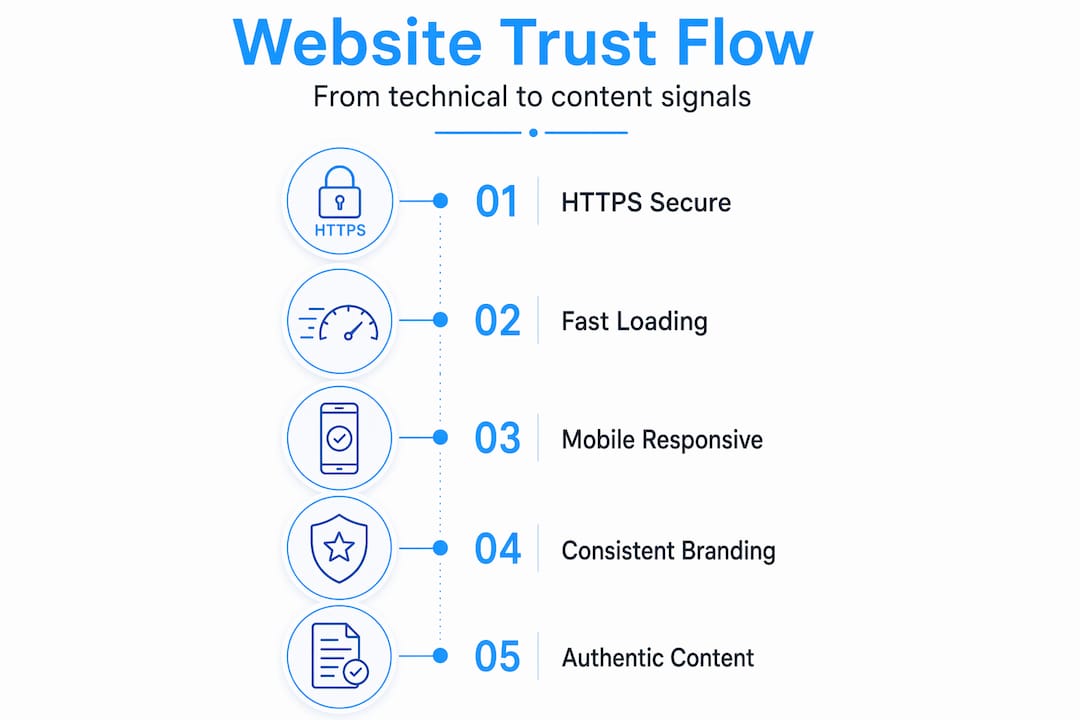
Before you think about fonts or photography, get the basics right. These are the elements that users and search engines both check first, often without the visitor realizing it.
Security, speed, and mobile responsiveness
HTTPS is non-negotiable. A browser that flags your site as "Not Secure" will kill conversions faster than any design mistake. Google's Page Experience includes HTTPS, Core Web Vitals, mobile-friendliness, and the absence of intrusive interstitials as direct ranking and trust factors. If your pages load slowly on mobile or content shifts around as it loads, visitors interpret that as a sign of an unprofessional, unreliable business.
Mobile-first design is not optional in 2026. The majority of first-time visitors to professional service websites arrive on a phone. A layout that works on desktop but breaks on mobile tells a prospective client that you don't pay attention to details. That's a problem when you're an attorney, CPA, or medical professional asking someone to trust you with sensitive matters.
Pro Tip: Test your site's Core Web Vitals using Google's free PageSpeed Insights tool. Aim for a green score on mobile, not just desktop. Many professional sites pass desktop tests and fail mobile ones without the owner ever knowing.
Brand consistency and navigation clarity
Here is a summary of the technical and brand elements that work together to establish trust before the visitor scrolls:
| Element | Why it matters |
|---|---|
| SSL certificate (HTTPS) | Eliminates browser security warnings |
| Page load under 3 seconds | Prevents abandonment before content appears |
| Responsive mobile layout | Shows professionalism and accessibility |
| Consistent logo and color palette | Reinforces brand recognition and stability |
| Clear, simple navigation | Reduces friction and guides visitors to key information |
| No intrusive pop-ups on entry | Avoids immediate frustration that damages first impressions |
Consistent branding across every page tells visitors they are on a legitimate, organized website. A logo that changes size, colors that vary between pages, or fonts that shift between sections create subconscious unease. Credibility is a usability problem, and navigation clarity directly influences how quickly a visitor decides whether to trust you. If someone cannot find your services page within two clicks, they move on.
Content and visuals that signal credibility
Technical trust gets visitors to stay. Content trust gets them to act. This is where most professional websites fall short because owners underestimate how much the content itself communicates about their business.
Authentic imagery and transparent storytelling
Founder photos and manufacturing transparency consistently outperform generic stock photography and standard security seals in building visitor confidence. When an attorney's website features a real photo of the attorney in their office, with a genuine bio that explains why they practice the type of law they do, it creates a human connection that no badge can replicate.
Use real team photos. Show your actual workspace. If you have a process, explain it. Visitors to professional service websites are often anxious because they're dealing with legal issues, financial problems, or health concerns. Seeing real people and honest, direct language dramatically lowers that anxiety.

For content clarity, educational, jargon-free writing enhances user trust and AI search comprehension alike. A CPA's website that explains tax strategy in plain language builds more trust than one filled with technical terms designed to impress rather than inform. You can also explore how typography shapes perception on professional sites, since font choice and text hierarchy signal competence before the reader processes the actual words.
What trust-building content looks like versus what it doesn't
| Trust-building content | Content that undermines trust |
|---|---|
| Specific client testimonials with names and outcomes | Generic "5-star reviews" with no detail |
| Real founder or team photos with context | Stock photos of people in generic office settings |
| Transparent pricing or at least a pricing framework | No pricing information, hard to find contact details |
| Honest case studies describing the problem and solution | Vague success stories with no specifics |
| Clear policies on confidentiality, returns, or service terms | Missing or hard-to-find policy pages |
Pro Tip: Whitespace is not wasted space. Professional service clients associate dense, cluttered layouts with overwhelm and disorganization. See how whitespace affects professional trust by reviewing design examples for legal websites where clarity and breathing room are prioritized.
Strategic placement of trust signals
Even the most credible trust elements fail when they're buried. Placement is the variable most business owners get wrong, and it's the one that has the most direct impact on conversion rates.
Where to place trust elements for maximum impact
The research here is specific. Unconditional returns messaging placed above the fold near the primary call-to-action button consistently produces double-digit conversion lifts for direct-to-consumer brands. The same principle applies to service businesses. If you offer a free consultation, a money-back guarantee, or a confidentiality promise, those statements belong next to your "Book Now" or "Contact Us" button, not tucked away in your footer.
Here is the order of priority for placing trust signals on your key pages:
- Security and privacy statement near any form where visitors enter personal information.
- Testimonials with specific outcomes directly below your main service description, not in a separate tab or page.
- Risk-reversal language ("No obligation," "Free initial consultation," "Cancel anytime") immediately adjacent to your primary call to action.
- Professional credentials and certifications in the header or hero section, not just on an "About" page that many visitors never reach.
- Press mentions or verified review counts with recency signals ("Updated 2026") in a strip above or below the fold.
The badge-stuffing trap
Overusing generic security badges can actually reduce conversions because it signals to sophisticated visitors that you're trying too hard to compensate for a lack of real credibility. A row of seven different padlock icons and "Secure Payment" seals on a law firm's contact page looks like template clutter. One clear, specific statement about how client data is protected does far more work.
The same logic applies to press logos. Two or three recognizable media names displayed cleanly carry more weight than a wall of logos that includes publications no one recognizes. Quality and specificity beat volume every time.
Pro Tip: Run a simple A/B test on your contact page. Move your strongest testimonial or guarantee statement to appear directly above the submit button. Track form completions for 30 days before and after. This single change regularly produces measurable lifts without any additional design investment.
Content structure and technical authority
Building a trustworthy site also means building one that search engines and AI systems recognize as authoritative. This matters because a site that ranks well is perceived as more credible by default. Visitors assume that Google has already vetted the results they click.
Google and AI-powered search reward content fidelity, structured pages, and authoritative citations. That means your home, services, FAQ, and case study pages should be content-rich, not minimal. A service page with three sentences and a contact form tells search systems you have little to offer on the topic.
One often-overlooked approach: building a verification page. An indexable verification page that aggregates outbound citations, third-party mentions, and verifiable claims about your business can accelerate domain authority recognition, especially for newer websites. Think of it as a digital press kit that search engines can crawl and index.
| Content structure element | Trust impact |
|---|---|
| FAQ page with specific answers | Demonstrates expertise and reduces visitor uncertainty |
| Case studies with named outcomes | Provides verifiable proof of results |
| Verification page with citations | Signals legitimacy to search engines and sophisticated visitors |
| Internal links between related pages | Shows content depth and keeps visitors engaged |
| Structured headings (H1, H2, H3) | Makes content scannable and authoritative for both users and AI |
For professionals in service industries, pairing this content structure with guidance on Google AI Overviews and SEO gives you a clear picture of how modern search systems evaluate your site's credibility.
Pro Tip: Avoid hiding content in mobile accordions or JavaScript-rendered tabs. Google's mobile-first indexing means content that only appears on interaction may not be crawled or attributed to your page's authority.
My take on trust after years of designing for professionals
I've worked with attorneys, CPAs, and medical professionals long enough to recognize the pattern that holds most of them back. They spend weeks choosing a color palette and almost no time thinking about whether a first-time visitor can figure out what they do and why they should be trusted in under ten seconds.
Here's what I've learned: trust is almost never about flashy design. The clients whose sites convert best tend to have the clearest navigation, the most honest service descriptions, and at least one piece of content, usually a testimonial or a case study, that makes the visitor feel like someone else has already taken the leap and been happy with the result.
I've also seen the badge-stuffing mistake up close. A professional adds every trust icon they can find to their homepage, and conversions actually drop. Visitors read the desperation behind it. What works is specific, earned credibility: a real photo, a real client quote, a clear statement of what you do and for whom.
The detail most professionals overlook? Their contact page. It's often the most generic page on the site, a plain form with no reassurance. Adding a single sentence about how quickly you respond and what happens after someone submits the form can measurably increase the number of people who actually hit send.
— Kate
Ready to make your website work harder for your business?
If you've read this far, you already understand that a credible, high-performing website is built on specifics, not templates. At Epdwebsites, we've been designing websites for attorneys, CPAs, real estate professionals, and consultants since 2009. Every project is built around the trust signals, content structure, and technical standards this article covers.
Explore our professional website features to see exactly what goes into a site designed to convert skeptical visitors into confident clients. Browse our completed client portfolio to see how trust-centered design looks across different professional industries. We also offer ongoing site update services so your credibility signals stay current as your business grows. Ready to talk through your specific situation? Contact Epdwebsites directly for a personalized consultation.
FAQ
How quickly do visitors judge website credibility?
Visitors form credibility judgments almost immediately, often within a few seconds of landing on a page. Poor design, slow loading, or missing trust signals cause users to leave before engaging with any content.
What design elements build the most trust?
Authentic founder photos, specific client testimonials, transparent policies, HTTPS security, and fast mobile performance are the design elements with the strongest impact on visitor trust. Placement near calls to action matters as much as the elements themselves.
Do trust badges actually increase conversions?
Generic security badges have limited impact and can backfire if overused. Specific risk-reversal language, such as a free consultation offer or confidentiality statement placed near a contact form, consistently outperforms decorative badge collections.
How does responsive design affect trust?
A site that breaks or displays poorly on mobile tells visitors you lack attention to detail. Mobile-friendly design is also a direct Google ranking factor, meaning unresponsive sites lose both credibility and visibility at the same time.
How does website structure affect search engine trust?
Well-structured pages with clear headings, internal links, and rich content help Google and AI-powered search systems recognize your site as authoritative. A verification page that aggregates third-party citations can accelerate trust recognition for newer professional websites.