
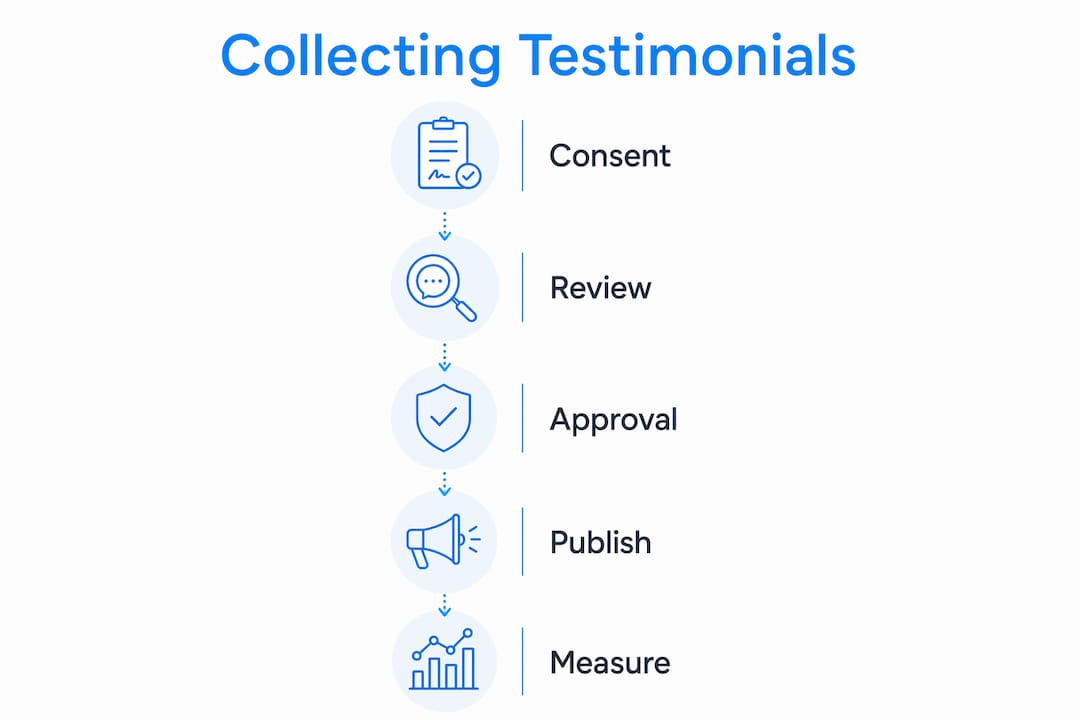
Get a signed, written media release first, then build testimonials around patient experience rather than clinical outcomes, and publish them with Schema.org Review markup on provider and service pages. That sequence handles your three biggest priorities at once: HIPAA compliance, authentic trust-building, and search visibility. Here is what to do right now:
- Obtain a written media release that names every platform (website, social media, Google Business Profile) and specifies duration and the patient's right to withdraw.
- Keep language focused on experience: staff communication, wait times, facility comfort. Avoid treatment results or clinical metrics.
- Film video testimonials in a neutral space, never an exam room, to prevent accidental capture of protected health information (PHI).
- Add Review schema markup to your CMS and link your Google Reviews profile where patient consent exists.
Three entities anchor this entire framework: HIPAA (the federal floor for patient privacy), Schema.org Review (the structured data standard search engines read), and Epdwebsites (the implementation partner for practices that need this built correctly from day one).
Table of Contents
- Your patient testimonials healthcare website guide starts here: the setup checklist
- How to collect patient testimonials ethically and legally in the U.S.
- Which testimonial formats work best for healthcare websites?
- Where and how to display testimonials on a healthcare website
- Technical setup: structured data, accessibility, and performance
- How to convert testimonials into internal improvements
- How to measure testimonial impact and run experiments
- Typical timeline and cost to add testimonial features
- Key Takeaways
- What most practices get wrong about testimonials
- Epdwebsites builds testimonial-ready healthcare websites
- Useful sources and references
Your patient testimonials healthcare website guide starts here: the setup checklist
Before you send a single outreach email, get these eight items in place.
- Draft a written consent and media release form that lists platforms, content types (written, video, audio), duration of use, and the patient's right to revoke consent.
- Assign an internal owner — one person in marketing or administration who manages the consent archive, outreach calendar, and moderation queue.
- Choose your testimonial formats (written quotes, video clips, caregiver statements, anonymized stories) based on your patient population and production capacity.
- Write a privacy and moderation policy that covers unsolicited reviews, takedown requests, and how you handle negative feedback.
- Add Review schema to your CMS so the development team can implement it during the build phase, not as an afterthought.
- Create a consent archive with metadata fields: patient ID (anonymized), date signed, scope of use, channels authorized, and expiration date.
- Confirm FTC compliance for any incentivized testimonials — disclosure is required if you offered anything of value in exchange for a review.
- Set a quarterly review cadence so the internal owner audits active testimonials, checks for expired consents, and updates the moderation log.
Pro Tip: Have the patient and a staff witness both sign the release form. Retain signed originals for at least six years to align with standard HIPAA record-keeping practice, and store digital copies in a secure, access-controlled archive.
How to collect patient testimonials ethically and legally in the U.S.

Written, informed authorization is the non-negotiable first step. Verbal or implied consent is not sufficient. The release form must state exactly what content will be used, where it will appear, and for how long.
What the release form must include:
- Full name of the patient (or legal guardian for minors)
- Description of the content (quote, photo, video)
- Specific platforms and URLs where content will appear
- Duration of use and renewal terms
- Right to revoke consent in writing, with a contact name and address
- Statement that participation is voluntary and does not affect care
Operational collection methods:
- In-person request at checkout: a staff member hands the patient a one-page release and a brief prompt card with three open-ended questions.
- Post-visit email sent within 24–48 hours: short, mobile-friendly, with a link to a secure form. Short, timely surveys consistently outperform longer ones sent days later.
- Tablet kiosk in the waiting room for patients who prefer to respond before leaving.
- Video session scheduled as a separate appointment for patients who agree to a recorded story.
HIPAA does not prohibit testimonials, but it requires explicit signed authorization and strongly favors language centered on staff interaction and facility experience over specific treatment details. State privacy laws (California's CMIA, for example) may impose additional requirements beyond HIPAA, so confirm your state's rules with legal counsel.
| Language to use | Language to avoid |
|---|---|
| "The staff made me feel heard and respected." | "My tumor shrank after three treatments." |
| "Scheduling was easy and the wait was short." | "Dr. X cured my condition in two weeks." |
| "The front desk team was kind and professional." | "My test results improved by 40%." |
| "I felt comfortable asking questions." | "This practice guarantees results." |
If you plan to republish a Google Review on your website, written authorization is still required — platform terms do not substitute for patient consent.
Which testimonial formats work best for healthcare websites?
Authenticity drives provider choice for a large majority of consumers, meaning raw, honest accounts tend to outperform polished scripts.
Format comparison:
- Short written quotes (2–4 sentences): Fastest to produce, easiest to place on any page. Best for homepage social proof and provider profile pages. Use the patient's first name and last initial unless they consent to full attribution.
- Long-form patient stories (300–500 words): Ideal for a dedicated testimonials page or a blog-style case study. Focus on the journey through the practice, not the medical outcome. Diverse patient stories that include caregivers and family members address anxieties that short quotes cannot.
- Short video clips (60–90 seconds): Highest trust impact, but require the most production care. Film in a neutral space — a lobby or quiet office — never an exam room. A signed media release must explicitly cover video and name the platforms. Neutral backgrounds prevent accidental PHI capture and simplify legal review.
- Caregiver and family statements: Particularly effective for pediatric, elder care, and mental health practices, where the decision-maker is often a family member rather than the patient.
- Anonymized quotes: Use when a patient wants to share their experience but not their identity. Label them clearly ("Anonymous patient, cardiology department") to maintain credibility.
Pro Tip: For video shoots, review custom photography best practices before production day — neutral backgrounds, consistent lighting, and proper consent documentation all apply to video as much as to still images.
Accessibility requirements apply to every format. Add closed captions to all video testimonials, provide text transcripts for audio content, write descriptive alt text for testimonial images, and offer key testimonials in languages spoken by your patient population.
Where and how to display testimonials on a healthcare website
Placement determines whether a testimonial actually reduces patient anxiety or just sits unread on a forgotten page.
| Page / location | Best testimonial type | Placement note |
|---|---|---|
| Homepage hero section | Short quote + first name/initial | Above the fold, near the primary CTA |
| Provider profile pages | Service-specific written quote | Directly below the provider bio |
| Service pages | Experience-focused quote or video | Mid-page, near the appointment CTA |
| Dedicated testimonials gallery | Mix of formats | Filterable by service or condition type |
| FAQ page callouts | Short anonymized quote | Adjacent to the question it answers |
For oncology and specialty practices, testimonials that highlight bedside manner and communication carry more weight than facility descriptions. For mental health providers, tone and placement matter as much as content — a calming design context makes testimonials land differently than a busy, high-contrast layout.
Schema.org Review markup tells search engines what your testimonials are. Populate these fields at minimum: author (patient's name or "Anonymous"), reviewBody (the testimonial text), datePublished, and reviewRating (omit the rating field if the patient did not provide a numeric score). Add a visible disclaimer near the testimonial section: "Individual experiences vary. These testimonials reflect personal accounts and do not guarantee specific outcomes."
Avoid auto-playing video carousels. They create accessibility barriers and hurt page speed. Use a static grid with a play button instead.
Technical setup: structured data, accessibility, and performance
A technically sound testimonial page is indexable, fast, and usable by everyone.
Review schema field priorities:
author: required — use the patient's consented name or "Anonymous"reviewBody: required — the full testimonial textdatePublished: required — the date the testimonial was published on the sitereviewRating: include only when the patient explicitly provided a numeric ratingitemReviewed: the practice name or specific service reviewed
Moderation and audit trail:
- Log every testimonial in a content management system with fields for consent status, publication date, and last review date.
- Document takedown requests and the date of removal.
- For unsolicited reviews that appear on third-party platforms, do not republish without obtaining a separate written release.
- Review the full testimonial inventory quarterly and remove any content with expired or revoked consent.
Performance and accessibility checklist:
- Host video testimonials on a platform like YouTube or Vimeo and embed them rather than self-hosting large files.
- Use lazy loading for testimonial images and video thumbnails.
- Keep testimonial page images under 150 KB each.
- Add ARIA labels to testimonial carousels and widgets so screen readers can navigate them.
- Provide keyboard navigation for any interactive testimonial component.
For a full governance and technical framework, the healthcare website design best practices guide covers CMS configuration and administrator responsibilities in more detail.
How to convert testimonials into internal improvements
Publishing testimonials is the marketing half. The operational half is where care actually improves — and research confirms that simply collecting feedback does not improve patient-centered care. Improvements happen only when feedback is discussed and acted on with clinical staff in their operational units.
Feedback intake flow:
- Tag each testimonial on intake: communication, wait time, staff courtesy, facility, or access.
- Enter tagged testimonials into your CRM or a shared spreadsheet with a date and source field.
- Route communication and staff-courtesy tags to the clinical lead; route wait time and access tags to the operations manager.
- Hold a quarterly meeting with both clinical and administrative representatives to review patterns and assign improvement actions.
The systematic review evidence also shows that multi-component interventions combining staff communication training with feedback review produce measurable improvements in patient experience metrics. A testimonial that praises a specific staff member's communication style is a training asset, not just a marketing asset.
How to measure testimonial impact and run experiments
Core metrics to track:
- Appointment request conversions on pages that display testimonials vs. those that do not.
- Time on page for testimonial-heavy pages vs. equivalent pages without them.
- Video completion rate for testimonial clips.
- Clickthrough rate on provider profile pages before and after adding service-specific testimonials.
- Assisted conversions: sessions that touched a testimonial page before converting.
A/B test plan:
| Test | Variant A | Variant B | Success metric |
|---|---|---|---|
| Homepage social proof | Short written quote | 60-second video clip | Appointment request rate |
| Attribution style | First name + last initial | "Anonymous patient" | Time on page |
| Placement | Hero section | Below-the-fold CTA area | Scroll depth + conversion |
One privacy note: never send PHI to analytics systems. Configure Google Analytics or your analytics platform to exclude any field that could identify a patient. Use aggregated, anonymized conversion data only.
Typical timeline and cost to add testimonial features
| Phase | Tasks | Typical duration |
|---|---|---|
| Discovery and legal review | Consent form drafting, platform audit, legal counsel review | 1–2 weeks |
| Collection and production | Outreach, interviews, video shoots, editing | 2–4 weeks |
| Development and schema | CMS build, Review schema implementation, accessibility audit | 1–2 weeks |
| QA and launch | Cross-browser testing, schema validation, consent archive setup | 3–5 days |
Cost drivers:
- Number of video testimonials (production, editing, captioning)
- Custom CMS layout vs. a template-based testimonial widget
- Legal counsel fees for consent form review
- Ongoing moderation and quarterly consent audits
In-house production cuts video costs significantly but adds staff time. A vendor handles production quality and consent documentation more consistently, which matters when a compliance audit arrives. For a detailed project scope and pricing, the Epdwebsites FAQ covers common questions about timelines and service tiers.
Key Takeaways
Patient testimonials work only when consent, content focus, placement, and technical markup are all handled correctly from the start.
| Point | Details |
|---|---|
| Consent is the foundation | Written, signed media release naming all platforms is required before publishing any patient story. |
| Focus on experience, not outcomes | Language about staff communication and facility comfort reduces HIPAA exposure and builds more authentic trust. |
| Schema.org Review markup matters | Populate author, reviewBody, and datePublished fields; omit rating fields when no numeric score was given. |
| Feedback must reach staff to improve care | Tagging and routing testimonials to clinical and operations teams is what drives measurable care improvements. |
| Epdwebsites handles the full build | From Review schema implementation to accessibility compliance, Epdwebsites delivers the technical and design work so practices can focus on patient care. |
What most practices get wrong about testimonials
The conventional wisdom says: collect more testimonials, display them prominently, and watch conversions climb. That is only half right. The practices that see the biggest gains treat testimonials as a two-way system. Externally, they reduce the anxiety a prospective patient feels before booking. Internally, they surface the specific staff behaviors and process failures that surveys never quite capture.
The compliance piece also gets underestimated. HIPAA does not ban testimonials, but the gap between "we got verbal permission" and "we have a signed, dated release with platform scope and a revocation clause" is exactly where legal exposure lives. A well-designed consent form is not bureaucratic friction. It is what makes the testimonial usable for years, not just months.
One more thing: authenticity beats production value every time. A 90-second phone-quality video of a patient speaking honestly about their experience will outperform a scripted, studio-lit testimonial. Patients can tell the difference, and so can search engines evaluating user-generated content signals.
Epdwebsites builds testimonial-ready healthcare websites
Medical practices that want testimonials done right — consent-compliant, schema-marked, accessible, and fast — need a web partner who understands both the technical requirements and the professional standards that healthcare sites demand.

Epdwebsites has been building premium websites for medical practices, attorneys, CPAs, and consultants since 2009. The service covers everything in this guide: CMS integration with Review schema, website accessibility compliance, Google Reviews linking, and hosting built for professional-grade performance. Projects move quickly, support is direct, and the work is built to represent your practice at its best.
View the full website features and capabilities or reach out to discuss your testimonial implementation project.
Useful sources and references
- Patient feedback to improve quality of patient-centred care in public hospitals: a systematic review — Clinical evidence on why feedback must be discussed with staff to drive care improvements. Use for operational and staff training sections.
- Patient Testimonials in Healthcare Marketing: What's Legal vs. What's Risky — Legal and compliance guidance on written consent, platform authorization, and republishing third-party reviews.
- HIPAA and Testimonials guidance (Too Simple) — Practical production rules: neutral recording locations, signed media releases, and experience-focused language.
- UGC for Healthcare: A Compliant Content Guide — Authenticity statistics and structured data guidance including Review schema and disclaimer best practices.
- Exploring effective patient feedback methods for eHealth in general practice (BMC Primary Care) — Evidence on timing and format of feedback collection, including short surveys and immediate post-visit prompts.
- Healthcare Marketing Experts Guide: Using Testimonials to Build Trust — Marketing rationale for diverse patient stories including caregiver and family perspectives.
- Schema.org Review documentation — Primary reference for structured data fields: author, reviewBody, datePublished, reviewRating, and itemReviewed.