
A website sitemap for law firms is a structured file that tells search engines exactly which pages exist on your site and how they relate to each other. Law firm websites carry significant complexity: practice area pages, attorney bios, location pages, blog posts, and resource libraries all compete for crawler attention. Without a sitemap, Google may miss your most important content entirely. This guide explains what sitemaps are, why they matter for legal websites specifically, and how to build and maintain one that actually improves your visibility.
What is a website sitemap for law firms?
A sitemap is a file, typically in XML format, that lists the URLs on your website and signals their relative importance to search engines. The industry standard distinguishes two types: XML sitemaps, which are built for search engine crawlers, and HTML sitemaps, which are built for human visitors navigating your site.
XML sitemaps and HTML sitemaps serve complementary roles. XML handles search indexing; HTML improves usability for potential clients browsing your services. Law firms need both.

Law firm websites are classified as Your Money or Your Life (YMYL) content by Google. That classification means Google applies stricter quality standards before ranking them. A technically sound sitemap is a foundation for search engine trust in legal sites. Without one, even well-written content risks going undiscovered.
XML sitemaps are essential for law firm websites with more than 50 pages. Most mid-size firms exceed that threshold quickly once you count every practice area subpage, attorney profile, city-specific landing page, and blog post.
What pages belong in a law firm sitemap?
Choosing the right pages is as important as having a sitemap at all. Including the wrong URLs wastes crawler attention and dilutes the signal you send to Google.
The pages that belong in every law firm sitemap include:
- Practice area pages: Each service you offer, from personal injury to estate planning, deserves its own indexed URL.
- Attorney biography pages: These build trust and often rank for name-based searches from prospective clients.
- Location and office pages: If your firm serves multiple cities or counties, each location page should appear in the sitemap.
- Blog and resource content: Well-written legal articles drive organic traffic and should be indexed promptly.
- Contact and consultation pages: These are conversion pages and must be discoverable.
Avoid sitemap bloat by keeping your sitemap focused on revenue-driving pages rather than every URL on the site. Overly large sitemaps dilute crawler attention and reduce SEO performance. Tag pages, filtered search results, and duplicate content pages should stay out.
All important content should be accessible within 3 clicks from the homepage, and your sitemap should reflect that shallow structure. A flat hierarchy means crawlers reach deep pages faster, and clients find what they need without frustration.
For large firms, segmenting sitemaps by content type improves crawl management. Separate files for practice areas, attorney profiles, blog content, and location pages let you monitor each category independently in Google Search Console.
How do sitemaps improve SEO and crawl efficiency?
Sitemaps guide crawlers but are not a direct ranking signal. That distinction matters. Sitemaps do not directly affect rankings but ensure that important deep pages receive crawl attention they might not otherwise get. Ranking still depends on content quality, authority, and links.
What sitemaps do is protect your crawl budget. Search engines allocate a finite amount of crawl time to each website. A clean, well-organized sitemap tells the crawler exactly where to spend that time. Without one, crawlers may waste resources on low-value pages and miss your highest-converting content.
For law firms, this matters most with deep pages. A practice area subpage covering a niche topic like "wrongful termination for remote workers" may have no strong internal links pointing to it. The sitemap becomes its lifeline to the index.
Pro Tip: Add a <priority> and <lastmod> tag to your XML sitemap entries. Setting higher priority for practice area pages and updating the modification date when you revise content signals to Google which pages deserve fresh crawls.
The SEO benefits of a well-maintained sitemap include:
- Faster indexing of new pages after a site update or content launch
- Improved crawl budget allocation toward high-value content
- Reduced risk of important pages falling out of the index
- Better visibility for location-specific pages targeting local search queries
- Cleaner signals for YMYL content that requires extra trust signals
Best practices for creating, submitting, and maintaining law firm sitemaps
Building a sitemap is straightforward. Maintaining it correctly is where most firms fall short.
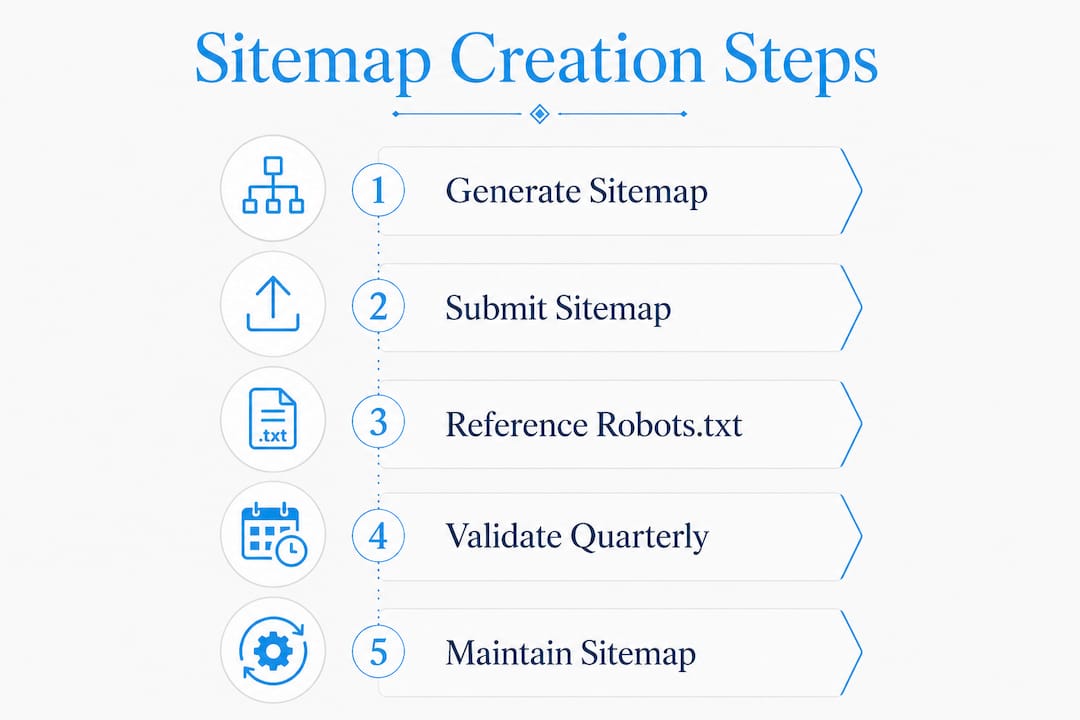
Step 1: Generate your sitemap
Most law firm websites run on WordPress, which supports sitemap generation through SEO plugins. Yoast SEO and Rank Math both produce XML sitemaps automatically and update them when you publish new content. If your site runs on a custom platform, dedicated sitemap generator tools can crawl your site and produce a valid XML file.
Step 2: Submit to search engines
Submitting your sitemap to Google Search Console and referencing it in your robots.txt file ensures discoverability by major search engines. In Google Search Console, navigate to the Sitemaps report, paste your sitemap URL (typically yoursite.com/sitemap.xml), and submit. Do the same in Bing Webmaster Tools. Both platforms confirm receipt and report any errors.
Step 3: Reference in robots.txt
Add a single line to your robots.txt file: Sitemap: https://yourfirm.com/sitemap.xml. This tells any crawler, not just Google, where to find your sitemap without requiring a manual submission.
Step 4: Validate and clean quarterly
Quarterly checks of sitemap status and errors in Google Search Console are the standard for maintaining accuracy. Look for pages returning 404 errors, redirect chains, or non-canonical URLs. Remove them immediately.
Sitemaps must only list canonical, indexable, HTTP 200 status URLs. Any URL returning a redirect or error code in your sitemap actively harms your crawl efficiency.
Pro Tip: Schedule a calendar reminder every quarter to open Google Search Console and review the Coverage and Sitemaps reports. Fix any flagged URLs within 48 hours to prevent indexing gaps.
The table below summarizes the key maintenance tasks and their recommended frequency:
| Task | Recommended frequency |
|---|---|
| Submit sitemap to Google Search Console | Once at launch, then after major site changes |
| Review sitemap errors in Search Console | Quarterly |
| Remove 404 and non-indexable URLs | As discovered, minimum quarterly |
| Update sitemap after new content is published | Immediately via plugin automation |
| Segment sitemap by content type | When site exceeds 200 pages |
Common pitfalls to avoid
Many firms include non-indexable or error pages in their sitemaps, which harms crawl efficiency. Other frequent mistakes include using HTTP URLs when the site runs on HTTPS, listing pages with canonical tags pointing elsewhere, and forgetting to update the sitemap after a site redesign. A law firm website rebranding checklist should always include sitemap review as a required step.
How a sitemap supports site architecture and client experience
A sitemap is not just a technical file. It is a mirror of your site's architecture. If your sitemap is disorganized, your site structure probably is too.
The HTML sitemap version serves a different but equally important purpose. Clients who cannot find what they need through your main navigation can use an HTML sitemap as a directory. For firms offering ten or more practice areas across multiple offices, this is a real usability tool, not a formality.
The table below compares how XML and HTML sitemaps function differently for law firm websites:
| Feature | XML sitemap | HTML sitemap |
|---|---|---|
| Primary audience | Search engine crawlers | Human visitors |
| Format | Machine-readable XML file | Linked page on your website |
| Main benefit | Faster indexing of all key pages | Easier navigation for clients |
| Updates | Automated via SEO plugin | Manual or template-driven |
| SEO impact | Direct crawl guidance | Indirect, through better engagement |
When you add a new office location or launch a new practice area, updating your sitemap immediately signals that change to Google. Pages that appear in the sitemap get crawled faster than those discovered only through internal links. That speed advantage matters when you are competing for local search rankings against other firms in your market.
Understanding law firm website hierarchy and how it connects to your sitemap structure gives your SEO efforts a measurable foundation. A well-structured site with a clean sitemap consistently outperforms a content-heavy site with poor architecture.
Key Takeaways
A law firm sitemap is a non-negotiable technical foundation that ensures your most important pages get indexed, discovered, and ranked by search engines.
| Point | Details |
|---|---|
| XML vs. HTML sitemaps | Use XML for crawlers and HTML for client navigation; both serve distinct purposes. |
| Page selection matters | Include only canonical, indexable, 200-status URLs to protect crawl budget. |
| Submit and reference correctly | Add your sitemap to Google Search Console and reference it in robots.txt. |
| Quarterly maintenance is required | Review and clean sitemap errors every quarter to maintain indexing accuracy. |
| Segmentation improves control | Split large sitemaps by content type to monitor practice areas, bios, and locations separately. |
Why law firms cannot afford to treat sitemaps as an afterthought
I have reviewed dozens of law firm websites over the years, and the sitemap is almost always the last thing anyone thinks about and the first thing that causes indexing problems. Firms spend thousands on content and design, then wonder why their new practice area pages are not showing up in search results. Nine times out of ten, the sitemap is either outdated, bloated with error pages, or was never submitted to Google Search Console at all.
The firms that get this right treat sitemap maintenance the same way they treat client file management: with a schedule, a responsible person, and a clear process. They segment their sitemaps by content type, they check Search Console quarterly, and they update the sitemap the same day they publish new content. That discipline compounds over time. Their pages get indexed faster, their local landing pages rank more consistently, and their crawl budget goes toward content that actually converts.
The uncomfortable truth is that a sitemap does not rank you. Content quality and authority do that. But a broken or bloated sitemap can actively prevent your best content from being seen. That is a self-inflicted wound no firm should accept. Treat your sitemap as infrastructure, not decoration, and it will quietly do its job every single day.
— Kate
Epdwebsites builds law firm websites with sitemap strategy built in
Law firm administrators who want their sites to perform in search should not have to manage sitemap submissions, crawl errors, and XML file structures on their own.

Epdwebsites has specialized in professional web design and hosting for attorneys since 2009. Every site we build includes proper sitemap architecture, Google Search Console setup, and the technical SEO foundation that legal websites require. Our web design and hosting packages are built specifically for professional service providers who need a site that works as hard as they do. If your current site is missing a clean sitemap or has never been submitted to Google, that is a fixable problem. We handle the technical side so you can focus on your clients.
FAQ
What is a sitemap for a law firm website?
A sitemap is a structured file, typically in XML format, that lists your website's URLs and signals their importance to search engines. Law firm sitemaps should include practice area pages, attorney bios, location pages, and blog content.
Do law firms need a sitemap?
Yes. Law firm websites with more than 50 pages need a sitemap to ensure all critical content gets indexed efficiently. Without one, important pages may never appear in search results.
How do I submit a law firm sitemap to Google?
Log in to Google Search Console, navigate to the Sitemaps section, and enter your sitemap URL (typically yoursite.com/sitemap.xml). Also add a reference to the sitemap in your robots.txt file for broader crawler discoverability.
How often should a law firm update its sitemap?
SEO plugins update XML sitemaps automatically when you publish new content. Manual reviews for errors and outdated URLs should happen at least quarterly using the Google Search Console Sitemaps report.
What pages should a law firm exclude from its sitemap?
Exclude any page returning a 404 error, redirect, or non-canonical URL. Also exclude tag pages, filtered results, and any page marked with a noindex tag. Only canonical, indexable, HTTP 200 status pages belong in a law firm sitemap.