
Yes, you can put HIPAA-compliant forms on your website, but only if every vendor touching that submission (host, form processor, email delivery) has signed a Business Associate Agreement and your stack enforces TLS encryption, encryption at rest, access controls, and audit logging. Before you build or buy anything, pull your current vendor list and confirm which ones will actually sign a BAA. If even one link in that chain won't, the whole form is a liability.
TL;DR:
- Ensure all vendors involved in data collection sign a Business Associate Agreement before PHI touches their systems.
- Verify encryption at every stage, including TLS 1.2 or higher in transit and encryption at rest in storage databases.
- Confirm notification emails and incoming data are securely routed and stored within HIPAA-compliant providers or servers.
- Regularly review access controls, audit logs, and retention policies, and test the full submission and breach response process periodically.
- Use only HIPAA-eligible hosting and form solutions that allow field-level control and specify BAA requirements explicitly from vendors.
Table of Contents
- What Makes a Web Form HIPAA-Compliant?
- Implementation Checklist: The Full Technical Stack
- How Do You Embed HIPAA Forms on Different Website Platforms?
- How Should Patient Data Move From Browser to Storage?
- Rolling Out and Maintaining Compliant Forms
- Why Compliance Has to Be Designed, Not Just Installed
- A Managed, HIPAA-Aware Website Built for Healthcare Practices
- Where to Verify These Claims Yourself
- Sources
What Makes a Web Form HIPAA-Compliant?
A form isn't compliant because it looks secure. It's compliant because a specific set of contractual and technical requirements are met, documented, and testable.
The Business Associate Agreement is the foundation. Under HIPAA, any vendor that creates, receives, maintains, or transmits protected health information on your behalf is a business associate, and HHS requires a signed BAA with each one before PHI ever touches their systems. That includes your form builder, your web host, your email delivery service, and any CRM or EHR the data flows into. Skip one, and you've created an unmonitored gap in the chain.
Encryption has two jobs: protecting data in transit and protecting it at rest. In transit means TLS 1.2 or higher on every page that touches PHI, not just the form page. At rest means the vendor storing submissions encrypts the database itself, not just the connection to it. Jotform publishes end-to-end encryption details and audit-ready activity logs as part of its HIPAA-enabled tier, which is the level of transparency worth asking any vendor to match.
Audit logs matter more than most practices realize until a breach investigation or a HIPAA audit forces the question. You need a record of who accessed a submission, when, and what they did with it. If a vendor can't produce that log on request, that's a real problem, not a minor inconvenience.
Beyond storage, verify these before you sign anything:
- E-signatures that meet ESIGN Act requirements, with a verifiable audit trail tied to the signer
- Role-based access controls so front-desk staff can't see clinical notes and vice versa
- Multi-factor authentication for anyone with admin access to submissions
- Secure file upload handling for insurance cards or photos of injuries
- Retention and auto-deletion settings, and templates built to collect only the minimum PHI needed
Pro Tip: Audit your form fields before launch. Every extra field asking for PHI you don't clinically need is one more data point you have to protect, encrypt, log, and eventually delete. Fewer fields means less risk surface, full stop.
Zoho Forms takes a similar approach, letting administrators mark specific fields as ePHI so encryption and access rules apply selectively rather than blanket. That level of control is worth prioritizing over a vendor that treats every field the same way.
Implementation Checklist: The Full Technical Stack
Every vendor in your submission path is a potential BAA gap. Walk the entire chain before launch, not after a patient complaint forces the audit.
- List every vendor that touches PHI. That's your web host, your form processor, your transactional email provider, the inbox where staff receive notifications, and whatever EHR or CRM the data lands in downstream.
- Confirm a signed BAA exists for each one. Not a promise, not a sales rep's assurance. A signed document on file, dated, and stored somewhere you can retrieve it during an audit.
- Check where notification emails actually go. This is the single most common failure point in the entire stack. A form vendor can encrypt storage perfectly, and the whole thing still breaks down if the "new submission" alert lands in an unencrypted Gmail inbox with the patient's name and complaint in the subject line.
- Verify your hosting is HIPAA-eligible. Many shared hosting plans are not, and most standard hosts won't sign a BAA at all, which means you need enterprise or HIPAA-tier hosting specifically built for this.
- Test the full submission path end to end. Submit a test form, trace where the data lands, confirm it's encrypted at rest, and pull the audit log to make sure the event was captured correctly.
- Run a breach-response drill. Know who gets notified, how fast, and what the notification timeline requires, before you ever need to use it for real.
Common failure modes worth watching for: analytics scripts that scrape form fields for conversion tracking (a serious HIPAA violation if PHI ends up in your Google Analytics dashboard), plugin updates that silently reset security settings, and staff forwarding form notifications to personal email during busy weeks. None of these show up in a demo. All of them show up in an audit.
How Do You Embed HIPAA Forms on Different Website Platforms?
The platform your website runs on changes what "compliant" actually requires, and this is where a lot of practices get tripped up.
Embedded forms versus hosted links. An embedded form lives visually on your page but often submits data to the vendor's own servers, which is fine as long as that vendor has a BAA. A hosted link sends the patient to the vendor's domain entirely. Neither approach is automatically safer. What matters is where the data lands and whether that landing spot is covered.
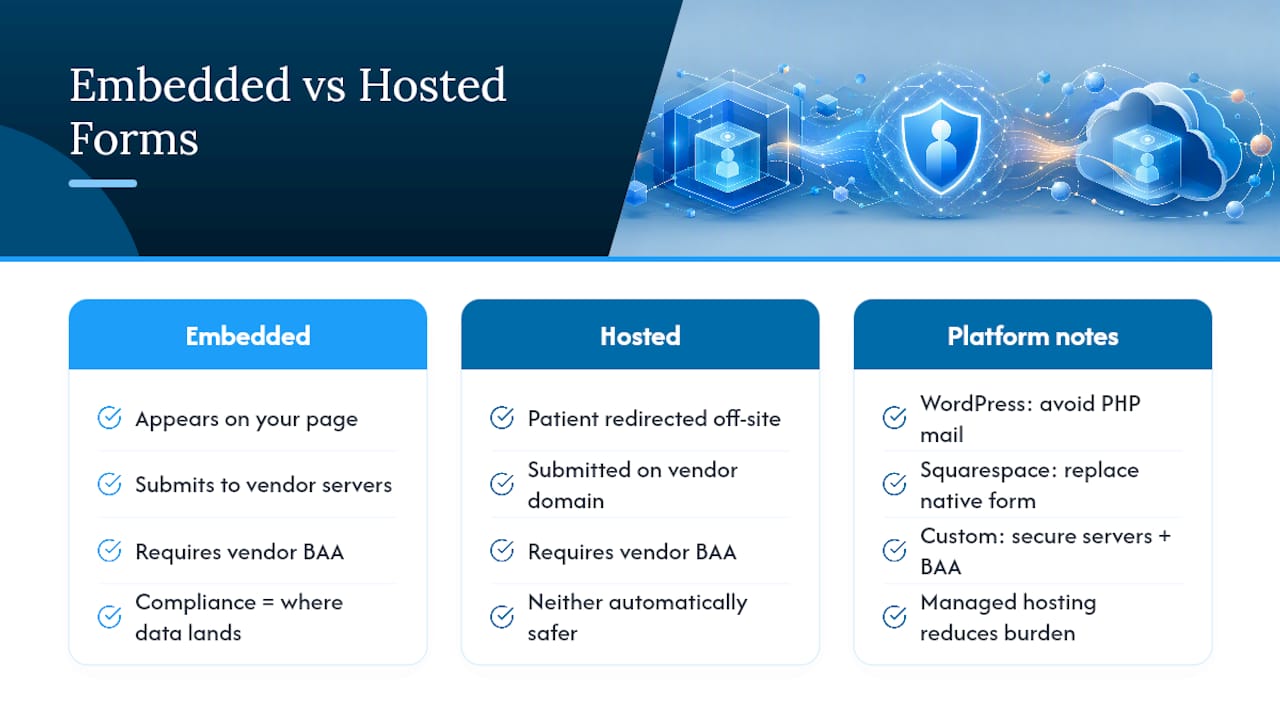
WordPress needs the most hands-on attention. Default WordPress mail functions and most free contact-form plugins were never built with PHI in mind, and routing notifications through PHP's default mail function is one of the most frequent compliance failures practices run into. Fix it by pairing HIPAA-eligible hosting with a form plugin built for healthcare and routing every notification through a transactional email provider that will sign a BAA. Generic shared hosting plans typically won't offer that agreement at any price.
Squarespace and other site builders create a different trap. Native contact forms on these platforms generally aren't built for PHI at all, and the safer move is replacing the built-in form with a HIPAA-capable hosted provider rather than trying to retrofit compliance onto a tool that was never designed for it.
Custom-built sites carry the most responsibility. There's no vendor to blame if something breaks. Server-side encryption, secure API calls, and a signed hosting BAA all fall on whoever built and maintains the site, which is exactly why managed hosting for medical websites built with these requirements in mind saves administrators from reinventing this wheel.
How Should Patient Data Move From Browser to Storage?
Picture the ideal path: a patient fills out a form over HTTPS, the submission lands in encrypted storage at the vendor, and from there it either exports securely into your EHR or generates a secure PDF for staff to review. Every hop in that chain needs its own protection, and skipping a step anywhere breaks the whole thing.

Minimize what you collect in the first place. Conditional logic is your best friend here. If a patient answers "no" to a question about current medications, the form should skip the follow-up fields asking for dosage and prescriber, rather than collecting unnecessary detail nobody will use.
Access governance deserves a recurring slot on someone's calendar, not a one-time setup:
- Review who has admin access to form submissions every quarter, and remove anyone who's changed roles or left
- Require MFA for every account touching PHI, no exceptions for convenience
- Sample the audit logs periodically instead of only pulling them after something goes wrong
- Restrict privileged accounts to the smallest group that genuinely needs them
Backups need the same encryption and BAA coverage as live data. A backup sitting unencrypted on a third-party server is just as exposed as an unprotected inbox. Set a clear retention policy, and when data ages out, delete it through a documented, secure process rather than letting it pile up indefinitely.
Pro Tip: Build your breach-response plan before you need it, not during. Know your detection window and your notification deadline in advance, because scrambling to figure out HIPAA's notification timeline in the middle of an actual incident is how mistakes happen.
Rolling Out and Maintaining Compliant Forms
Launching is only half the job. Compliance has to survive contact with real staff, real patients, and real software updates six months from now.
- Run staging tests before go-live. Submit test entries covering every field type, confirm encrypted delivery, and check that audit logs capture each event accurately.
- Onboard staff with clear roles. Define who can view submissions, require MFA for that access, and train front-desk staff on how to handle a patient's request to correct or delete their data.
- Set a maintenance cadence. Quarterly BAA reviews, annual vendor audits, and a check after any major plugin or platform update, since updates are a common point where security settings quietly reset.
- Know when to call in specialists. Complex HL7 or EHR integrations, or a vendor that won't produce a BAA no matter how many times you ask, are both signs it's time for outside technical help rather than pushing forward alone.
A medical practice website launch checklist built around these phases keeps the rollout from turning into guesswork.
Why Compliance Has to Be Designed, Not Just Installed
Epdwebsites has built websites for professional service providers, including medical practices, since 2009, and the pattern holds steady: the practices that struggle with HIPAA forms usually have the right software already. What they're missing is the operational design around it, staff who know which inbox is safe to check, a documented BAA file, a person responsible for the quarterly review. One clinic we've seen cut intake errors substantially just by adding conditional logic that stopped collecting fields nobody was using downstream. The technology is the easy part. The habits around it are what actually hold up during an audit.
— Kate
A Managed, HIPAA-Aware Website Built for Healthcare Practices
Chasing down BAAs across five different vendors while also trying to run a practice is its own kind of full-time job, and most administrators don't have the bandwidth for it. Epdwebsites handles that groundwork directly: HIPAA-eligible hosting with a signed BAA, secure form implementation, staging tests before anything goes live, and support for connecting your intake forms to the EHR or CRM you already run on.

That means one point of contact instead of five separate vendor contracts to track, and a build that's tested for compliance before your first patient ever fills out a form. Every project includes ongoing maintenance, so plugin updates and platform changes get checked against your compliance setup instead of quietly breaking it. If your practice needs a website built around these requirements from the ground up, see what's included in a managed website build and get a plan that fits your specialty and your current systems.
Where to Verify These Claims Yourself
Every vendor and compliance claim in this piece has a public page you can check directly rather than taking anyone's word for it, including ours. Start with HHS's HIPAA guidance for covered entities for the legal baseline on BAAs and PHI handling.
For vendor-specific detail, Jotform's HIPAA page outlines its encryption and audit-log setup, Zoho Forms documents its field-level ePHI marking, and FormDoctor shows what a purpose-built intake platform with EHR integration looks like in practice. Each page lists how to request a BAA directly, which is the fastest way to confirm a vendor will actually back up its compliance claims in writing.
This article is general information, not a substitute for advice from a qualified lawyer. Consult a qualified legal professional about your own circumstances before acting on anything here.