
A working patient intake forms website replaces paper clipboards with secure, mobile-first digital forms that patients can complete before they ever walk in. To do that job right, it needs a signed Business Associate Agreement, either a direct connection to your EHR or practice management system or a clean data export, a responsive design that works on any phone, editable templates, and encrypted storage with a full audit trail.
TL;DR:
- Digital intake forms must be secured with a signed Business Associate Agreement and encrypted, role-based access to ensure HIPAA compliance.
- Forms should support conditional logic, electronic signatures, and flexible export options to match legal and clinical requirements without rewriting existing language.
- Integration options like direct EHR connections simplify data flow, but manual CSV import remains a fallback requiring careful testing before full rollout.
- The success of electronic forms depends heavily on optimal placement on the website and user-friendly design features to reduce abandonment.
- Implementing secure, branded online intake within your website can streamline workflows and reduce staff time spent on data entry and correction.
Table of Contents
- Why Move Patient Intake Forms Online
- HIPAA, Security, and Compliance Essentials for Online Intake
- Templates, Form Building, and Customization: What to Expect
- Integration and Workflow: EHR, PMS, and Data Flows
- Getting Started: Setup Steps, Timeline, and Pricing to Expect
- Data Storage, Retention Policies, and Backup Procedures
- Legal Considerations Beyond HIPAA: Consent and Liability
- Handling Patient Digital Signatures Securely and Legally
- What Actually Moves the Needle on Patient Intake
- How Epdwebsites Builds HIPAA-Ready Intake Into Your Website
- Sources
Why Move Patient Intake Forms Online
Paper intake costs more time than most administrators realize. A front-desk staffer spends several minutes per patient just deciphering handwriting and manually keying insurance numbers into the practice management system. Multiply that by a full day's schedule and you've lost hours that could go toward actual patient care. Digital intake forms cut that transcription work almost to zero because the data arrives typed, structured, and ready to drop into a chart.
The forms worth digitizing first are the ones that eat the most staff time or carry the highest error risk:
- New patient registration and demographics
- Medical history and current medications
- Consent forms for treatment, HIPAA acknowledgment, and financial responsibility
- Payment and insurance card capture
- Pre-visit health screening questionnaires
Patients can complete these through a few different channels: a link texted or emailed before the appointment, a tablet or kiosk in the waiting room, or a form embedded right on your website's "New Patients" page. Most practices end up running two channels at once, pre-visit links for scheduled appointments and an in-office backup for walk-ins or patients who forgot.
HIPAA, Security, and Compliance Essentials for Online Intake
Any vendor handling protected health information for a covered entity must sign a Business Associate Agreement (BAA) before you send a single form live. That agreement should spell out data ownership, breach notification timelines, and exactly what the vendor is permitted to do with the information it stores. If a sales rep hesitates on the BAA question, that's your answer.
Beyond the paperwork, verify the technical and operational controls actually back it up. Ask vendors these questions directly:
- Is data encrypted in transit (TLS/SSL) and at rest?
- Does the platform log every access event, and can you pull an audit trail on demand?
- Is access role-based, so front-desk staff and clinicians see only what they need?
- What's the incident response process if a breach occurs?
- Can you provide a SOC 2 or ISO 27001 attestation, or at minimum a security whitepaper?
Pro Tip: Keep the signed BAA and the vendor's security documentation in a shared compliance folder your practice's HIPAA officer can access anytime. When an auditor or a nervous new hire asks "are we covered?", you want that answer in thirty seconds, not thirty emails.
Templates, Form Building, and Customization: What to Expect
Most platforms ship with a library of ready-made templates, new patient packets, consent forms, screening questionnaires, so you're not building from a blank page. The harder work is converting your existing PDFs without losing legal language your compliance officer already approved. A good builder lets you paste that exact wording into a form field rather than forcing a rewrite.
Look for these capabilities before you commit to a builder:
- Conditional logic that shows or hides fields based on prior answers (skip the pregnancy questions for a male patient, for instance)
- Multi-page packets with a progress indicator, so a ten-page intake doesn't feel like one endless scroll
- Electronic signature capture and file or photo upload for insurance cards and IDs
- Multilingual support and accessible formatting for patients using screen readers
- Export options in PDF, CSV, or structured data formats your EHR can actually ingest
Template libraries like the ones JotForm publishes show how far no-code builders have come, though clinical practices still need to check every converted form against the original legal text line by line.
Integration and Workflow: EHR, PMS, and Data Flows
Three connector types exist, and each comes with a tradeoff. Native EHR integrations post data directly into a patient's chart with no manual step, but they only work if your vendor has already built that specific connector for your system. HL7 or API-based connections are more flexible and can bridge to almost any system, though they usually need IT involvement to configure. CSV export and import is the fallback: universal, but someone has to run the import manually.
The highest-impact workflow trigger is sending the form automatically the moment an appointment gets booked, whether through your scheduler or a calendar invite with an embedded link. Reminder nudges a day or two before the visit catch the patients who ignored the first message. Kiosk check-in covers everyone else. Some practices also deploy dedicated intake apps for tablets when they want a managed, locked-down device experience instead of a browser tab.
Before full rollout, test the pipeline with a handful of sample patients:
- Confirm every field maps to the correct location in the patient record
- Check for duplicate patient records created by mismatched name or date-of-birth formatting
- Verify uploaded documents (insurance cards, IDs) attach to the right chart, not a generic queue
Getting Started: Setup Steps, Timeline, and Pricing to Expect
Rolling out digital intake follows a predictable sequence: audit your current paper forms, pick or build templates that match them, map every field to your EHR or PMS, pilot with a small group of staff, then launch practice-wide.
- Audit existing paper and PDF forms for outdated or redundant fields
- Select templates and customize the legal and clinical language
- Map fields to your practice management system
- Pilot with front-desk staff for one to two weeks
- Train staff over one or two sessions, then launch organization-wide
A realistic timeline runs two to six weeks depending on how many systems need integration; for healthcare businesses navigating such digital transformations, financing options like a Healthcare Business Loan SG can support these investments. Pricing typically follows a monthly subscription per location or per provider, with add-on fees for SMS reminders or extra storage, plus a one-time setup or onboarding fee.
Pro Tip: Short training videos, even a two-minute screen recording hosted somewhere like Wistia, cut staff support calls dramatically compared to a printed instruction sheet nobody reads.
Data Storage, Retention Policies, and Backup Procedures
Where patient data lives, and how long it stays there, matters as much as how it gets collected. Most states require medical records to be retained for a minimum period, often seven years for adults and longer for minors, though the exact number varies by state and by whether the patient is a minor. Your intake platform's retention settings need to match whatever your state and your malpractice carrier require, not the vendor's default setting.
Ask any platform where servers are physically located and whether data is encrypted both at rest and in transit. Backup procedures deserve equal scrutiny: does the vendor run automated daily backups, and can they demonstrate a recent successful restore, not just a backup log that nobody has tested? A backup that has never been restored is a backup you can't actually trust.
Retention policy also needs an offboarding clause. If you switch vendors or close a location, what happens to the data? A responsible platform gives you a defined export window and a certificate of deletion once you've pulled everything you need. Get that in writing before you sign, not after you're trying to leave.
Finally, separate "storage" from "access." Data can sit encrypted on a server for years while still being accessible to far more staff than it should be. Role-based access controls limit who can view stored records, and periodic access reviews, quarterly is a reasonable cadence, catch permissions that should have been revoked when someone changed roles or left the practice.
Legal Considerations Beyond HIPAA: Consent and Liability
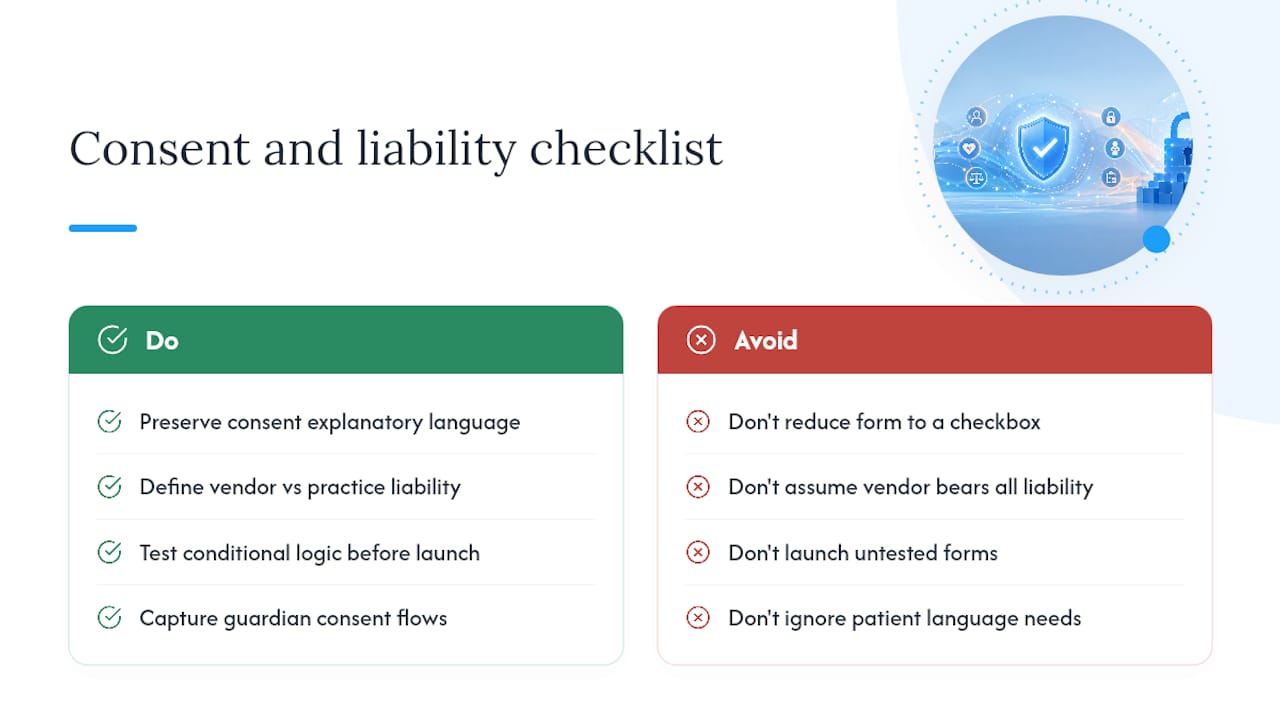
HIPAA covers privacy and security, but it doesn't address whether a digital consent form actually holds up if a patient later disputes it. Informed consent for treatment is a separate legal requirement, and the language needs to be clear enough that a reasonable patient understood what they agreed to. Converting a paper consent form into a digital checkbox without preserving the original explanatory language is a common shortcut that weakens that protection.
Liability shifts a little differently onliner than on paper. If a form has a bug, a conditional field that should have appeared but didn't, and a patient's allergy information never reaches the clinician, the practice still bears the clinical responsibility even though the vendor built the software. That's why the contract with your intake vendor should spell out where their liability ends and where yours begins, and why testing the form's logic thoroughly before launch isn't optional.
Minors, guardianship, and language barriers each add another layer. A form needs a way to capture that a parent or legal guardian, not the patient, is providing consent, and it needs to hold up if that consent is later challenged. Multilingual support matters here too: a consent form a patient can't fully read in their own language is a weak legal document regardless of how secure the platform storing it happens to be.
None of this replaces a conversation with legal counsel familiar with your state's consent statutes. But knowing where the gaps typically show up, conditional logic failures, translated consent language, guardian consent flows, lets you ask sharper questions before a problem surfaces.
Handling Patient Digital Signatures Securely and Legally
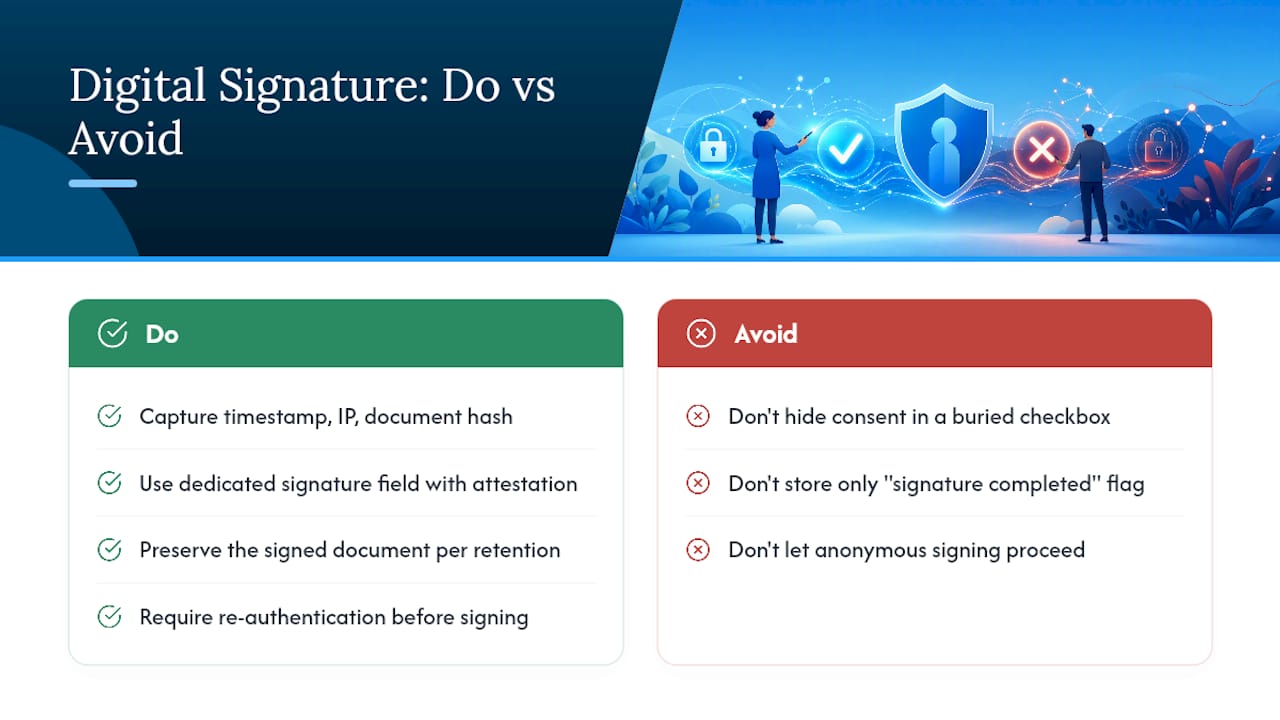
A digital signature on an intake form needs to do two things simultaneously: prove the person signing is who they claim to be, and create a record that can't be quietly altered afterward. Most compliant e-signature systems handle this by capturing a timestamp, an IP address, and sometimes a typed or drawn signature alongside a hash of the exact document version signed. Change the document later and the signature no longer matches, which is exactly the point.
The ESIGN Act and state-level equivalents generally recognize electronic signatures as legally binding for consent and treatment authorization, provided the process meets a few conditions: the signer must clearly intend to sign, must be able to access and retain a copy of what they signed, and the system must reliably associate the signature with that specific document. A checkbox buried at the bottom of a long form with no clear signature block is legally shakier than a dedicated signature field with a visible attestation statement.
Storage matters just as much as capture. The signed document, not just a record that a signature occurred, needs to be retained for the same period your state requires for the underlying medical record. If a vendor only stores "signature completed: yes" without preserving the actual signed document, you have a compliance gap that surfaces the moment a dispute lands on your desk.
One practical safeguard: require re-authentication (a code sent to a phone or email) before allowing anyone to open and sign a consent packet, especially for high-stakes documents like treatment consent or financial responsibility agreements. It's a small friction point that closes a real gap between "someone signed this" and "the patient signed this."
What Actually Moves the Needle on Patient Intake
Most guides on this topic obsess over compliance checklists and skip the part that actually determines whether patients finish the form: where it lives on your website and how it's designed to feel. A form buried three clicks deep in a "Resources" menu gets abandoned. A form linked directly from the homepage, the appointment confirmation, and a dedicated pre-visit page gets completed.
Placement isn't the only lever. Accessible design, larger tap targets, clear progress indicators, plain-language field labels, cuts abandonment more than any feature list a vendor pitches you. We've found that practices who treat their patient portal as an extension of the website rather than a bolted-on afterthought see far fewer confused front-desk calls. The maintenance side matters just as much: hosting, security patches, and backups need to run quietly in the background so staff never think about them until they need to.
— Kate
How Epdwebsites Builds HIPAA-Ready Intake Into Your Website
A vendor's generic form builder solves half the problem. The other half is getting that form to actually live inside a website that looks credible, loads fast on a patient's phone, and doesn't break when your EHR updates. Epdwebsites has built and hosted medical and professional websites since 2009, and integrating secure patient intake into that design is part of the standard build, not an expensive add-on bolted on later.

A typical project includes custom design around your existing patient workflow, secure hosting with the technical controls compliance officers actually ask about, and staff onboarding so your front desk isn't guessing how the new forms behave on launch day. Most practice sites with integrated intake go from kickoff to live in a matter of weeks, not months. If your current site still routes new patients to a PDF download, start with a look at Epdwebsites' website features and see what a properly integrated intake workflow could look like on your own site.