
A website prototype is an interactive, clickable model of a law firm's site that simulates real user journeys, navigation flows, and client intake workflows before a single line of production code is written. The industry term is "interactive prototype," and understanding what does website prototype mean for law firms is the first step toward avoiding costly redesigns and missed client conversions. Unlike a static brochure site, a legal website prototype lets you test how a prospective client moves from your homepage to a consultation request form, revealing friction points before they cost you cases.
How does a website prototype improve law firm website design efficiency?
Prototyping reduces rework by 40% and accelerates development by 30%. That means a project your team estimated at 10 weeks can realistically ship in 7, with fewer emergency revisions after launch.

The reason is straightforward. When attorneys and managers can click through a working model of their site, they spot problems immediately. A partner might discover that the "Schedule a Consultation" button is buried three scrolls below the fold. A manager might notice the intake form asks for case details before collecting basic contact information, which frustrates prospective clients and drives them away.
Fidelity levels determine how much detail a prototype contains at each stage:
- Low-fidelity prototypes focus on layout and basic click-through navigation. They are fast to build and ideal for early stakeholder alignment.
- Mid-fidelity prototypes add realistic content, typography, and form fields. They work well for internal usability reviews.
- High-fidelity prototypes closely resemble the finished site, with real visuals, animations, and full interactivity. These are used for final approval and developer handoff.
Fixing a navigation problem in a low-fidelity prototype takes an hour. Fixing the same problem after launch can take days and disrupt active client traffic. The math strongly favors prototyping early.
Pro Tip: Start your law firm's prototype at low fidelity and get at least two non-attorney staff members to test it. They will find usability problems your design team overlooked because they are closer to the client experience.
Prototypes vs. wireframes vs. mockups: what is the real difference?
Many law firm partners hear these three terms used interchangeably. They are not the same, and the distinction matters when you are managing a website development budget.
| Design Artifact | Interactivity | Visual Detail | Primary Use |
|---|---|---|---|
| Wireframe | None | Low (boxes and lines) | Structure and layout planning |
| Mockup | None | High (full visual design) | Visual approval and branding review |
| Prototype | Full click-through | Low to high | User flow testing and stakeholder sign-off |
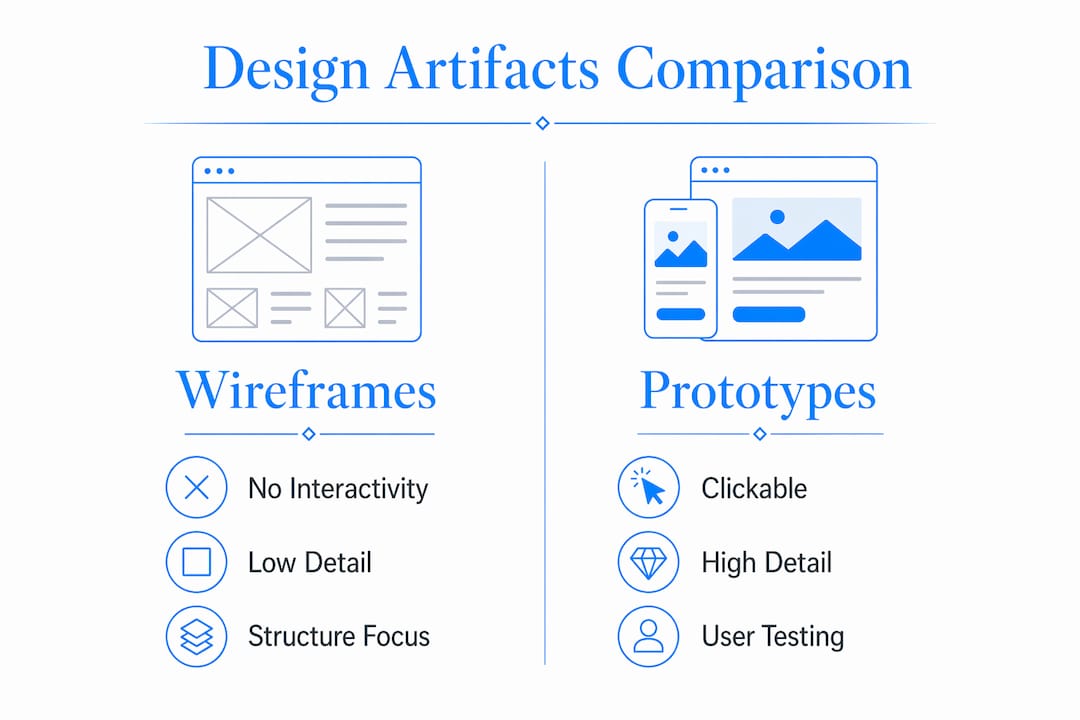
Prototypes provide interactivity that wireframes and mockups simply cannot. A wireframe shows you where the document upload button will sit on the page. A prototype lets a test user actually try to upload a document and reveals whether the file size limit error message is clear, whether the confirmation screen appears correctly, and whether the form resets properly after submission.
For law firms, this distinction is especially important. Client intake is a multi-step process involving personal information, case type selection, document uploads, and scheduling. A static mockup cannot expose the broken logic that sends a user back to step one after a timeout. A prototype catches it before your developer writes the code.
Tools like Figma and Adobe XD are the industry standard for building legal website prototypes. Claude Design is also used specifically for mocking client portal workflows without requiring a vendor commitment upfront.
Pro Tip: When reviewing a prototype in Figma or Adobe XD, ask your designer to walk through the "error path," not just the happy path. What happens when a client uploads the wrong file type? That scenario reveals more than a perfect run-through ever will.
Custom build vs. vendor portal: how prototyping guides the decision
This is where prototyping delivers its highest return for law firms. Many firms default to off-the-shelf client portal vendors without testing whether those platforms actually match their workflows. The result is predictable.
Vendor portals meet only 70–90% of a firm's workflow needs, leaving a 10–30% functionality gap that firms either work around manually or pay to customize at significant cost. That gap represents real operational friction: staff workarounds, client confusion, and missed intake steps.
Prototyping solves this by acting as a decision tool before you sign a vendor contract. Here is how the process works in practice:
- Map your firm's actual client intake workflow, including every form field, document requirement, and confirmation step.
- Build a prototype that replicates that workflow exactly as your firm needs it.
- Test the vendor portal against the prototype to identify where it falls short.
- Use the gap analysis to decide whether to customize the vendor solution or build a custom site.
"Firms should treat prototypes as digital twins of their operations, pressure-testing scenarios like network drops or permission errors before committing to a development path." — AI Vortex Legal Guides
One family law firm discovered through this process that their preferred vendor portal did not support conditional form logic, meaning clients with minor children were shown the same intake form as clients without. The prototype revealed this gap in two hours of testing. Fixing it post-launch would have required a custom integration costing several times the prototype investment.
How do prototypes increase client engagement and contact form submissions?
Law firm websites in 2026 prioritize functional client engagement over visual design. That shift makes prototyping a direct revenue tool, not just a technical step.
Strategic placement of calls to action, tested through prototyping, boosts contact form submissions by 47%. That is not a marginal improvement. For a firm receiving 50 website inquiries per month, a 47% increase means roughly 23 additional potential client contacts every month.
Here is how to use prototyping specifically to drive that result:
- Test CTA placement on mobile first. More than half of legal website visitors arrive on a phone. Prototype the mobile layout separately and confirm your "Call Now" or "Get a Free Consultation" button is visible without scrolling.
- Reduce intake form fields. Prototype two versions of your contact form: one with 8 fields and one with 4 fields. Test both with real users and measure where they abandon. Shorter forms consistently outperform longer ones.
- Validate content hierarchy. Place your strongest trust signal (bar membership, years of practice, client results) above the fold in the prototype and test whether users notice it before they reach the contact form.
- Test responsive behavior. A prototype built in Figma can simulate tablet and desktop breakpoints. Confirm that your intake form does not collapse into an unusable layout on a 10-inch screen.
The user experience principles that apply to professional service sites are especially sharp for law firms because trust is the primary conversion driver. A prototype lets you test whether your site communicates that trust before you spend money building it.
Pro Tip: Record short screen-capture sessions of real users navigating your prototype. Watching someone hesitate for 8 seconds on your navigation menu tells you more than any survey response.
What are best practices for prototyping a law firm website?
The prototyping process works best when it follows a clear progression and involves the right people at each stage.
Build in stages, not all at once
Start with a low-fidelity prototype covering your five most critical pages: home, practice areas, attorney profiles, contact, and intake form. Get internal sign-off before adding visual detail. Moving to high fidelity too early wastes time on aesthetics before the structure is validated.
Involve real users early
Attorneys and managers are too close to the content to spot usability problems. Bring in two or three people who match your typical client profile and ask them to complete a specific task: "Find out how to schedule a consultation for a divorce case." Watch where they get stuck. Their confusion is your prototype's most valuable output.
Use a structured testing checklist
Before signing off on any prototype, verify these elements:
- All navigation links resolve to the correct destination page
- The intake form submits successfully and displays a confirmation message
- Error states (wrong file type, missing required field) display clear, helpful messages
- The site renders correctly on mobile, tablet, and desktop viewports
- Load time simulation shows no critical bottlenecks on the homepage
A prototype's job is to make itself obsolete by clearing the path to production. When your developer receives a high-fidelity prototype with documented interactions and tested user flows, the handoff is clean and the build is faster.
Prototyping reduces risk by demonstrating how features behave under realistic conditions, not just ideal ones. For a law firm, that means testing what happens when a client tries to upload a 50MB PDF, not just a 2MB one.
Pro Tip: Schedule a final prototype review with your firm's receptionist or intake coordinator. They handle client questions daily and will immediately spot form language that confuses real callers.
Key takeaways
A website prototype is the single most effective tool a law firm can use to reduce development risk, validate client workflows, and increase contact form conversions before launch.
| Point | Details |
|---|---|
| Prototype definition | An interactive, clickable model that simulates real client navigation before development begins. |
| Development efficiency | Prototyping reduces rework by 40% and cuts development time by 30% on average. |
| Vendor portal decisions | Use prototypes to expose the 10–30% functionality gap in off-the-shelf portals before signing contracts. |
| Client conversion impact | Strategic CTA placement tested through prototyping increases contact form submissions by 47%. |
| Best practice sequence | Progress from low-fidelity layout testing to high-fidelity clickable models before developer handoff. |
Why i think most law firms skip the step that matters most
I have worked on professional service websites since 2009, and the pattern is consistent. Law firm partners approve a visual mockup, assume the design is "done," and hand it to a developer. Six weeks later, the intake form breaks on mobile, the document upload crashes on large files, and the "Contact Us" button is invisible on the homepage.
Every one of those problems would have surfaced in a two-hour prototype test. The real cost is not the fix itself. It is the client inquiries lost during the two weeks the site is broken, and the credibility damage to a firm that presents itself as detail-oriented.
Treating a prototype as a digital twin of your firm's operations, not just a marketing preview, changes the entire outcome. I have seen firms avoid five-figure post-launch fixes by testing one conditional logic path in their intake form during prototyping. That is not a hypothetical. It is a repeatable result.
The firms that get the most from their attorney website design investment are the ones who treat the prototype phase as seriously as the final build. They bring in real users, test error paths, and push back on anything that is not clear to a first-time visitor. That discipline pays off in measurable client engagement, not just a site that looks good in a screenshot.
— Kate
Get a law firm website built right the first time
If you are ready to move beyond static mockups and build a site that actually converts visitors into clients, Epdwebsites has been doing exactly that for professional service firms since 2009.

Epdwebsites builds premium law firm websites that include structured design reviews, responsive layouts, and intake-focused user flows tested before launch. Every project includes personalized support, fast turnaround, and hosting built for professional credibility. Whether you are starting from scratch or replacing a site that is not performing, the process starts with understanding your firm's specific client workflows, not a generic template. Explore the law firm website benefits that drive real client growth, then reach out to discuss your project.
FAQ
What does a website prototype mean for a law firm?
A website prototype is an interactive model of your firm's site that lets you test navigation, intake forms, and client workflows before development begins. It is the industry-standard method for catching usability problems before they cost you clients or budget.
How is a prototype different from a wireframe?
A wireframe is a static layout showing page structure, while a prototype is clickable and simulates real user interaction. Prototypes reveal broken flows and form errors that wireframes cannot expose.
What tools are used to build legal website prototypes?
Figma and Adobe XD are the most widely used tools for building law firm website prototypes. Claude Design is also used specifically for mocking client portal workflows without requiring a vendor commitment.
How much can prototyping improve contact form conversions?
Strategic CTA placement and intake form optimization tested through prototyping increases contact form submissions by 47%, according to legal web design research. That translates directly to more qualified client inquiries per month.
When should a law firm start the prototyping process?
Prototyping should begin after the initial site structure is agreed upon but before any production code is written. Starting with a low-fidelity prototype and progressing to high fidelity ensures stakeholder alignment at every stage without wasting development hours on unvalidated designs.