
Legal website accessibility compliance is the practice of building and maintaining a website that meets the Americans with Disabilities Act and the Web Content Accessibility Guidelines so all users can access your content and your business stays legally defensible. The Department of Justice formally adopted WCAG 2.1 Level AA as the mandatory standard for public entities, with a compliance deadline of april 26, 2028 for small Title II organizations. Federal courts apply the same standard to private businesses under Title III, even without a formal DOJ rule. For attorneys, CPAs, medical practices, and other professional service providers, this legal website accessibility compliance guide covers every layer: applicable law, technical requirements, audit steps, and ongoing risk management.
Which laws govern website accessibility compliance?
Website accessibility law in the U.S. flows from two primary sources: the ADA and federal court precedent. Understanding which applies to your business determines your compliance obligations and your litigation exposure.
ADA Title II vs. Title III

ADA Title II covers state and local government entities. The DOJ's 2024 rulemaking explicitly adopted WCAG 2.1 Level AA for Title II web accessibility, giving government websites a clear, enforceable standard. Title III covers places of public accommodation, which courts have consistently interpreted to include commercial websites. No formal DOJ regulation exists for Title III private sites, but federal courts in the Second, Ninth, and Eleventh Circuits apply WCAG 2.1 and 2.2 Level AA as the benchmark in private lawsuits.
State laws add monetary stakes
The ADA limits plaintiffs to injunctive relief at the federal level. State laws in California, New York, and Florida permit monetary damages. That gap is exactly why digital accessibility litigation attracts plaintiff attorneys. A demand letter under California's Unruh Act, for example, can carry statutory damages of $4,000 per violation.
The litigation volume is not theoretical
Over 4,000 ADA web-related lawsuits and tens of thousands of demand letters are filed annually in the U.S. That volume means professional service providers with client-facing websites, including law firms, medical practices, and financial consultants, face real and measurable risk. Knowing the legal requirements for websites is no longer optional for any business that serves the public online.
Key legal frameworks to track:
- ADA Title II: Applies to government entities; WCAG 2.1 Level AA mandatory; april 2028 deadline for small entities
- ADA Title III: Applies to commercial websites; courts use WCAG 2.1/2.2 AA as the de facto standard
- State laws: California Unruh Act, New York Human Rights Law, and Florida Civil Rights Act add monetary damages
- Section 508: Applies to federal agencies and contractors; also references WCAG 2.1 Level AA
What are the technical requirements of WCAG 2.1 and 2.2?
WCAG, the Web Content Accessibility Guidelines published by the World Wide Web Consortium, organizes all requirements under four principles: Perceivable, Operable, Understandable, and Robust. These four principles are often called POUR. Every technical requirement in the standard traces back to one of them.
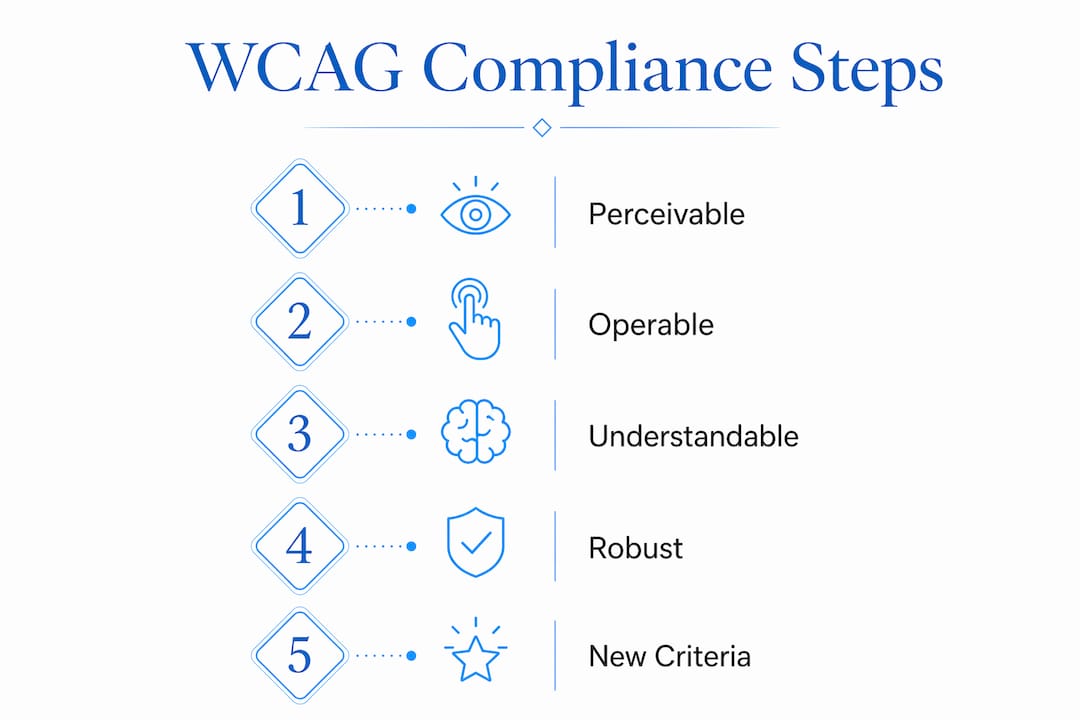
The POUR framework in practice
Perceivable means users can see or hear all content. Operable means all functions work without a mouse. Understandable means content and interfaces behave predictably. Robust means the code works with current and future assistive technologies like screen readers and voice control software. A site that fails on any one principle fails compliance.
Specific Level AA requirements you must meet
- Color contrast ratio: Text must achieve a minimum contrast ratio of 4.5:1 against its background. Large text (18pt or 14pt bold) requires 3:1. A website color scheme for law firms built without checking contrast ratios is one of the most common compliance failures.
- Alt text for images: Every meaningful image needs a descriptive text alternative. Decorative images require an empty alt attribute so screen readers skip them.
- Keyboard navigation: Every interactive element, menus, forms, buttons, modals, must be reachable and operable using only a keyboard. Keyboard traps, where focus gets stuck, are a direct ADA violation.
- Form accessibility: All form fields need visible labels. Error messages must identify the specific field and explain how to fix the problem.
- Video captions: Prerecorded video requires synchronized captions. Live video requires real-time captions.
- Resize and reflow: Text must scale to 200% without loss of content or function. On mobile viewports, content must reflow without horizontal scrolling.
WCAG 2.2 adds eight new criteria over 2.1
The most relevant additions for professional service websites include Focus Appearance (visible keyboard focus indicators must meet minimum size and contrast), Dragging Movements (any drag action must have a single-pointer alternative), and Accessible Authentication (login processes cannot require cognitive tests like puzzles). Targeting WCAG 2.2 over 2.1 is the prudent choice because it is backward-compatible and aligns with where DOJ enforcement is heading.
Pro Tip: Run your site through the W3C's free WCAG 2.2 Quick Reference checklist before any audit. It maps every success criterion to a testable condition and saves hours of guesswork during manual review.
| Feature area | WCAG 2.1 Level AA | WCAG 2.2 Level AA |
|---|---|---|
| Color contrast | 4.5:1 for normal text | Same, unchanged |
| Keyboard focus | Visible focus required | Minimum size and contrast added |
| Authentication | No specific rule | Cognitive tests prohibited |
| Dragging interactions | No specific rule | Single-pointer alternative required |
| Form error handling | Labels and error messages | Same, unchanged |
How to conduct a website accessibility audit and remediation plan
A website accessibility audit is the structured process of identifying every barrier on your site and creating a prioritized plan to fix them. The audit has two phases: automated scanning and manual testing.
Phase 1: Automated scanning
Automated tools like axe DevTools, WAVE, or Lighthouse scan your HTML and flag issues like missing alt text, low contrast, and absent form labels. These tools are fast and consistent. The limitation is real: automated checkers alone miss complex issues like keyboard traps, navigation flow problems, and screen reader announcement errors. Automation typically catches 30–40% of accessibility issues. Manual testing catches the rest.
Phase 2: Manual and assistive technology testing
Manual testing means navigating your entire site using only a keyboard, then repeating the process with a screen reader like NVDA on Windows or VoiceOver on macOS. Test every form submission, every modal dialog, every PDF download, and every client portal. Combining automated scans with manual keyboard and screen reader testing captures the complex issues that automation misses entirely.
Phase 3: Prioritize and remediate
Not all issues carry equal legal weight. Prioritize fixes in this order:
- Barriers that block access entirely, such as forms users cannot submit or navigation users cannot reach by keyboard
- Content failures affecting core information, such as images without alt text on service pages
- Enhancement issues that affect experience but not core access, such as focus indicator styling
Phase 4: Build your compliance documentation
Documenting accessibility efforts with formal statements, user feedback mechanisms, and remediation logs creates a compelling affirmative defense in litigation. Your accessibility statement should name the standard you target, list known limitations, and provide a direct contact method for users to report issues. The DOJ advises every business to include a reporting mechanism so users can flag barriers before they become lawsuits.
Pro Tip: Date-stamp every remediation log entry. Courts and plaintiff attorneys look for evidence of good-faith effort. A timestamped record of fixes is far more persuasive than a verbal claim of compliance.
Ongoing compliance requires treating accessibility as part of your regular site maintenance cycle. Every new page, updated PDF, or added form needs an accessibility check before it goes live. Dynamic content like forms and intake portals is the most common trigger for demand letters because it changes frequently and often bypasses the original audit scope. For a broader look at how these obligations apply to your practice, the 2026 accessibility guide for professionals covers the latest federal expectations in detail.
What mistakes increase accessibility litigation risk?
The most dangerous mistake is assuming a quick technical fix eliminates legal exposure. Several patterns consistently appear in demand letters and lawsuits against professional service providers.
"Accessibility overlays and fix-it widgets are not a substitute for genuine remediation. Courts and plaintiff attorneys are fully aware of their limitations, and relying on them alone can worsen your legal position rather than improve it." — American Bar Association, 2025
Accessibility overlays alone are insufficient and may worsen user experiences or legal risk when relied upon as the sole compliance method. An overlay sits on top of broken code without fixing the underlying HTML. Screen reader users frequently report that overlays interfere with their own assistive technology, creating new barriers rather than removing existing ones.
Additional high-risk mistakes to avoid:
- Neglecting dynamic content: PDFs, online intake forms, client portals, and appointment schedulers are frequent lawsuit triggers. Each one needs its own accessibility review.
- Skipping user testing: Automated tools and internal reviews miss real-world usage patterns. Testing with actual screen reader users surfaces issues no checklist will catch.
- Failing to update after redesigns: A site that was compliant in 2023 may not be compliant after a theme update or new plugin install. Every significant change restarts the compliance clock.
- Under-documenting efforts: A business with no accessibility statement, no remediation log, and no feedback mechanism looks like it has done nothing. Documentation is your first line of defense.
- Ignoring state law exposure: Federal ADA litigation may result only in injunctive relief, but state law claims in California, New York, and Florida carry monetary damages. Businesses operating in those states face compounded risk.
For law firms specifically, the website design considerations for attorneys article covers how these risks intersect with professional credibility and client trust.
Key Takeaways
Legal website accessibility compliance requires meeting WCAG 2.1 or 2.2 Level AA standards, documenting every remediation step, and treating accessibility as an ongoing maintenance obligation rather than a one-time project.
| Point | Details |
|---|---|
| Know your legal framework | ADA Title II mandates WCAG 2.1 AA; Title III courts apply the same standard to private sites. |
| Target WCAG 2.2 Level AA | It is backward-compatible with 2.1 and aligns with current DOJ enforcement direction. |
| Combine testing methods | Automated scans plus manual keyboard and screen reader testing together catch the full range of issues. |
| Document everything | Accessibility statements, remediation logs, and user feedback mechanisms form your legal defense. |
| Avoid overlays as a sole fix | Overlays do not fix underlying code and can increase legal exposure rather than reduce it. |
Accessibility compliance is a practice, not a project
I have worked with attorneys, CPAs, and medical practices long enough to see a consistent pattern: compliance gets treated as a checkbox exercise, completed once and forgotten. That approach is exactly what plaintiff attorneys count on. The sites that attract demand letters are rarely the ones with the worst code. They are the ones that updated a contact form, added a new PDF brochure, or launched a client portal without running a single accessibility check afterward.
The professionals who stay out of court are the ones who build accessibility into their workflow. Every content update, every new page, every redesigned section gets a quick review before it publishes. That is not a burden. It is the same discipline you apply to any other compliance obligation in your practice.
The other thing I have seen underestimated is the business case. An accessible website loads faster, ranks better in search, and converts more clients because it works for everyone, including users on mobile, users with slow connections, and older clients who rely on larger text. Accessibility and good web design are not in tension. They reinforce each other. The legal website compliance overview for business owners makes this case well if you want to bring a colleague or partner up to speed quickly.
— Kate
Accessible web design for professional service providers
Professional service providers face a specific compliance challenge: their websites handle sensitive client interactions through forms, portals, and downloadable documents, and every one of those elements carries accessibility obligations.

Epdwebsites has built accessible, professionally designed websites for attorneys, CPAs, consultants, and medical practices since 2009. Every site is built with WCAG standards in mind from the first line of code, not retrofitted after the fact. The website accessibility services page covers how Epdwebsites approaches compliance for professional clients, and the full features overview details the design and hosting options available. If your current site has not had an accessibility review, now is the right time to act before a demand letter forces the issue.
FAQ
What is WCAG 2.1 Level AA?
WCAG 2.1 Level AA is the set of web accessibility guidelines published by the World Wide Web Consortium and formally adopted by the DOJ as the mandatory standard for Title II entities. It covers requirements including color contrast, keyboard navigation, alt text, and form labeling.
Does the ADA apply to private business websites?
Yes. Federal courts in the Second, Ninth, and Eleventh Circuits have consistently ruled that commercial websites are places of public accommodation under ADA Title III, applying WCAG 2.1 and 2.2 Level AA as the compliance benchmark.
How often should a website accessibility audit be conducted?
An audit should run at least annually and after every significant site update, including new forms, PDFs, or redesigned pages. Dynamic content like intake portals is the most common trigger for demand letters and needs the most frequent review.
Are accessibility overlays enough to achieve compliance?
No. Legal experts and courts recognize that overlays do not fix underlying code. Relying solely on an overlay can worsen user experiences for screen reader users and may increase rather than reduce legal exposure.
What should an accessibility statement include?
An accessibility statement should name the WCAG standard you target, list any known limitations, provide a direct contact method for users to report issues, and include a date showing when the statement was last reviewed.