
A conversion-first website with strong local visibility and one frictionless scheduling path will produce the fastest lift in new patient bookings. That's the short answer. The longer one is a system: your site needs to answer three silent questions every prospective patient asks before they book: "Do you treat my issue?", "Can I trust you?", and "How do I book?" Get those three right, and your site becomes a patient acquisition engine rather than a digital brochure.
The fastest wins, in priority order:
- Claim and optimize your Google Business Profile — it drives more new-patient discovery than almost any other single action
- Fix your booking path — one clear CTA above the fold, linked to a real scheduling tool or request form
- Update your three highest-traffic service pages — title, who it's for, outcomes, and a CTA
- Add or refresh provider bios with a photo, credentials, and a short patient-facing paragraph
- Set up automated review prompts after each visit to build social proof continuously
Practices that address all five areas typically see measurable lift in appointment requests within 30–60 days. Google Analytics 4 and Google Search Console give you the baseline before you start so you can actually measure what moved.
Table of Contents
- How do you turn website visitors into booked patients?
- What content actually attracts and converts patients?
- What trust signals do patients need to see before booking?
- Is your website fast and easy to use on a phone?
- How does structured data help your pages rank?
- How should paid ads connect to your website to book more patients?
- What metrics actually tell you if your site is acquiring patients?
- A 30–90 day action plan to start attracting new patients
- Key Takeaways
- What most medical websites get wrong about patient acquisition
- Your medical website should be working harder to fill your schedule
- Useful sources and tools
How do you turn website visitors into booked patients?
Most practice websites lose patients at the booking step, not the discovery step. The fix is almost always the same: reduce friction between "I found you" and "I scheduled."
The single highest-impact change is a visible, low-friction scheduling path. That means a "Book Online" or "Request an Appointment" button in the top navigation and again above the fold on every service page. On mobile, it should be a sticky button at the bottom of the screen. One click to a form or scheduling widget, not three pages of navigation.
A practical on-site conversion checklist:
- Place your primary CTA in the header, above the fold, and at the bottom of every service page
- Offer at least two contact options: online booking (or request form) and a phone number
- Keep your appointment request form to five fields or fewer: name, phone, email, preferred date, and reason for visit
- Add a telehealth or virtual visit link wherever you list in-person services, clearly labeled
- Display "Accepting New Patients" status prominently, updated in real time if possible
- After form submission, confirm receipt immediately and state when the patient will hear back
Chatbots and live chat handle a specific job well: answering after-hours questions about services, insurance, and hours. They should not attempt to triage symptoms or give clinical guidance. Set clear escalation rules so any message about symptoms, urgency, or medication routes to a human within one business hour. Research cited by Healthcare Success shows that responding to inquiries promptly raises the likelihood of converting a lead into a scheduled patient.
For telehealth, label virtual visits explicitly. "Telehealth Available" in a badge near the service name is clearer than a paragraph explaining the option. Patients scan; they don't read.
Pro Tip: A request-first workflow (patient submits a form, staff calls back to confirm) converts better for specialty practices where insurance verification matters. A self-scheduling widget works better for primary care and high-volume practices where speed is the priority.
What content actually attracts and converts patients?
Service pages and provider bios are the two highest-converting content assets on a medical website. Everything else supports them.
Service pages should answer four questions in order: What is this service? Who is it for? What can the patient expect? How do they get started? A page that buries the booking CTA below 800 words of clinical background will lose the patient before they act. Write each page for the person who just Googled "knee pain specialist near me" and landed on your orthopedics page: they want to know you treat their problem, what happens next, and how to book.
Provider bios convert because patients choose doctors, not practices. A strong bio includes a professional photo, board certifications, subspecialty focus, medical school and residency, and a short paragraph written in plain language about the provider's approach to patient care. Detailed staff pages build the trust that converts a browser into a booked patient.
For FAQ and blog content, start with the questions patients actually type. Google's "People Also Ask" boxes on healthcare queries are a free research tool. Common high-value topics: "What does [procedure] feel like?", "How long is recovery from [surgery]?", "Do you accept [insurance plan]?" Each FAQ answer can be repurposed as a social post or a short video script.
Patients actively use the internet to research treatments, hospital policies, and provider credentials before making care decisions. A site that answers those questions without offering clinical advice earns trust and keeps patients on the page longer.
Video is underused in healthcare. A 60-second provider introduction filmed on a smartphone outperforms a stock photo and a paragraph of credentials. Procedure explainer videos reduce pre-appointment anxiety and increase show rates. Host on YouTube and embed on the relevant service page; this improves page dwell time and gives the video its own search presence.
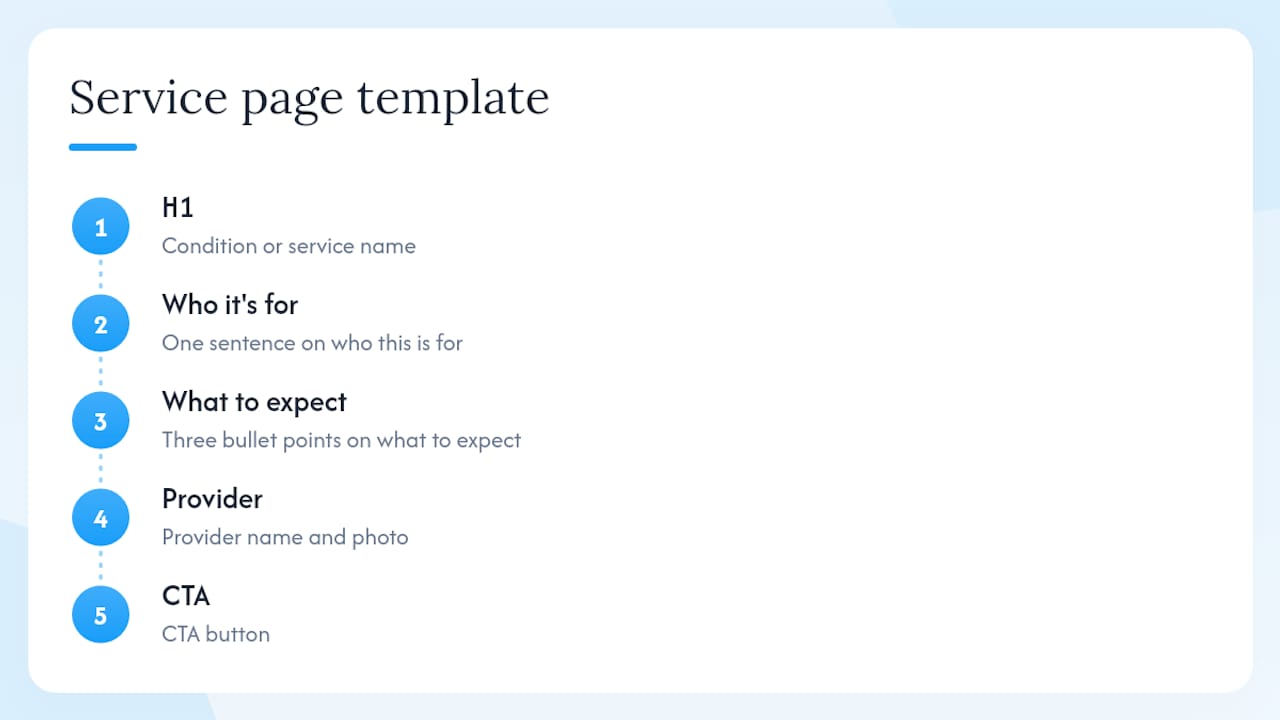
Pro Tip: Use this template for every new service page: (1) Condition or service name in the H1. (2) One sentence on who this is for. (3) Three bullet points on what to expect. (4) Provider name and photo. (5) CTA button. You can build a complete page in under two hours with this structure.
What trust signals do patients need to see before booking?
Visible trust signals reduce hesitation and increase conversions. Patients are making a decision about their health; they need to feel confident before they hand over their contact information.
Display these on every page:
- SSL padlock (HTTPS) — non-negotiable; patients notice the "Not Secure" warning
- A clear, plain-language privacy policy linked in the footer
- A one-sentence statement near your intake form explaining how patient data is handled and that it is protected in accordance with HIPAA
- Provider credentials and board certifications, visible on both the bio page and the relevant service pages
- Hospital affiliations and any procedural volume data you can share (e.g., "Our surgeons have performed over 500 joint replacements")
Patient reviews are among the most powerful trust signals on a medical website. A structured review request workflow — a brief follow-up message sent after each visit with a direct link to your Google or Healthgrades profile — builds review velocity consistently. Display a curated selection of reviews on your homepage and service pages, attributed to the platform they came from. Never fabricate or paraphrase reviews; display only what patients actually wrote.
For insurance and access information, put accepted payers on a dedicated page and link it from the navigation. Add parking, public transit, and accessibility notes. These details seem minor, but a patient who can't figure out whether you take their insurance will call a different practice.
A note on compliance: your website's intake forms and chat tools must handle patient data in a manner consistent with HIPAA. Use form providers and chat platforms that offer a Business Associate Agreement (BAA). This is not optional.
Is your website fast and easy to use on a phone?
Mobile-first speed and clear navigation cut abandonment and improve SEO. Most patients searching for a provider are on a smartphone, often in a moment of need. A site that loads slowly or buries the phone number loses them in seconds.
Performance checklist:
- Score your Core Web Vitals in Google Search Console; prioritize Largest Contentful Paint (LCP) and Cumulative Layout Shift (CLS)
- Compress all images before upload; use WebP format where your CMS supports it
- Enable browser caching and use a CDN if your hosting plan supports it
- Eliminate render-blocking scripts in the page head
Mobile layout specifics: Your phone number and booking CTA should be reachable with one thumb tap. Sticky headers with a "Call" button and a "Book" button are standard on high-converting medical sites. Test your site on an actual Android and iPhone, not just a browser emulator.
Accessibility basics (WCAG AA):
- All form fields have visible labels (not just placeholder text)
- Body text is at least 16px and passes a 4.5:1 contrast ratio
- All images have descriptive alt text
- The site is fully navigable by keyboard
For practices that need a structured review of their site's accessibility requirements, Epdwebsites offers a dedicated website accessibility service that covers WCAG compliance for medical practices.
Pro Tip: Run Google's PageSpeed Insights on your homepage and your highest-traffic service page. Fix the top two "Opportunities" it flags. Those two fixes typically produce the largest speed gains for the least development time.
For navigation, organize your main menu around patient intent: conditions treated, services, providers, insurance, and contact. Avoid internal jargon like "Clinical Programs" when patients search for "knee replacement." Use the language patients use.
How does structured data help your pages rank?
Structured data tells search engines exactly what your pages are about, making them eligible for rich results like provider cards, FAQ dropdowns, and local business panels. Without it, search engines guess. With it, they know.
Essential technical items:
- Unique, descriptive meta titles (50–60 characters) and meta descriptions (150–160 characters) for every service and provider page
- Canonical tags on any page that could be reached via multiple URLs
- An XML sitemap submitted to Google Search Console
- A robots.txt file that does not accidentally block service or provider pages
- Mobile usability confirmed in Search Console with zero critical errors
Schema types to implement:
MedicalOrganizationon your homepage and about page — include name, address, phone, URL, andmedicalSpecialtyPhysicianon each provider bio page — include name, credentials, specialty, and a link to the practiceMedicalWebPageon service pages — includeabout,audience, andspecialtypropertiesFAQPageon any page with a question-and-answer sectionLocalBusinessif you have a single-location practice and are not usingMedicalOrganization
Implementation checklist for developers:
- Add JSON-LD blocks to the
<head>of each relevant page type - Validate every schema block in Google's Rich Results Test before publishing
- Submit updated pages in Search Console after adding schema
- Monitor the "Enhancements" tab in Search Console for errors within two weeks of launch
Google's dominant search market share means that technical SEO investments targeting Google's crawling and indexing systems produce the highest return for most practices.
How should paid ads connect to your website to book more patients?
Paid channels work only when they send visitors to a page built for one job. A Google Ad that lands on your homepage wastes the click. A Google Ad that lands on a page matching the ad's headline, with a single CTA and a short form, converts.
Landing page checklist for paid campaigns:
- Headline matches the ad copy word-for-word (message match)
- One CTA only: book, call, or request
- Form with five fields or fewer
- Provider photo and one trust signal (credential or review)
- UTM parameters on every URL so you can track source in Google Analytics 4
Paid channel notes:
- Google Ads — target high-intent queries: "[specialty] near me," "[condition] treatment [city]." Use call extensions and location extensions on every campaign.
- Meta (Facebook/Instagram) ads — healthcare ad restrictions limit targeting options. Creative must do the qualification work that targeting cannot. A specific headline ("Accepting new patients with chronic back pain in Phoenix") self-selects the right audience.
- Remarketing — patients who visited a service page but did not book are a high-value audience. A display or social remarketing campaign with a direct booking CTA typically converts at a lower cost than cold traffic.
For referral traffic, build a dedicated landing page for each referral source. A page that says "Welcome, [Referring Practice] patients" with a streamlined intake form closes the handoff cleanly and reduces drop-off. Automate a confirmation email that goes to both the patient and the referring provider.
Message-matched landing pages and measurable CRO experiments on high-intent pages are the two highest-leverage paid-channel improvements most practices have not yet made.
What metrics actually tell you if your site is acquiring patients?
Sessions and pageviews tell you almost nothing about patient acquisition. The metrics that matter are booked appointments, lead-to-booking conversion rate, speed-to-lead, and blended patient acquisition cost (CAC).
Tracking setup:
- Google Analytics 4 — configure conversion events for form submissions, phone call clicks, and booking widget completions
- Google Search Console — monitor which queries drive clicks to service and provider pages; watch for pages losing impressions
- Call tracking — use a dynamic number insertion tool (CallRail is widely used) to attribute phone calls to their traffic source
- CRM or booking system integration — connect your scheduling platform to GA4 so you can track from click to confirmed appointment
Key KPIs:
| Metric | What it measures |
|---|---|
| Scheduled appointments | The only outcome metric that matters |
| Conversion rate by page | Which pages turn visitors into leads |
| Lead-to-booking rate | How many inquiries become confirmed patients |
| Speed-to-lead | Time from form submission to first staff contact |
| Blended CAC | Total marketing spend divided by new patients scheduled |
Blended CAC — total marketing spend divided by new patients scheduled — is the metric that aligns marketing reporting with practice revenue. Cost per lead is a vanity metric if those leads never book.
CRO experiments to run first:
- CTA button text: "Book Now" vs. "Request an Appointment" vs. "Check Availability"
- Scheduling widget placement: above the fold vs. after the service description
- Headline message match on your top service page
- Review prominence: homepage sidebar vs. inline within service page content
Use Google Optimize or a similar A/B testing tool. Run each test for at least two weeks and a minimum of 100 conversions before reading results.
Pro Tip: Report blended CAC to practice leadership monthly. It converts marketing activity into a number executives understand: "We spent $X and acquired Y new patients." That framing gets marketing budgets approved faster than any traffic report.
A 30–90 day action plan to start attracting new patients
A focused patient acquisition strategy connects website, listings, and intake workflows into a system. Random tactics underperform. Here is a prioritized timeline your web or marketing team can execute immediately.
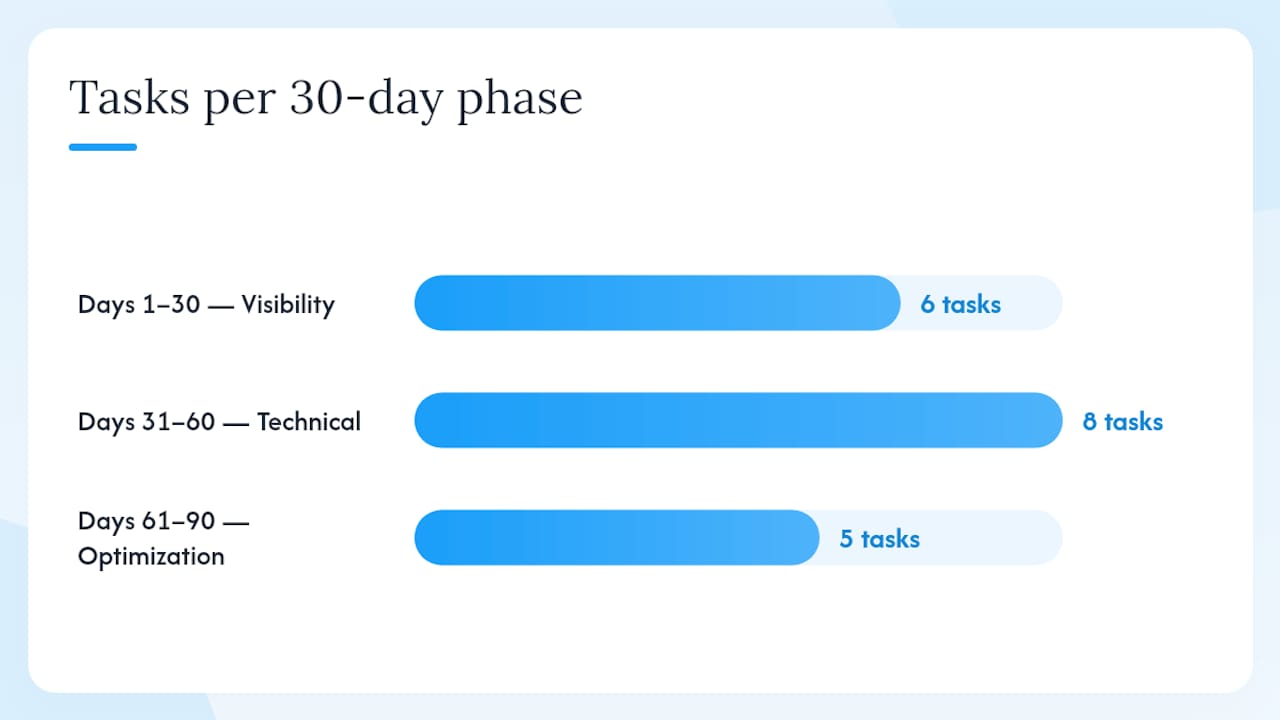
Days 1–30: Visibility and conversion foundations
- Claim and fully optimize your Google Business Profile (categories, photos, description, hours)
- Audit your booking path: can a new patient book in under three clicks from your homepage?
- Update your three highest-traffic service pages using the service-page template from Section 4
- Add or refresh provider bios with current photos and credentials
- Set up Google Analytics 4 conversion tracking for form submissions and phone clicks
Days 31–60: Technical and content depth
- Run Core Web Vitals audit; fix the top two performance issues
- Add
MedicalOrganizationandPhysicianschema to homepage and provider pages - Publish one locally targeted content piece (e.g., "Knee pain treatment in [City]: what to expect")
- Build and launch one paid search landing page for your highest-value service
- Claim Zocdoc and Healthgrades profiles; verify NAP consistency across all directories
Days 61–90: Optimization and measurement
- Launch your first CRO experiment (CTA text or widget placement on top service page)
- Automate post-visit review request messages linking to Google and Healthgrades
- Pull blended CAC report: total spend divided by new patients scheduled in the period
- Review Search Console for pages losing impressions and update their meta titles
- Add FAQ schema to your two highest-traffic service pages
For a complete pre-launch and post-launch checklist, the medical practice website launch checklist covers every technical and content item in sequence.
Ownership: Assign one person to own each phase. Visibility tasks (GBP, directories) typically sit with a marketing coordinator. Technical fixes (schema, Core Web Vitals) need a developer or your web agency. Content updates can be split between a writer and the clinical team for accuracy review.
Key Takeaways
A conversion-first website with strong local visibility and one frictionless scheduling path produces the fastest, most measurable lift in new patient bookings.
| Point | Details |
|---|---|
| Google Business Profile first | Claim, complete, and post weekly; it drives more new-patient discovery than almost any other single action. |
| Fix the booking path | One visible CTA above the fold linked to a real scheduling tool removes the most common conversion barrier. |
| Service pages and provider bios | These two content types convert browsers into booked patients; update your top three service pages first. |
| Structured data and technical SEO | Add MedicalOrganization and Physician schema so Google can surface your pages in rich results. |
| Measure blended CAC | Track total marketing spend divided by new patients scheduled; optimize channels against that number, not cost per lead. |
| Epdwebsites builds for acquisition | Epdwebsites designs medical practice websites with built-in SEO, booking integration, and performance hosting to support every tactic in this plan. |
What most medical websites get wrong about patient acquisition
The conventional wisdom says "just get more traffic." More Google Ads, more social posts, more blog content. The practices I see struggle most are not traffic-starved. They have visitors. They just have no clear path from "I found you" to "I booked."
The single most common mistake is treating the website as a credential display rather than a conversion tool. A beautifully designed homepage with a full-screen hero image and a tagline like "Compassionate Care for the Whole Family" tells a patient nothing about whether you treat their specific problem or whether you are accepting new patients. That patient clicks back and books with the practice whose site answered their question in the first ten seconds.
The small change that produces the most consistent lift? Moving the booking CTA from the bottom of the page to a sticky button in the mobile header. It sounds trivial. For a practice getting 400 mobile visitors a month, it can mean 15–20 additional appointment requests without spending a dollar on ads.
For practices with limited budgets, fix the booking path before anything else. Not the logo, not the color scheme, not the blog. The path from homepage to confirmed appointment request. That single fix outperforms almost every other investment at the same cost.
Your medical website should be working harder to fill your schedule
Most practices are leaving new patients on the table because their website was built to look good, not to convert. Epdwebsites builds professional medical websites designed from the ground up to acquire patients: fast-loading, mobile-first, with built-in SEO, clear booking paths, and hosting that keeps your site secure and compliant.

Every build includes structured service pages, provider bio templates, Google Analytics setup, and the technical foundations this article covers. Add-ons like AI chatbots and Google Reviews integration are available for practices that want to automate inquiry handling and review collection from day one.
If your current site is not consistently converting visitors into appointment requests, that is a solvable problem. See what a professional medical website build includes and get a quote for your practice.
Useful sources and tools
Official tools referenced in this article:
- Turning Your Healthcare Website into a Patient Acquisition Engine
- Patient Acquisition Strategy: A 2026 Guide for Practices — Leaping Lemur Media | Digital Growth Agency
- Medical Practice Website That Books New Patients | O Trucking
- Patient Acquisition Strategy: What Each New Patient Actually Costs You
- oberlo.com
Research sources used in this article:
Booking and call tracking tools:
Internal resources from Epdwebsites:
- Professional medical website benefits
- Healthcare website design best practices
- Patient testimonials guide for practices
- Why doctors need a professional web presence
- Managed hosting for medical websites
This article provides general website and marketing guidance for healthcare practices. It is not legal, medical, or HIPAA compliance advice. Confirm your specific compliance obligations with a qualified healthcare attorney or privacy professional.