
Healthcare website image selection is the process of choosing authentic, relevant, and high-quality visuals that build patient trust and represent your practice accurately online. The wrong images cost you patients before they ever read a word of your content. Real staff photos are the highest-trust visual asset for healthcare websites, outperforming stock and AI-generated imagery in every measurable trust signal. This guide covers the full process: image types, quality standards, HIPAA compliance for 2026, and a repeatable workflow that any healthcare marketing professional can apply immediately.
What is the best healthcare website image selection guide for 2026?
The best approach to medical website imagery starts with one rule: show real people, real spaces, and real care. Patients make trust decisions within seconds of landing on your site. The visuals they see in those first moments either confirm that your practice is credible or send them to a competitor.
Authentic staff and facility photos demonstrate clinical investment and credibility in a way that stock images simply cannot replicate. A photo of your actual waiting room, your real front desk team, or your physician in a genuine patient interaction communicates something no generic image library can fake. Patients recognize the difference, even if they cannot articulate why.

Overusing generic stock photos signals a lack of investment and erodes patient trust over time. When the same smiling nurse appears on three competing practice websites in your market, the image stops communicating anything meaningful. It becomes visual noise.
What types of images build the most trust on healthcare sites?
The four image categories that perform best on healthcare websites are real staff photography, facility and environment photos, treatment-in-action scenes, and conceptual or illustrative imagery. Each serves a distinct purpose, and the strongest sites use all four in the right proportions.
Real staff photography is the anchor of any credible healthcare site. Headshots and candid photos of physicians, nurses, and support staff give patients a face to connect with before their first appointment. These images belong on the homepage, the "About" page, and individual provider bios. They should be shot by a professional photographer with consistent lighting, background, and styling across the full team.
Facility and environment photos reduce patient anxiety. A clear image of your parking entrance, your check-in desk, and your exam rooms tells a nervous first-time patient exactly what to expect. This category is especially effective for specialties like oncology, behavioral health, and pediatrics, where the physical environment carries significant emotional weight. For sensitive specialties, the importance of compassionate imagery cannot be overstated.
Treatment-in-action scenes show your team doing the actual work of care. These images require careful planning and written patient consent, but they deliver the strongest proof of clinical competence. A dermatologist performing a procedure, a physical therapist guiding a patient through an exercise, or a dentist reviewing an X-ray with a patient all communicate expertise without a single word.
Conceptual and illustrative imagery fills gaps where real photography is impractical. Anatomical diagrams, health condition infographics, and abstract wellness visuals work well in blog posts and educational content sections. Use them to support text, not to replace authentic photography on primary pages.
Pro Tip: Before approving any image for your site, ask one question: if a scared patient saw this, would it make them feel better or worse? Images that pass this empathy test are the ones worth keeping.
How do technical standards affect healthcare image quality?
Image quality on a healthcare website is not just about aesthetics. It signals professionalism, affects page speed, and determines whether your site meets accessibility requirements.
Resolution, lighting, and consistency
High-resolution photography shot with consistent lighting and a unified color palette tells patients that your practice pays attention to detail. Inconsistent image styles, such as mixing bright outdoor shots with dark indoor photos, create a disjointed experience that undermines credibility. Every image on your site should feel like it belongs to the same visual family.
Color psychology in healthcare
Blue and green color schemes convey trust, stability, and health, making them the dominant palette choices for healthcare branding. Blue communicates reliability and calm. Green signals growth and vitality. Your photography should complement these tones rather than clash with them. A warm-toned image on a cool-blue site creates visual tension that patients feel even if they cannot name it.
Mobile optimization
Over 60% of searches now happen on smartphones. That means every image on your healthcare site must load fast and display correctly on a small screen. Responsive images that resize automatically, compressed file formats like WebP, and lazy loading are not optional features. They are baseline requirements for any site built in 2026.
Accessibility compliance
Images need descriptive alt text that conveys meaning to screen readers. Decorative images should carry empty alt attributes so assistive technology skips them. Contrast ratios between image overlays and text must meet WCAG 2.1 AA standards. For a full breakdown of these requirements, the accessible design guide for medical sites covers every checkpoint.
Pro Tip: Run every hero image through a page speed tool before publishing. A single uncompressed image can add two or more seconds to your load time, which directly reduces patient engagement.
The table below summarizes the key technical standards every healthcare marketing professional should verify before launch:
| Standard | Requirement |
|---|---|
| File format | WebP or optimized JPEG for photos |
| Alt text | Descriptive for informational images, empty for decorative |
| Contrast ratio | Minimum 4.5:1 for text over images (WCAG 2.1 AA) |
| Mobile display | Responsive images with srcset attributes |
| File size | Under 200KB per image for fast load times |
What are the HIPAA rules for images on healthcare websites?
HIPAA governs any image that contains protected health information (PHI). A photo that identifies a patient, shows a medical record, or captures a recognizable clinical interaction falls under HIPAA's Privacy and Security Rules. Violating these rules carries significant financial penalties and reputational damage.
The 2026 HIPAA Security Rule updates raise the compliance bar considerably. Multi-factor authentication and end-to-end encryption are now mandatory standards for sharing patient images, not just recommended practices. Any platform or workflow your team uses to handle clinical photography must meet these requirements before a single image is uploaded.
Clinical images containing PHI require strict encryption, controlled access, and documented audit logs. Any image shared outside a HIPAA-compliant platform, including via personal email or consumer messaging apps, constitutes a potential breach regardless of intent.
The following practices protect your practice from compliance failures:
- Obtain written consent before photographing any patient, even for general marketing purposes.
- Store clinical images only on HIPAA-compliant platforms with encryption at rest and in transit.
- Restrict access to patient images using role-based permissions and MFA.
- Maintain audit logs that record who accessed, shared, or modified any clinical image.
- Prohibit personal devices from capturing or storing patient images without an approved mobile device management (MDM) solution in place.
- Review your image library annually to confirm that no PHI has been inadvertently published on your public-facing website.
The safest rule for your public website: use only images of consented staff, consented patients, or stock imagery that contains no identifiable PHI. Every other image belongs behind a secure, access-controlled system.
How do you build a repeatable image selection workflow?
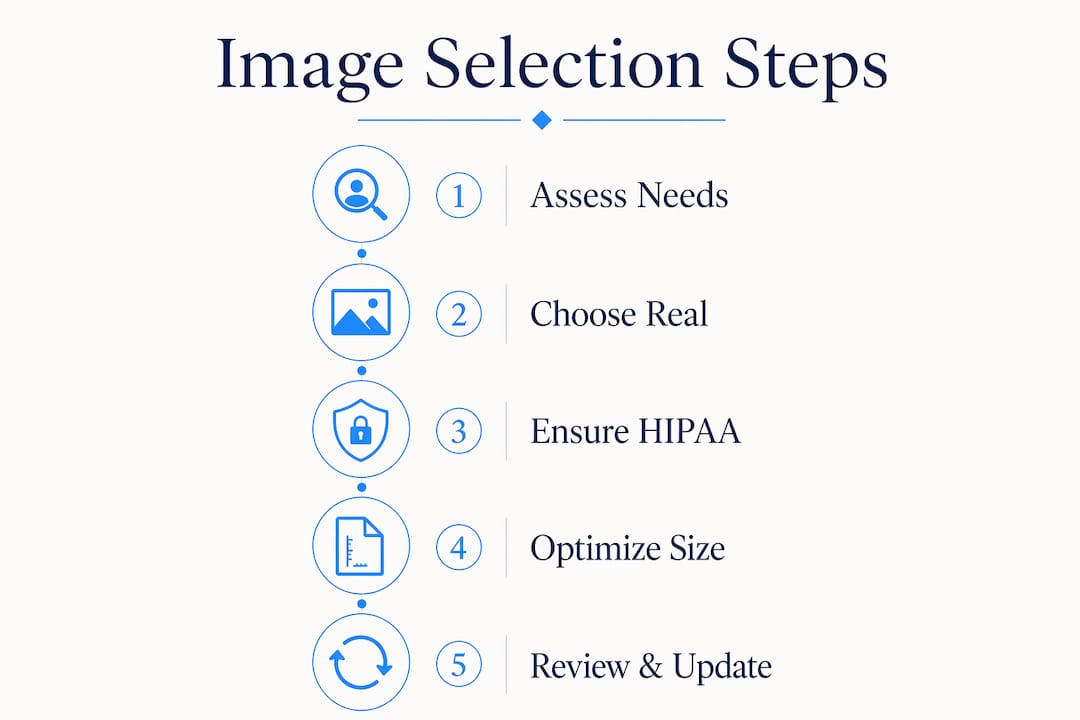
A repeatable workflow removes guesswork and keeps your site visually current. The process has five stages: plan, source, approve, publish, and maintain.
- Plan your shot list. Before any photo shoot, document every image your site needs. Group shots by page: homepage hero, provider bios, facility tour, services, and blog. A written shot list keeps the photographer focused and prevents expensive reshoots.
- Prepare consent forms. Every person who appears in a photo needs a signed release before the image goes live. Prepare these forms in advance and collect signatures on shoot day.
- Choose your source. Real photography costs between $1,500 and $5,000 per day but delivers the highest return through patient trust and conversions. Stock imagery costs less upfront but carries the credibility risks described earlier. AI-generated images of staff or clinical scenes should be avoided entirely.
- Review and approve. Every image should pass three checks before publishing: the empathy test, the compliance check (no PHI visible), and the technical check (resolution, file size, alt text).
- Schedule maintenance. Refresh your image library every two to three years, or immediately after significant staff changes, facility renovations, or rebranding. Outdated photos of staff who no longer work at your practice actively undermine trust.
Pro Tip: Original photography with strong alt text, descriptive captions, and unique file names improves both traditional SEO and AI search visibility. Search engines and AI recommendation tools favor unique visual content as an expertise signal.
For a complete checklist aligned with 2026 standards, the medical practice website launch checklist covers every image-related step from planning through go-live.
Key Takeaways
Effective healthcare image selection requires authentic photography, strict HIPAA compliance, and a repeatable review workflow to build lasting patient trust.
| Point | Details |
|---|---|
| Prioritize real photography | Authentic staff and facility photos outperform stock and AI images in patient trust. |
| Apply technical standards | Use WebP format, descriptive alt text, and responsive sizing for every image. |
| Meet 2026 HIPAA requirements | MFA and end-to-end encryption are now mandatory for any clinical image sharing. |
| Use the empathy test | Ask whether a scared patient would feel reassured by each image before publishing. |
| Maintain your image library | Refresh visuals every two to three years or after major staff or facility changes. |
Why authentic images are the most underrated marketing asset in healthcare
Most healthcare marketing conversations focus on SEO rankings, ad spend, and patient review volume. Image selection rarely gets the same attention, and that is a costly oversight.
I have reviewed dozens of healthcare websites where the copy was polished and the structure was sound, but the images were doing active damage. A physician bio with a blurry headshot. A homepage hero featuring a stock photo that appears on at least four other local practice sites. A facility page showing a waiting room that was renovated three years ago. Each of these details tells a prospective patient that the practice does not pay close attention, and that impression transfers directly to clinical trust.
The HIPAA compliance dimension makes this even more consequential. Practices that treat image handling casually, sharing clinical photos over personal messaging apps or storing them on non-compliant platforms, are not just risking fines. They are risking the kind of public breach that ends patient relationships permanently.
The practices that get this right treat image selection as a foundational marketing decision, not an afterthought. They invest in professional photography, build compliant workflows, and refresh their visuals on a schedule. That investment shows up in patient acquisition numbers, and it compounds over time as the site builds authority with search engines and AI recommendation tools alike.
— Kate
How Epdwebsites supports healthcare image strategy
Healthcare marketing professionals who want a site that works as hard as their clinical team need more than a template. Epdwebsites has built premium web design solutions for medical practices since 2009, with a focus on authentic visual presentation, fast-loading image delivery, and designs that meet current accessibility standards.

Every project includes personalized guidance on image selection, file preparation, and layout decisions that support patient trust and engagement. Whether you are launching a new practice site or refreshing an existing one, Epdwebsites brings the same attention to visual detail that your patients expect from your clinical care. Review the portfolio of completed projects to see how authentic imagery translates into credible, high-performing healthcare websites.
FAQ
What images build the most trust on a healthcare website?
Real staff photography is the highest-trust visual asset for healthcare websites. Authentic photos of your actual team, facility, and care environment consistently outperform stock imagery in patient engagement and credibility.
Are AI-generated images acceptable for healthcare websites?
AI-generated images should be avoided for staff or clinical depictions. Patients recognize inauthentic imagery, and its use erodes the trust that healthcare websites depend on to convert visitors into patients.
What does HIPAA require for images on healthcare websites?
Any image containing identifiable patient information requires written consent, encrypted storage, and controlled access. The 2026 HIPAA Security Rule updates make multi-factor authentication and end-to-end encryption mandatory for clinical image sharing.
How often should healthcare website images be updated?
Refresh your image library every two to three years, or immediately after staff changes, facility renovations, or rebranding. Outdated images of former staff actively undermine patient trust.
Does original photography improve healthcare website SEO?
Original medical imagery with descriptive alt text and captions improves both traditional search rankings and AI search visibility. Search engines treat unique visual content as an expertise and trust signal.